Extended Advertising Modes: Choose Connectable, Scannable and Broadcast Behavior Correctly
Choose advertising mode from the interactions the product requires. Extended advertising cannot be both connectable and scannable. A design that depends on a scan response and a connection from the same extended set therefore needs revision before payload construction or radio tuning begins.
Applicability: Bluetooth Core 6.1 advertising properties and Zephyr v4.2.0 extended-advertising APIs. This guide uses ordinary undirected modes; directed, anonymous, decision-based and periodic advertising need additional rules. All configuration tests below are proposed, not executed on a controller or phone.
1. Distinguish the API from the transmitted mode
The HCI command named LE Set Extended Advertising Parameters can configure either legacy or extended PDUs. Likewise, an advertising-set object does not by itself prove that the on-air mode is extended. Record the legacy-PDU property and the effective host options rather than inferring behavior from the function name.
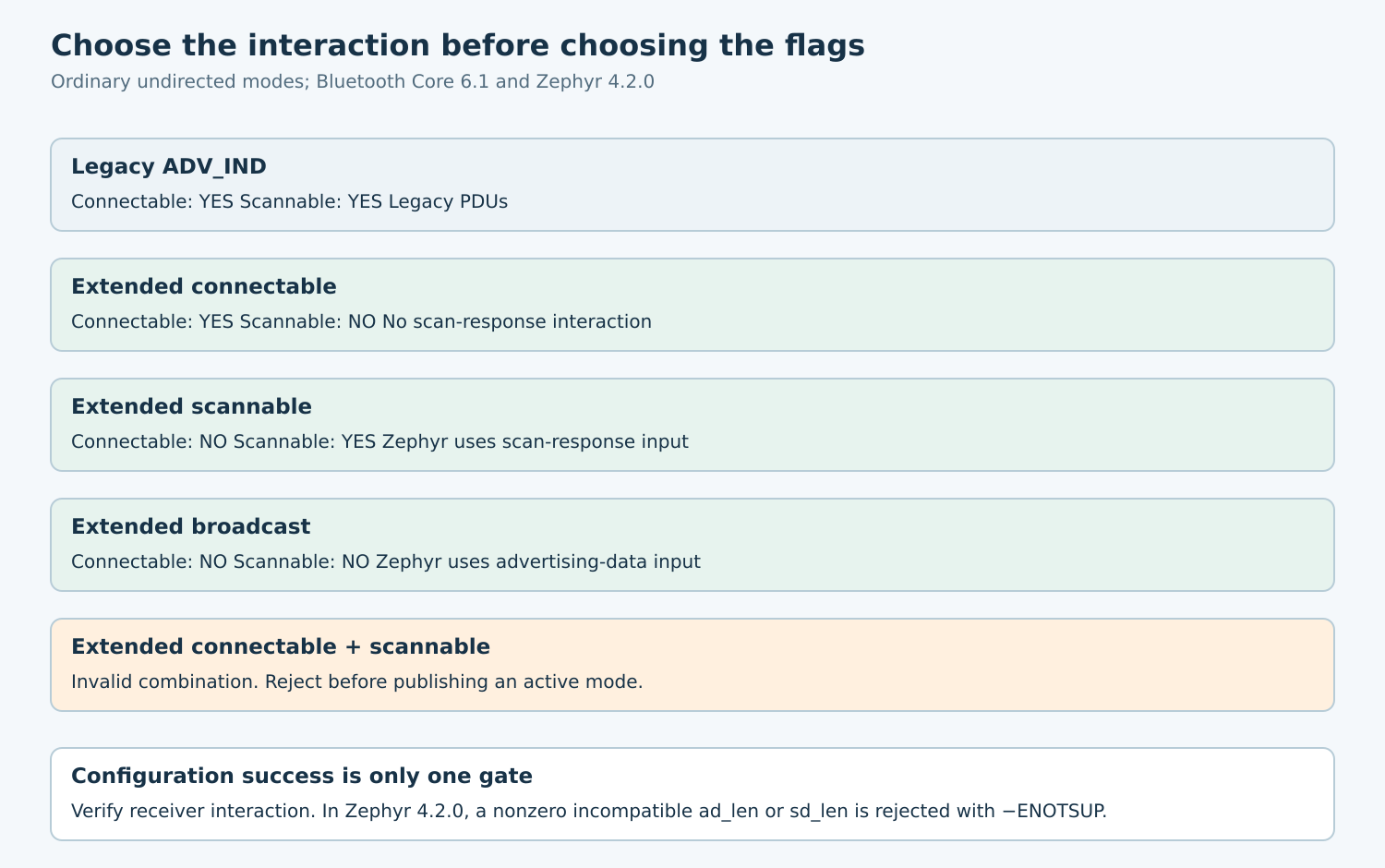
The Core property table permits legacy ADV_IND to be connectable and scannable. For extended PDUs, those two properties cannot both be set. Invalid combinations are rejected with Invalid HCI Command Parameters. Do not generalize a successful legacy configuration into an extended-mode configuration by adding one option.
Describe the product requirement in behavioral terms: can an eligible peer connect, can an active scanner request a response, or should observers only receive a broadcast? “Discoverable” is too vague to answer those questions.
2. Write the compatibility matrix
| Ordinary undirected mode | Connectable | Scannable | Intended interaction |
|---|---|---|---|
| Legacy ADV_IND | Yes | Yes | Legacy connection and scan-response behavior |
| Extended connectable | Yes | No | Connection establishment, without scan response |
| Extended scannable | No | Yes | Active-scanner response exchange |
| Extended broadcast | No | No | Nonconnectable, nonscannable observation |
| Extended both | Yes | Yes | Invalid combination |
Use this matrix in design review before selecting a convenience macro. A commissioning workflow that requires a connection should not choose the scannable-only extended row because its name or user-interface fields are currently supplied through a scan response.
If two behaviors truly require separate sets, treat that as a new resource and discovery design. Specify which one the app observes, which one it connects to and how it associates them without relying on a display name. Do not assume the controller can run both simultaneously.
3. Check the host’s data-routing behavior
In the Zephyr v4.2.0 API contract, BT_LE_ADV_OPT_EXT_ADV selects extended mode. The header describes advertising-data input as ignored for extended scannable operation, and scan-response input as ignored for non-scannable operation. However, the exact tagged implementation is stricter than that description.
In bt_le_ext_adv_set_data, extended scannable mode with nonzero ad_len returns −ENOTSUP. Extended non-scannable mode with nonzero sd_len also returns −ENOTSUP. These arguments count array entries, not serialized bytes. Follow this source-verified behavior for v4.2.0: use a zero count for the incompatible input, and check the return rather than relying on the header’s “ignored” wording.
For example, a hypothetical extended scannable status service should declare its status record as scan-response content. If the product instead requires a passive observer to receive that record, choose and qualify an appropriate broadcast mode. Increasing scan duration cannot make a passive scanner request a response.
The same header prohibits combining extended SCANNABLE with CONN, requires scan-response data for extended scannable operation, and directs extended advertising through the set APIs rather than bt_le_adv_start. Use the tagged definitions rather than copying a macro from another Zephyr release.
4. Treat a mode change as a state transition
Save a complete intended configuration: behavior properties, peer compatibility, address policy, PHY choices, active data input and required receiver actions. Avoid updating only the property bits while retaining assumptions from the previous mode.
Stop the set before changing its advertising parameters and check that the stop succeeded. The tagged Zephyr implementation rejects parameter updates while advertising is enabled. The controller’s Core contract also rejects parameter setup on an enabled advertiser.
Reconcile existing data before the transition. The Core parameter command can reject a new type that does not support advertising data already stored in the set. A clean recreate may be simpler than in-place mutation when the application cannot demonstrate the required cleanup sequence.
Load the data appropriate to the new mode, check its result, then start. Update the application-visible mode only after the sequence succeeds. If any stage fails, report the failed transition and known state rather than displaying the desired mode as though it were effective.
Keep old callbacks and delayed user actions associated with their configuration generation. A “connect” button created from an earlier connectable observation should not remain actionable after the product changes to broadcast-only behavior.
5. Build negative tests around interactions
- Request extended connectable plus scannable. Expect rejection; record whether the host rejects locally or the controller reports the protocol error.
- Configure extended scannable with no scan-response data. Confirm startup cannot silently satisfy the intended response contract.
- Supply a nonzero advertising-array count to extended scannable mode, or a nonzero scan-response-array count to extended non-scannable mode. Expect −ENOTSUP from the tagged host implementation; repeat with zero incompatible counts as valid controls.
- Attempt parameter mutation while active. Verify a controlled error and unchanged published configuration.
- Attempt connection to the scannable-only and broadcast-only rows. Verify the application does not promise that operation.
- Exercise a legacy-only receiver against the extended modes and report incompatibility explicitly.
Keep valid controls beside each negative case. A failing connection attempt proves little if the same receiver cannot connect to the known-good connectable setup. Preserve controller status and receiver behavior separately.
6. Observe the actual wire behavior
Use controlled transmitters and receivers with recorded capabilities. For scannable operation, distinguish passive observation from active scan-request/response exchange. For connectable operation, verify successful connection establishment rather than inferring it from an advertising label in a scanner app.
Capture the actual PDU properties and PHYs where instrumentation permits. A scanner application’s merged row can hide whether a displayed field came from advertising data, scan response or a cache. Use fresh test sessions and recognizable fixture revisions to expose that ambiguity.
Acceptance requires agreement among intended behavior, accepted configuration and observed interaction. Retain the mode matrix and negative-test outcomes as regression artifacts. They protect the product from a seemingly small option change that removes the very connection or response exchange its user workflow depends on.