HID over GATT for Instrument Controls: Validate the Report Map Against Host Behavior
A HID report can arrive intact over Bluetooth and still operate the wrong host control. The Report Map defines how bytes become buttons, relative movement, absolute values or vendor-defined data. Validate that interpretation before treating a successful notification as a working instrument interface.
Applicability: HID over GATT Profile 1.2, USB HID 1.11 descriptor rules and the Zephyr 4.2.0 peripheral_hids sample. This article covers ordinary GATT Report Protocol operation, excluding HID ISO and short-connection-interval extensions. The sample is implementation evidence, not a claim of complete HOGP 1.2 conformance. All proposed host tests remain unexecuted.
1. Write the intended host action first
List each physical control, its state or movement semantics and the intended consumer. A panel button might be a host keyboard key, a generic button exposed to an application or a vendor-defined command. Those choices produce different host behavior even if their electrical inputs are identical.
Do not choose a mouse collection solely because a sample already compiles. A relative X field can move a system pointer; it is not automatically an instrument’s setpoint increment. Likewise, a keyboard usage can reach whichever application has focus.
Define the supported host OS/build, input API, application version and operating context. If a vendor-defined usage requires application interpretation, include that application in the product compatibility contract rather than promising universal plug-and-play behavior.
Use harmless lab actions for qualification. Do not connect a development control map to a host session where an unexpected key or click could trigger consequential work.
2. Expand the Report Map into a bit ledger
The USB HID 1.11 descriptor model assigns fields through Main, Global and Local items. Report Size and Report Count determine bit allocation. Logical bounds, usages and relative/absolute flags determine interpretation; padding also occupies report space.
Build a ledger for every Report ID and type: usage page/usage, bit offset, bit width, count, logical range, signedness, relative or absolute behavior and constant padding. Sum the bits independently of the firmware structure definition.
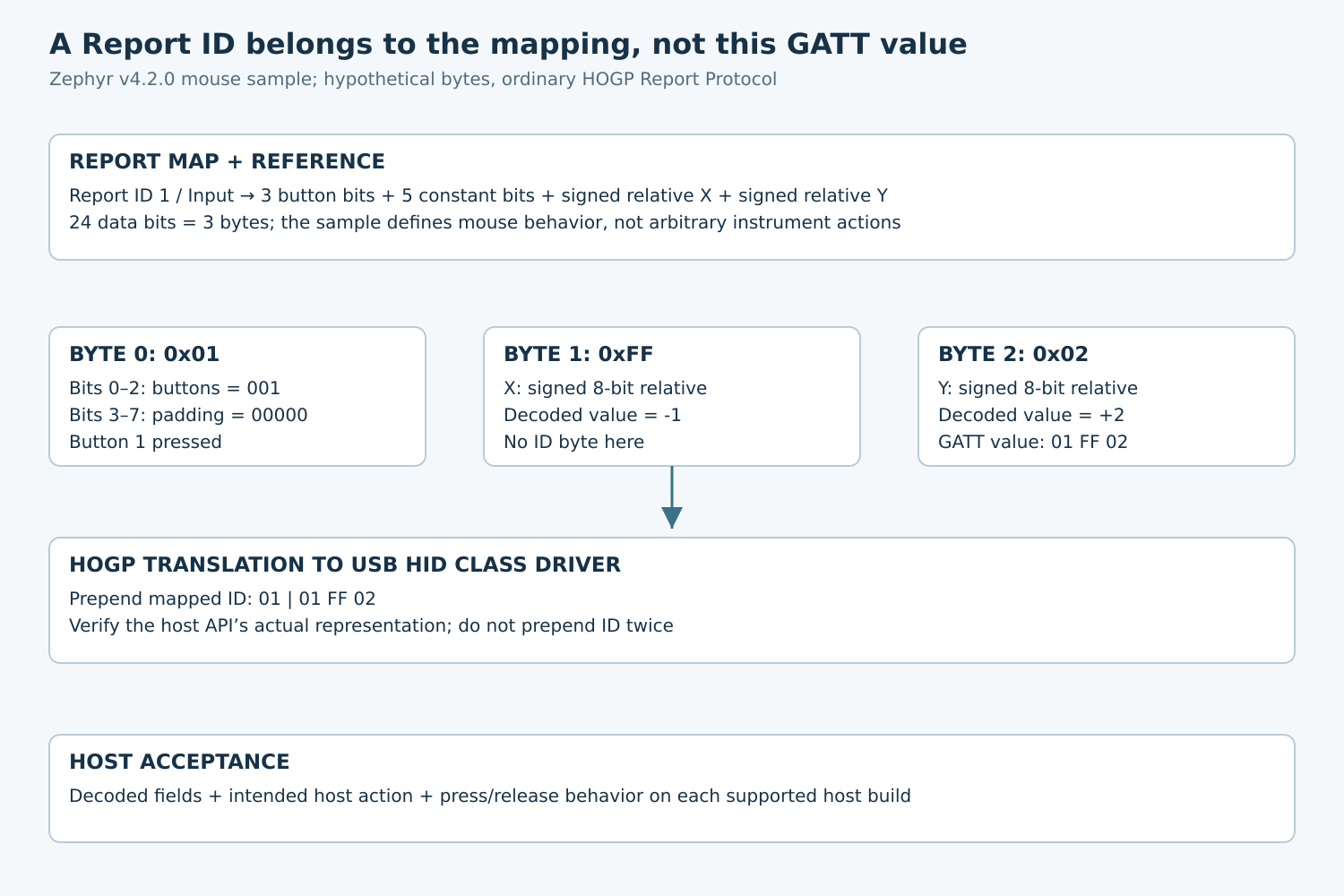
The tagged Zephyr sample defines Report ID 1, three one-bit absolute buttons, five constant padding bits, then signed eight-bit relative X and Y fields. The data therefore occupies 24 bits, or three bytes.
Its Logical Minimum item bytes are 0x15, 0x81. The nearby source comment calls the value 129, but the signed one-byte minimum represents -127. Read the encoded descriptor and HID item semantics rather than copying that misleading comment into a decoder.
This sample’s map describes a mouse. It is useful for proving packing and host translation, while also demonstrating why an instrument designer must review the selected usages.
3. Join the map to the right GATT characteristic
HOGP 1.2 sections 4.7–4.8.1 connect the Report Map, Report Reference descriptors and report-bearing characteristics. Identify a report by its Report ID and Report Type combination. Do not identify it merely by the repeated Report characteristic UUID or by discovery order.
Record each characteristic value handle and its Report Reference pair in the test manifest. Include external report references when the design uses report data in another service. The simple fixture here has one internal Input Report.
For ordinary GATT Report transfer, do not prepend the USB-style Report ID to the characteristic value. The HOGP translation layer uses the descriptor mapping to add the ID before passing input to a USB HID class driver, and removes it in the reverse direction.
The Zephyr sample makes this boundary visible: its Report Reference is ID 1/Input, but hog_button_loop submits a three-byte report array. It does not send a four-byte array beginning with a separate ID.
A hypothetical notification value 01 FF 02 means button 1 pressed, X=-1 and Y=+2 under this map, with padding zero. At the described USB-class translation boundary the corresponding representation is 01 01 FF 02: ID first, then the three data bytes. A particular application API may expose another representation; inspect its contract.
4. Validate state changes, not just one pressed report
For absolute button bits, include release reports. A hypothetical transition 01 00 00 followed by 00 00 00 changes button 1 from pressed to released without relative motion. Verify both transitions at the host input layer.
For relative fields, repeated equal values represent repeated movement. Two reports with X=+1 are not necessarily duplicates to discard. If the application needs an absolute setpoint, declare and test an absolute value contract instead of quietly changing the meaning of a relative field.
Test each button independently, combinations, zero movement and both signed limits. Confirm that the constant padding bits remain zero in the fixture and that one field cannot spill into its neighbor.
Preserve raw GATT bytes, decoded HID fields and the host-visible action as separate observations. Correct bytes with an unexpected action point toward usages, host mapping or application routing; wrong bytes point toward packing or report selection.
5. Qualify Report Protocol and supported host paths
HOGP distinguishes Report Hosts from Boot Hosts. A Boot Host ignores ordinary Report characteristic notifications and uses the relevant Boot characteristics. A custom report map therefore does not establish pre-boot compatibility.
If the product claims Boot operation, qualify its required characteristics, protocol-mode handling and fixed-format behavior separately. Otherwise state that the instrument control requires a compatible Report Host.
Observe discovery, security requirements and notification enablement before evaluating input delivery. The sample selects encrypted or authenticated access permissions through CONFIG_SAMPLE_BT_USE_AUTHENTICATION; copying the sample does not choose the finished product’s security policy automatically.
Record report-map revision and host history. A map change is an interface change, even if the characteristic UUID remains the same. Preserve retained-history and clean-state results separately rather than erasing a failing host’s state as the first diagnostic step.
6. Use a multi-host acceptance matrix
- Decode the exact exported Report Map and compare its bit ledger with the intended control contract.
- Read Report Reference descriptors and confirm every ID/type pair reaches the intended characteristic.
- Capture the three-byte fixture and verify the translation boundary without adding a second ID byte.
- Exercise press, release, simultaneous buttons and signed movement boundaries on each supported host build.
- Repeat with application focus changed and with the intended consumer absent; document safe, expected behavior.
- Test reconnect, suspend/resume and the supported protocol mode without claiming generic host support.
- Introduce a deliberately wrong report length or reference pair in an isolated development build and verify that the diagnostic evidence identifies the mismatch.
Acceptance is an end-to-end agreement among descriptor semantics, report routing, encoded bytes and host action. Keep that four-part record with the firmware and application versions so a later “Bluetooth works, controls do not” report has a concrete starting point.