Buildroot Git History: Trace When a Removed Configuration Symbol Changed Meaning
When an old Buildroot configuration contains a symbol that no longer appears in the current menu, do not immediately delete the line or replace it with a similarly named option. First establish whether the feature was renamed, merged into another selection, made unconditional or removed entirely. Git history and the version's legacy configuration help turn that uncertainty into an evidence-based migration decision.
This is a focused historical investigation, rather than a general defconfig upgrade checklist. It proposes how to explain one missing symbol. No particular product migration or runtime result is claimed.
Verify the exact symbol and source revision
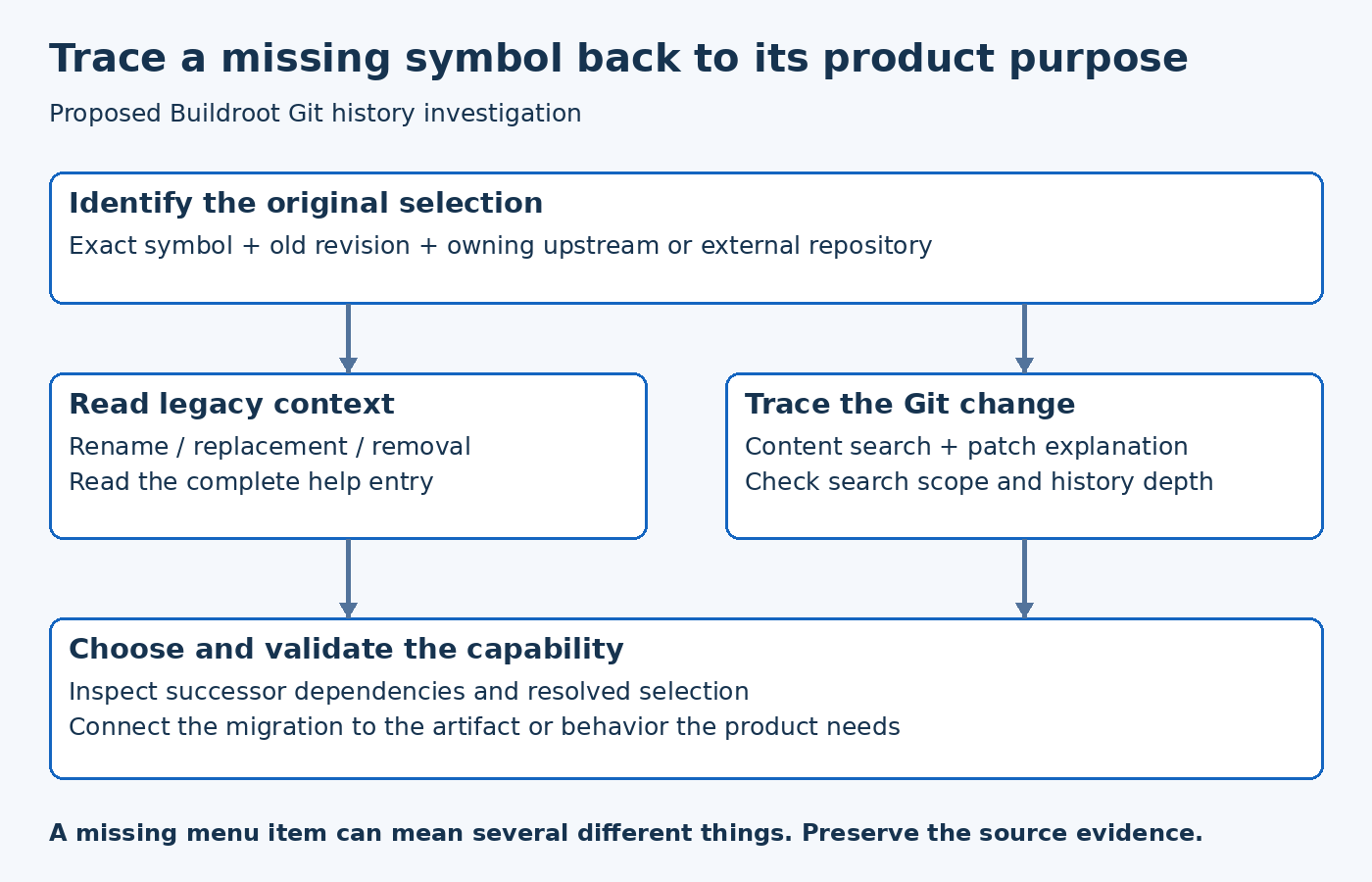
Copy the symbol from the configuration that actually produced the old image. Record the old Buildroot revision, the new revision and any external tree that supplied configuration definitions. Search the selected source trees for the exact name before assuming the option was part of upstream Buildroot.
A vendor tree can define a symbol that never existed upstream. A copied defconfig can also outlive the board package that introduced it. In either case, searching only the latest upstream menu gives an incomplete picture. Start with provenance, then decide which repository's history answers the question.
Preserve the old configuration as evidence. Editing it before recording the symptom can erase the original selection and make a later explanation depend on memory. Work on a review copy until the migration choice is understood.
Read the relevant legacy entry
The Buildroot 2026.08 Config.in.legacy source contains versioned explanations for many historical option changes. Entries can describe removal, replacement or renaming and may select a successor. Read the complete matching entry, including its help text and surrounding release context.
Do not assume that every historical symbol will still have an entry in the current file. The absence of a match is a reason to inspect older revisions and the original repository, not proof that the option was harmless. Nor does a successor selection establish that every product behavior remains equivalent.
A useful note separates two facts: what the configuration system now does, and what the product needs. A legacy entry can answer the first. The second still requires checking the use case that originally motivated the option.
Search history for the change, not just the name today
The Git log reference provides content-change searches. Its -S mode looks for changes in the number of occurrences of a string; -G searches added or removed lines matching a pattern. These searches answer related but different questions.
Start with the exact symbol in a bounded old-to-new revision range. Review the patch and commit explanation rather than stopping at the first matching subject line. If the name moved between files or changed without an occurrence-count change, a different search or broader path scope may be necessary.
Keep the search method in the investigation record. A path-limited search that excludes the file where the option moved can produce a misleading empty result. Likewise, a shallow repository may not contain the history needed for a long-lived product. State that limitation before drawing a conclusion.
Follow the capability through the replacement
Once the change is located, examine the new symbol's dependencies, defaults and selected components. A textual rename is the simplest case. A package split, combined feature or removed upstream component may require a real product decision.
For a hypothetical serial diagnostic feature, the old option might have selected an entire utility package while the replacement controls only one subfeature. Copying the replacement name without checking the installed command would miss that difference. Conversely, a removed switch may correspond to functionality that is now always built. The same visual symptom, a missing menu item, can therefore lead to opposite conclusions.
Use the source to determine which case applies. Do not generalize the hypothetical example into a claim about an actual Buildroot release. The investigation should identify the exact change and its effect on the selected product configuration.
Check the resolved result and observable behavior
After choosing the migration, resolve the new configuration and inspect whether the intended capability is selected. Then verify the corresponding artifact or behavior at the appropriate layer: package presence, installed files, kernel support, service startup or application response.
Keep those checks proportional to the change. If an option only changes an image-generation detail, a package list may not be sufficient. If it affects a runtime service, a successful build says little about whether the service still satisfies the requirement.
The Git show documentation is useful for inspecting the selected historical commit and file content. Preserve a stable commit reference with the explanation, so another maintainer can revisit the source evidence even after branch tips move.
Leave a migration note that can be reviewed
A concise note should identify the old symbol, its original role, the commit that changed it, the chosen replacement or removal decision and the validation performed. If the old feature is no longer available, record the limitation rather than implying an equivalent option was found.
Commit the reviewed configuration change alongside that explanation. Avoid a message such as remove obsolete option if the team has not established what capability was affected. The point of historical inspection is to prevent a necessary product behavior from disappearing under a cosmetic cleanup description.
A missing symbol is a prompt to trace intent. The best outcome is not merely a quiet configuration tool; it is a documented answer to what changed, why the new selection is appropriate and what evidence shows the product still behaves as intended.