EEZ Studio NumberInput: Distinguish the Visible Draft from the Committed Flow Value
An EEZ Studio Dashboard NumberInput can show text that has not been assigned to its Flow variable. Reading the visible field as the application's committed value can therefore produce a misleading diagnosis: the field appears to contain 100, while a calculation still uses 5.
The NumberInput reference describes the bound value and range properties. The pinned Dashboard implementation reveals the separate editing state examined here. This analysis applies to EEZ Studio v0.29.0, commit 3000161d09d40a5c1dc2477ddc30b38037b3a612, rather than to a native LVGL input widget.
Follow the draft before following the number
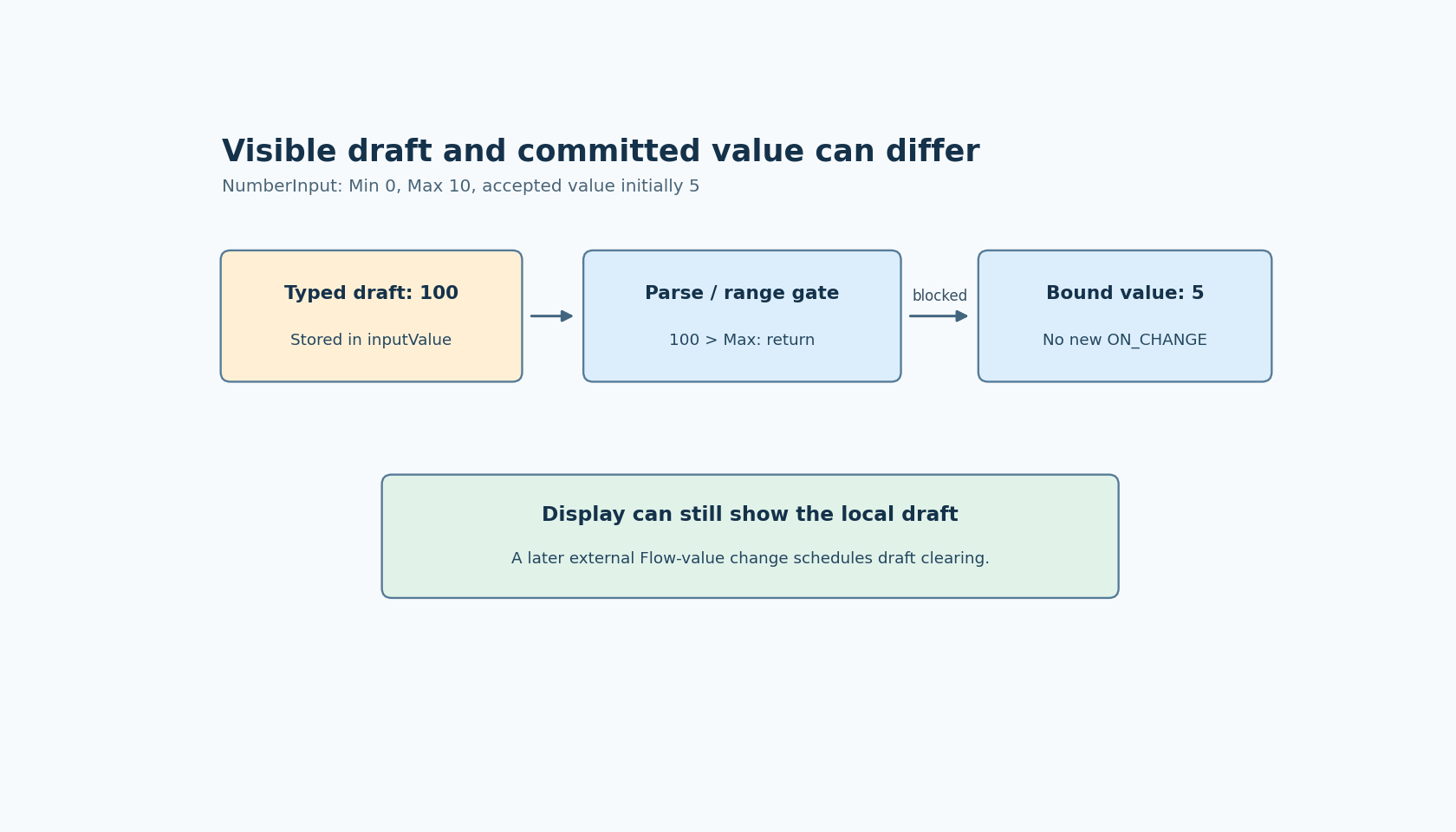
The component's change handler first stores event.target.value in a local inputValue field. Only afterward does it parse that string as a number. If the result is NaN, below Min or above Max, the handler returns before assigning the bound property and before executing ON_CHANGE.
Rendering favors the local inputValue whenever it is defined. That choice explains the apparent contradiction: a rejected numeric draft can remain visible while the Flow variable retains its previous accepted value. The rejection protects the assignment path; it does not immediately replace the text with the old number.
This is useful editing behavior to understand, even when the final application needs additional feedback. An empty field can be an intermediate state while someone replaces a number. Treating every intermediate string as an accepted command would be a different policy.
Observe three separate results
Build a small proposed fixture with a bound value initially set to 5, Min set to 0 and Max set to 10. Add a read-only label showing the bound variable and an ON_CHANGE log recording the event's numeric value. Wait for the initial view to settle before editing.
Enter an in-range value such as 7. The source predicts assignment and an event when the handler runs in an active Flow. Then try an out-of-range draft such as 100 and, separately, clear the field. Record what the browser actually lets the input contain; native number-input editing behavior can affect the exact visible sequence.
For a delivered out-of-range or empty draft, the relevant comparison is among field text, bound variable and event count. The rejected handler path should leave the latter two unchanged. A screenshot of the field alone cannot show that distinction.
Use a separate label rather than another editable control bound to the same variable. A second editor introduces another writer and can hide the original behavior. Likewise, avoid connecting the fixture to a device command; an in-memory value is sufficient to establish this state boundary.
An external value change can end the draft
During rendering, the component compares the evaluated Flow value with latestFlowValue. When they differ, it updates that remembered value and schedules clearing inputValue. Once the local draft is cleared, rendering uses the Flow value again.
Consequently, an external assignment can replace a partially edited field. That is a different path from rejecting the draft itself. To distinguish them, leave an invalid draft visible and change the bound variable through a separate test control. Observe the variable change and the subsequent display update independently.
The inspected code schedules this clearing through a timer. It does not establish an exact elapsed-time guarantee for the visible replacement. Nor should assigning the same value be assumed to trigger this comparison in the same way as changing it.
Make the committed value explicit
For a settings screen, decide whether typing should commit immediately on accepted changes or whether the page requires a separate application-level confirmation. This widget's handler does not by itself create a multi-field transaction or make every visible draft valid.
If the application needs an invalid-draft indicator, implement and verify that behavior deliberately; do not infer that a missing ON_CHANGE event is an error event. Consumers of the committed variable should continue to interpret it as the last accepted assignment.
No Dashboard was run here. The source-backed finding is a precise separation between local text, numeric acceptance and Flow assignment. That separation makes it possible to explain a stale-looking calculation without assuming the variable binding is broken.