ifm AL1432 Parameter Changes: Separate Activation from the Next EtherCAT Startup
An online parameter can appear in a tool yet fail to affect an AL1432
port. Another change can work temporarily and disappear after the
EtherCAT connection is re-established. These are different failure
points: applying the current port configuration and deciding what the
next startup will write.
Use AL1432 manual 11489157/02, February 2024, as the model-specific
reference. The objective is a reproducible port configuration, not
repeated online writes until the current machine happens to behave
correctly.
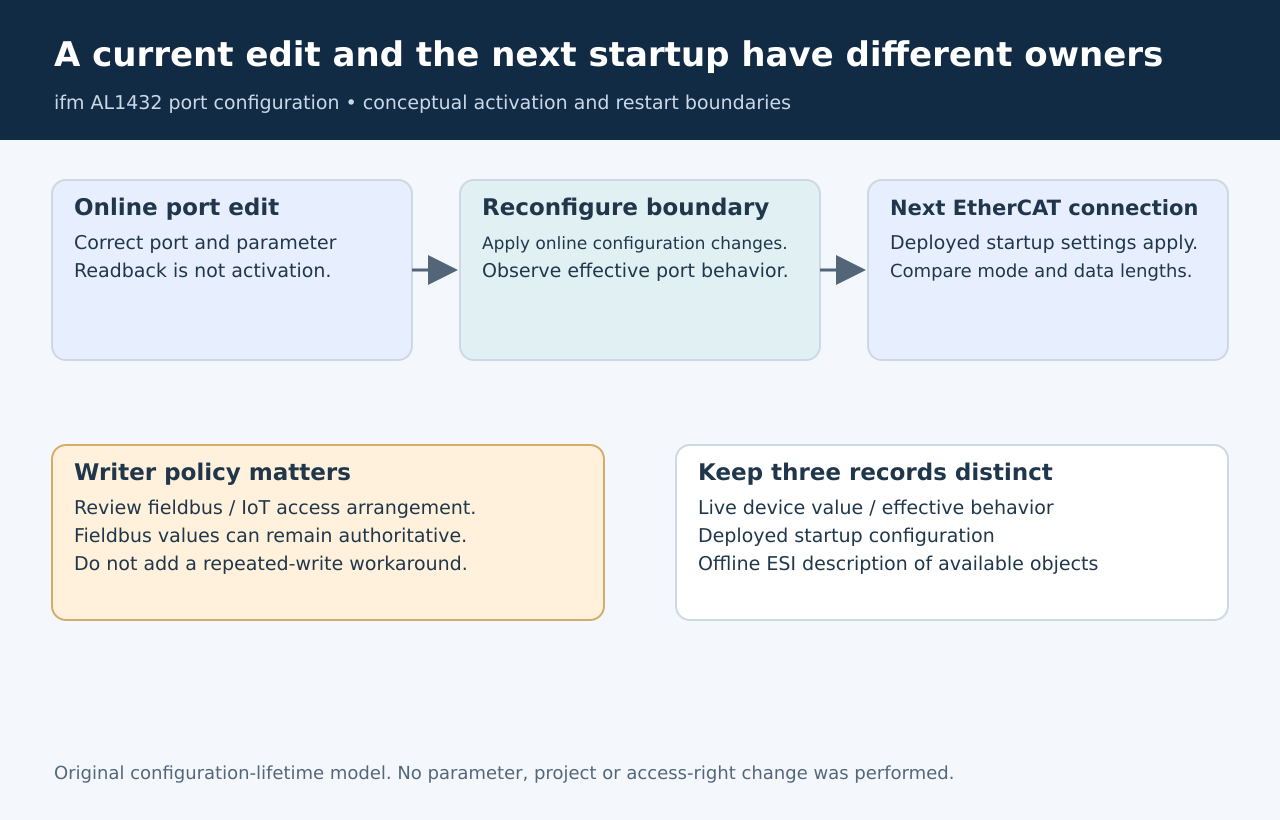
Original configuration-lifetime model. No parameters, startup entries
or access settings were changed.
Check whether the
value has been activated
For online port-configuration changes, ifm requires a separate
Reconfigure action at the corresponding 0x80n8 object, subindex 0x02.
The manual distinguishes that activation from editing the configuration
values. Its port-one object table identifies 0x8008:02 as the activation
control. AL1432
manual, section 9.2.5 and configuration area
For diagnosis, record the intended port, exact parameter and returned
write result. Then determine whether the documented activation boundary
occurred. A readback of the edited field answers a narrower question
than observing the port’s effective operating behavior.
Apply configuration changes only in an approved commissioning state.
Switching a port’s mode or process-data interpretation can affect
consumers and outputs; it is not a harmless observation operation.
Inspect what startup will
write next
AL1432’s preset startup parameters are transmitted and activated when
the EtherCAT connection is established. The manual also permits
user-specific startup settings for each port’s process-data input
length, output length and Master Control operating mode. Changes saved
in the project take effect on the next connection establishment.
Suppose a temporary online mode change is accepted while the deployed
project still supplies an earlier Master Control value at startup. A
later connection can restore the project’s choice. That is a plausible
configuration-source conflict, not sufficient evidence of defective
nonvolatile storage.
Compare the online value with the startup entry and the configuration
actually deployed to the controller. A corrected file on an engineering
laptop does not prove that the running controller contains it.
Beckhoff’s CoE guidance distinguishes the live object directory, the
offline description and startup commands. A startup entry includes an
execution transition, object address and data. Those are separate
evidence from a value displayed in an offline ESI-derived directory. CoE
parameter management
Include the fieldbus
and IoT write policy
The same AL1432 manual defines access arrangements for fieldbus and
IoT Core. When both are configured for read/write access, its stated
fieldbus-side parameter values take precedence. Its exclusive-IoT
arrangement also requires the corresponding fieldbus Keep settings
choice. Review that policy before diagnosing a browser-side edit that
does not remain authoritative.
Do not change access rights merely to suppress the symptom. Establish
which interface is supposed to own the parameter in production. If the
fieldbus owns it, put the approved value in that configuration. If a
supported maintenance arrangement temporarily assigns another owner,
document how normal ownership resumes.
Compare the two
boundaries deliberately
For an authorized fixture, use one innocuous, reversible parameter
change whose effect can be observed without operating equipment. Capture
the online value before and after the documented activation, then
compare it after a planned connection restart with the deployed startup
settings.
The resulting record should answer two concrete questions: what made
the present configuration effective, and what source determined the
configuration after reconnection? If those answers disagree with the
intended policy, fix the owning configuration rather than adding a
background task that repeatedly rewrites the value.
Keep sensor Data Storage separate. That mechanism concerns parameter
sets belonging to connected IO-Link devices. It is not a substitute for
managing the AL1432 port’s activation and EtherCAT startup
configuration.