Bluetooth Mesh Subnet Bridging: Define Which Traffic May Cross the Boundary
Define a Mesh subnet bridge as a small, reviewable forwarding matrix. Sharing two NetKeys with a node does not mean every message should cross between those subnets. The bridge table identifies the permitted subnet pair, source, destination and direction; application authorization remains a separate boundary.
Applicability: historical Bluetooth Mesh Protocol 1.1 subnet bridging and Zephyr 4.2.0 bridge/network sources. The examples use synthetic unicast addresses and key indices within one mesh network. They are proposed configuration tests, not executed changes. IP routing, protocol translation and directed-path tuning are excluded.
1. Identify the security boundary being connected
A Mesh subnet is defined by shared network-key material. A bridge belongs to the relevant subnets and can re-protect permitted Network PDUs for another subnet. It does not translate application commands into a different protocol or make arbitrary independent mesh networks interchangeable.
The Mesh 1.1 architecture still requires appropriate network and application security at the communicating endpoints. Bridging does not distribute a missing AppKey, bind a model or authorize a sensitive operation.
Write the intended use in address-level terms before enabling it. For example: “source element 0x0101 on subnet index 0x001 may send to element 0x0201 on subnet index 0x002.” Record why that path is needed and whether a response path is required.
Keep addresses unique under the network’s allocation policy. The fact that endpoints use different NetKeys is not permission to reuse the same unicast address for unrelated nodes within that mesh network.
2. Build the exact forwarding tuple
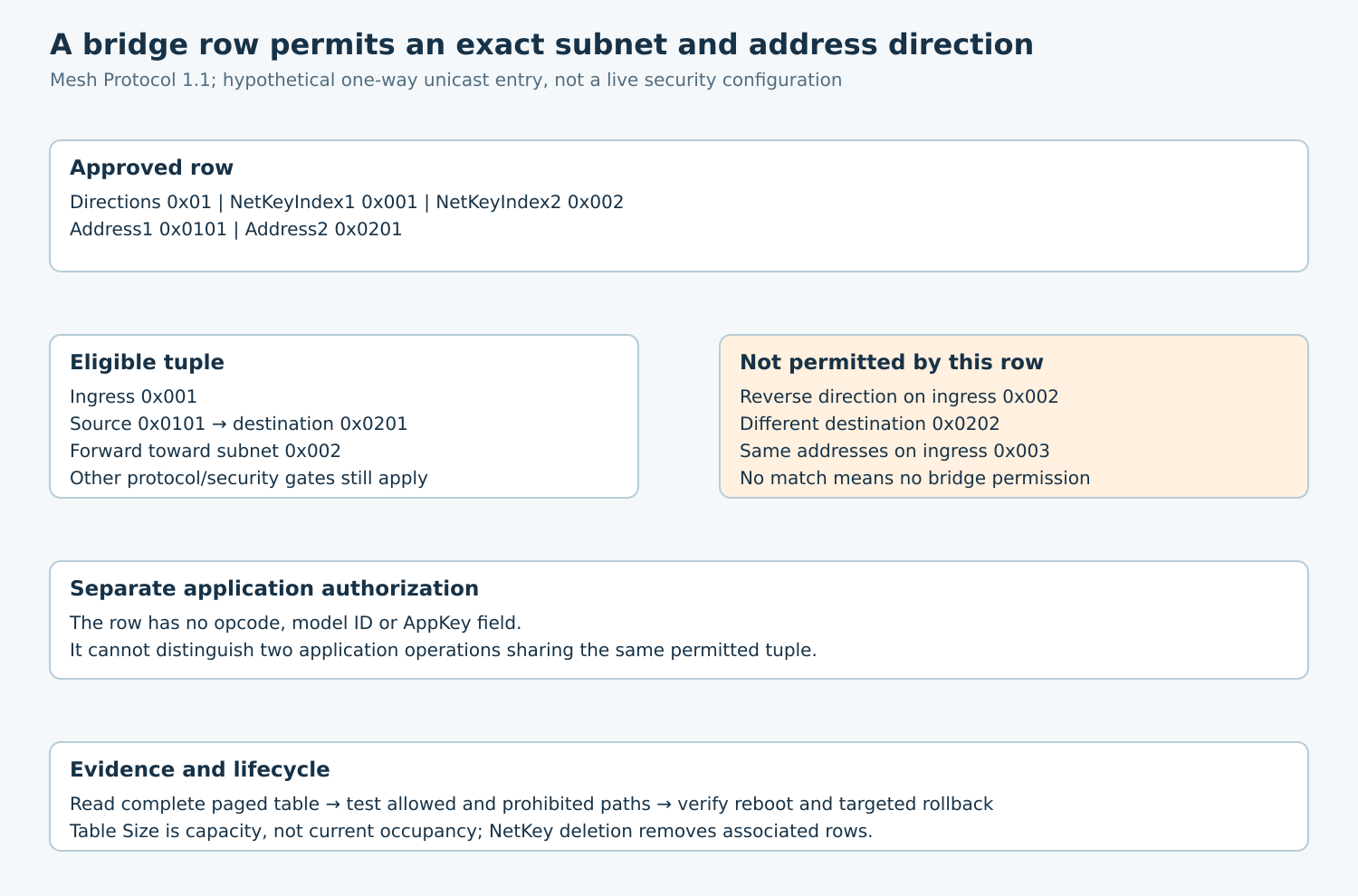
Section 4.2.42 defines each Bridging Table entry through Directions, NetKeyIndex1, NetKeyIndex2, Address1 and Address2. Direction 0x01 permits Address1-to-Address2 forwarding. Direction 0x02 additionally permits the reversed address pair on the reversed subnet path.
For the hypothetical one-way entry, use indices 0x001 and 0x002 with addresses 0x0101 and 0x0201. A message must match the relevant ingress subnet as well as the source and destination. Matching only the destination is insufficient.
| Ingress / source / destination | One-way row result |
|---|---|
| 0x001 / 0x0101 / 0x0201 | Eligible for forwarding to 0x002, subject to other protocol checks |
| 0x002 / 0x0201 / 0x0101 | No reverse permission from this row |
| 0x001 / 0x0101 / 0x0202 | Destination mismatch |
| 0x003 / 0x0101 / 0x0201 | Ingress-subnet mismatch |
A two-way row can support a required reply, but broadens the permitted direction. Review that change explicitly. Do not describe a one-way application transaction as broken radio merely because its response has no bridge permission.
3. State what the table cannot authorize
The table has no model ID, AppKey index, opcode, register range or application role field. Therefore, it cannot express “allow telemetry but deny configuration commands” when those messages use the same permitted source/destination/subnet tuple.
Use application keys, model bindings and product authorization for that finer policy. A bridge-path review should identify where each required restriction is actually enforced, rather than treating address filtering as an application firewall.
In the Zephyr network path, bridge processing selects another subnet and re-encrypts the Network PDU under its network credentials while retaining the received IV context. It does not rewrite the Access payload into a newly authorized command.
The same path rejects forwarding when received TTL is at most one and applies replay protection before bridge-table traversal. A matching row is only one gate. Test these independent gates with fresh, controlled traffic rather than attributing every rejection to the table.
4. Install and read back under one configuration owner
Start with bridging disabled while preparing an authorized lab configuration. Query feature state and table capacity. The Zephyr Bridge Configuration Client header describes Table Size as maximum entry capacity, not the number currently installed.
Confirm both required NetKeys exist on the bridge, then add only the intended row. Check the remote status and returned tuple, not just the local send result. The exact local bridge implementation can return zero while reporting Invalid NetKey or Insufficient Resources through its status output.
Adding an already matching subnet/address tuple updates its Directions field. It does not create a second independent row. A retry with a different direction can therefore change policy; preserve the intended row generation in the coordinator.
Read the Bridging Table List for the selected subnet pair, following its start-index mechanism to cover all entries. Unlike Proxy Filter Status, this protocol provides address-entry evidence. Keep the configuration stable during pagination or repeat the read until a consistent snapshot is obtained.
Enable bridging only after the verified table matches the approved matrix. Make the device’s own stored state authoritative evidence; a successful UI save alone is insufficient.
5. Test prohibited paths as carefully as permitted ones
Use harmless model traffic on isolated lab nodes. For every allowed row, create a matching case and cases with one changed dimension: source, destination, ingress subnet and direction. Observe the bridge’s outgoing network context as well as endpoint behavior.
A missing application response does not prove that prohibited traffic stayed on its original subnet. The destination may have rejected a forwarded packet later because of an AppKey or model mismatch. Capture at the forwarding boundary when verifying isolation.
Use new valid message identities for policy tests so the replay list does not hide an accidentally permissive row. Test replay rejection separately using an already accepted authorized lab message. Exhaust replay resources only in a controlled fixture and verify the supported refusal behavior.
Disable bridging and repeat an otherwise permitted case. Then restore the approved state and repeat with a TTL that cannot be forwarded. These controls distinguish feature state, table policy and propagation limits.
6. Reconcile deletion, reboot and recovery
Deleting a NetKey removes associated bridge-table entries under the specification. Verify the resulting table before restoring service. Key Refresh and key deletion are different operations; do not replace the latter with an undocumented recovery shortcut.
For targeted rollback, identify the exact nonzero address tuple to remove. Removal messages have broader matching forms involving unassigned addresses, so review their scope before use and confirm remaining rows afterward.
Restart the bridge and manager in a lab test, then read back enabled state and all relevant rows. An interrupted or deferred settings write must not lead the coordinator to assume a policy survived when it did not.
Acceptance is a versioned matrix with positive and negative forwarding evidence, capacity limits and a tested rollback. Each crossing should be explainable by one approved tuple and the endpoint’s independent application-security contract.