EEZ Studio Delay: Treat the Duration as an Entry-Time Value
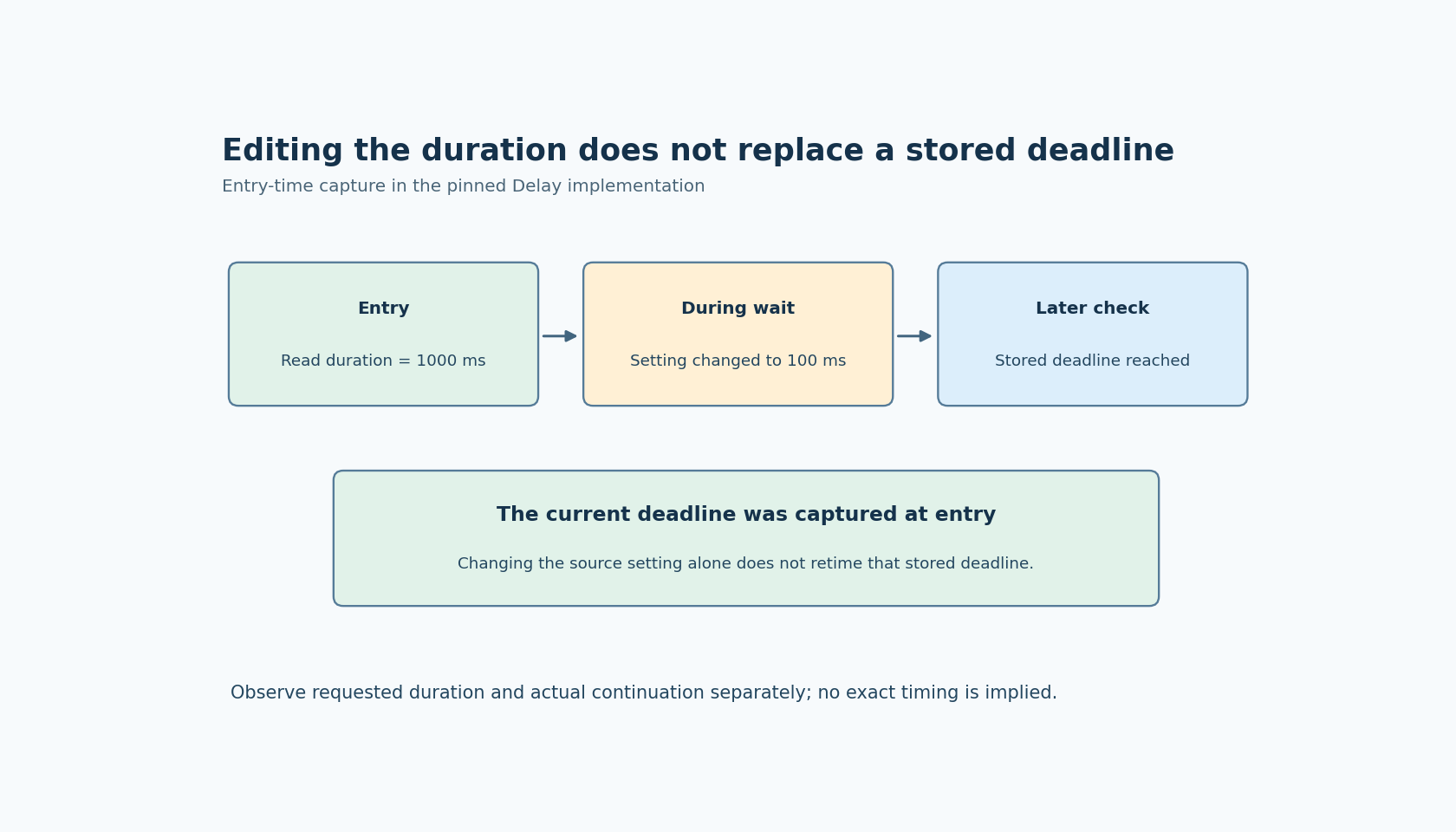
A user changes a delay setting while an EEZ Studio Delay action is already waiting, but the current wait does not shorten. That can be consistent with the inspected implementation: the duration is evaluated when the action creates its waiting state, then converted into a stored deadline. Later checks use that deadline rather than repeatedly reading the duration expression.
The Delay documentation describes a millisecond expression. The pinned framework implementation evaluates it when execution state is absent, floors the numeric duration and stores waitUntil. Subsequent executions compare the current clock with that stored value and either continue or requeue.
The reference is framework commit dc9af2d5004201d6c31273a4c4fcfe27fc20c234, inspected separately from EEZ Studio v0.29.0. Check the runtime actually used by the exported project. The discussion concerns standard EEZ Flow and does not establish behavior for Flow Lite.
Decide whether edits affect this wait or the next one
Suppose a setting initially requests 1,000 milliseconds. The Flow enters Delay, and the user then changes the setting to 100. For the inspected implementation, changing that expression's source variable does not itself replace the deadline already stored for the active wait.
That may be the right product behavior: an operation keeps the parameters with which it started, while edits apply to the next operation. Make that policy visible. A settings field labeled simply “delay” can imply immediate retiming when the application actually applies changes only at the next start.
If the product requires a restartable countdown, design an explicit restart or cancellation mechanism supported by the actual application. Do not assume that rewriting the duration variable or sending another trigger to the same component creates that behavior automatically.
Test the entry-time boundary with timestamps
Use a diagnostic Flow with a recorded entry time, a duration-setting change and a recorded continuation time. Begin with a comfortably observable duration, change the setting during the wait, and compare that run with a second run started after the setting change.
The experiment should distinguish “the active wait was retimed” from “the next wait used the new value.” Use reasonable timing tolerance based on the actual runtime and observation method. A single late callback does not prove that the duration expression was re-evaluated.
Keep the entry and completion observations independent of a repainting label. Display refresh can add its own delay to what the observer sees. If the requirement is about Flow continuation, measure that milestone; if it is about a visible countdown, measure the display behavior separately.
A deadline is not an exact wake-up appointment
The source uses requeueing and a clock comparison. It does not establish that continuation occurs at exactly the requested millisecond. The runtime must execute the component again before it can observe that the deadline has been reached.
Therefore, report requested duration and observed elapsed time separately. Test under the workload the product will encounter, especially if other Flow or native work can delay processing. Do not publish a fixed jitter or precision claim from the presence of a millisecond-valued property.
A zero-duration wait also deserves its own test. The inspected code first creates state and queues a later check rather than directly treating zero as a documented synchronous no-op. If execution ordering matters, observe it instead of assuming that a zero setting removes the scheduling boundary.
Validate the duration before entering Delay
The implementation rejects a NaN conversion, but that is not a complete application-level range policy. Choose an allowed nonnegative range for the product and reject values outside it before starting the wait. Explicitly decide how fractional input is presented, since the inspected code floors the numeric duration before storing it.
Do not depend on conversion of negative or extremely large values into an unsigned deadline to implement a special mode such as “disabled” or “forever.” Those meanings should be represented by explicit application logic, not accidental numeric behavior.
For long-running systems, inspect the clock representation and the deadline comparison used by the actual runtime. The cited function uses an unsigned stored deadline and a direct comparison; this article does not establish a wrap-safe contract for every uptime and duration. Include the relevant boundary in a controlled clock test if the product can encounter it.
Repeated triggers require a separate contract
The inspected function stores execution state for the component within its Flow state. That alone does not promise one independent timer per incoming trigger. Before allowing overlapping requests, test the exact triggering and Flow-instance arrangement used by the application.
If several requests must retain distinct deadlines, give them explicit identities and an implementation that supports that requirement. A single Delay component should not be described as a general multi-request timer service without evidence.
No timing or repeated-trigger experiment was executed here. The practical outcome is a precise UI and Flow contract: define when the duration is captured, what edits mean during a wait, how inputs are bounded and which completion milestone is measured. That avoids turning an entry-time delay into an undocumented live countdown.