EEZ Studio External Bitmaps: Make Asset Inputs Survive a Clean Checkout
An EEZ Studio project can be small enough to commit easily while still depending on a bitmap stored outside the repository. It works on the designer's machine because that file exists there. Another developer can open the project but cannot regenerate the same UI assets.
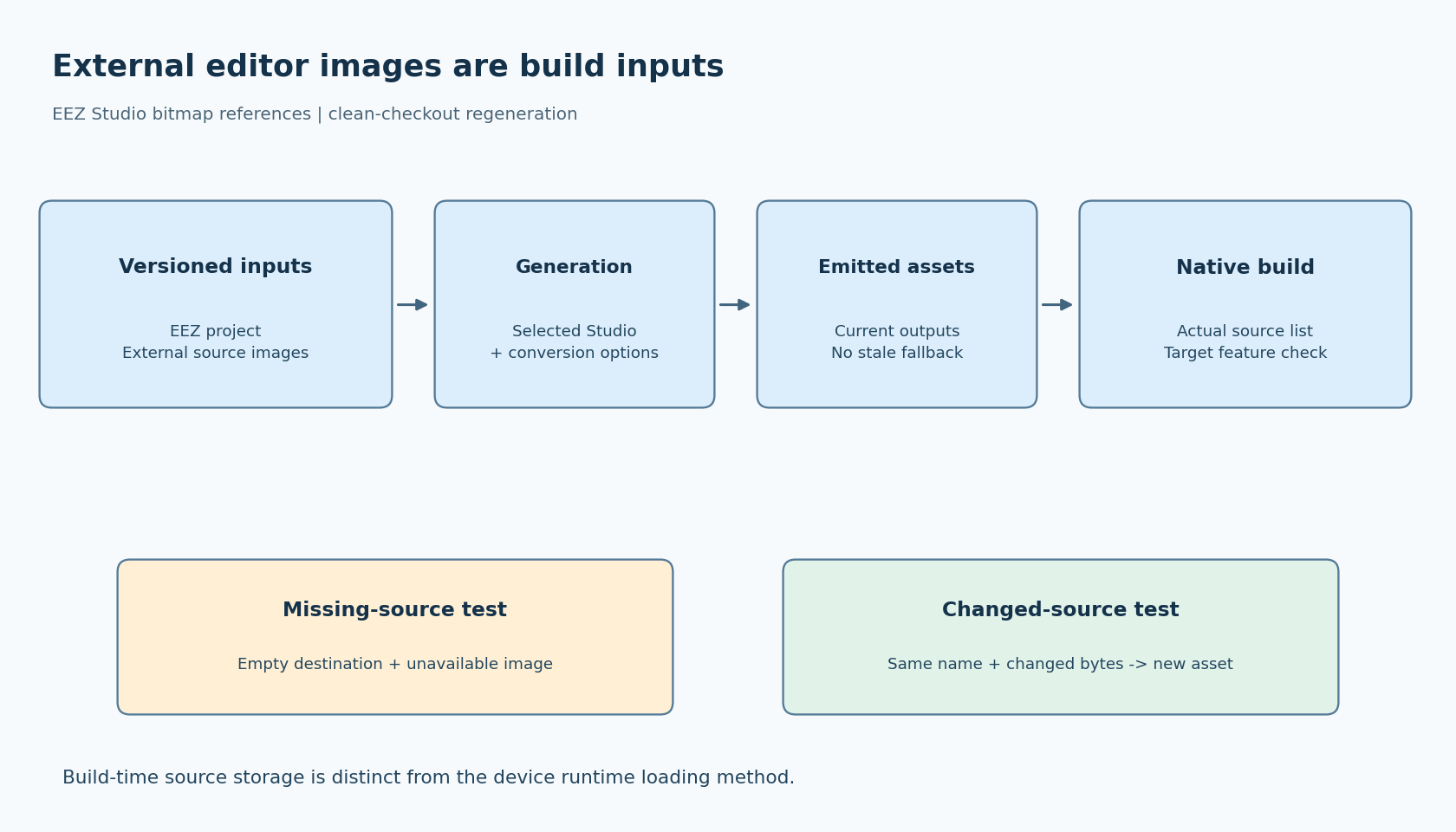
The important distinction is between an image embedded in the project and an external source image used during generation. Moving the source outside the project changes the build inputs that must travel with it. It does not, by itself, mean the deployed device loads that image from a filesystem.
Identify which kind of image dependency you have
EEZ's maintainer proposed the choice between embedded and externally referenced bitmaps in issue 938, and the feature appears in the Studio 0.27.0 release notes. This article uses Studio v0.29.0 source as its implementation reference.
The tagged bitmap implementation shows the relevant distinction when importing an image: the embedded route reads image content, while the external route records a path through the project's relative-path helper. Inspect the saved project and the selected release's behavior rather than assuming a file is embedded because it is visible in the editor.
Build a list of the bitmaps used by the project. For each, record whether its source is embedded or external, the source location when external, the generated output it contributes to, and the owner responsible for updating it. Include imported projects if they supply assets.
This list is an input inventory. It is separate from a device-side filesystem manifest or a list of compiled C arrays.
Put external sources inside a reproducible boundary
A practical repository arrangement keeps the EEZ project and its external source images under the same versioned root. That makes it possible to preserve relative relationships when the checkout moves to another directory. The exact folders are a team convention, not a vendor requirement.
Avoid relying on a personal downloads directory or a shared drive that silently changes. If assets must come from a separate versioned package, record the package revision and retrieval step. A path that resolves today is not enough to identify the bytes needed for an older firmware release.
Keep source images and emitted assets conceptually separate. A generated C array can allow today's firmware to compile even after the original image disappears. That does not prove the project can be regenerated. Conversely, having the source image does not establish that every necessary emitted file is included in the native build.
Record content hashes when exact reproduction matters. A filename such as status_ok.png can retain its name while its dimensions, alpha channel or pixels change. The version-control diff or hash should make that input change visible to the person reviewing the UI update.
Perform a clean-room regeneration check
Use a new checkout in a different directory, preferably on the environment used for release builds. Do not copy the designer's generated output into it before the test. Preserve a known-good output snapshot elsewhere for comparison.
- Obtain the documented EEZ Studio version and required source assets.
- Open the project from the new location and check its asset diagnostics.
- Build to a new destination and record any missing-input or conversion errors.
- Compare the generated asset list with the expected list. Investigate missing and unexpected files before comparing image appearance.
- Build the native firmware using only those newly generated files and the declared dependencies.
- View representative assets on the target or native harness, including transparency and any format-specific cases the project uses.
A clean compile alone is insufficient if the build accidentally finds old generated files elsewhere. Inspect the source list and dependency paths so the test actually uses the output just produced.
These steps are proposed; they do not claim that every image converter produces byte-identical output across all platforms. If outputs differ, separate semantic image changes from converter metadata, ordering or tool-version effects before accepting a normalization rule.
Test a missing source without trusting cached output
In a disposable copy, make one external bitmap unavailable and rebuild into an empty destination. Observe the project's diagnostic behavior and whether the intended build process stops. Do not assume the editor or surrounding scripts enforce the failure policy you need.
The release workflow should not quietly substitute an older emitted image when a required source is missing. A useful gate checks both that generation succeeded and that the expected outputs were produced in the current run. The specific mechanism depends on the build integration; it should not require deleting unrelated handwritten files.
Restore the input, regenerate and confirm recovery. Then deliberately change that image while keeping its filename. Verify that the change reaches the generated artifact and the rendered UI. Together, the missing-input and changed-input cases detect two different weaknesses: hidden dependencies and stale outputs.
Keep runtime delivery as a separate question
An externally referenced editor bitmap is a build-time input in this workflow. Whether the target uses compiled assets, binary resources or runtime files is a separate project and deployment choice. Document the actual selected path rather than inferring it from the editor's source-storage option.
The acceptance result should be concrete: a fresh checkout can locate every external source, regenerate the expected assets, build without hidden old output and display the intended images. That is the reproducibility boundary a future maintainer needs. It protects the ability to rebuild the UI even when the original designer's machine is no longer available.