EEZ Studio JSONParse: Audit the Declared Result Type Before Trusting Converted Fields
A successful JSON syntax parse is only one step in EEZ Studio's Dashboard JSONParse action. The declared type of its result output also selects how parsed objects and arrays enter the Flow runtime. That conversion can change a field before a downstream action sees it.
The JSONParse documentation tells the developer to configure the result type in Flow Outputs and illustrates an array of structures. To understand what that means for numeric-looking strings, follow the output through the Dashboard runtime rather than treating the port declaration as a passive label.
This analysis is scoped to EEZ Studio v0.29.0 editor commit 3000161d09d40a5c1dc2477ddc30b38037b3a612. It is source inspection, not an executed Dashboard test or a claim about every embedded EEZ Flow implementation.
Follow the declared type into propagation
The JSONParse action implementation first evaluates Value and rejects a non-string result. Inside its try block it parses the text, passes the parsed value to result propagation, and then continues through seqout.
The next boundary is important. In Dashboard propagateValue, the runtime looks up the compiled output's valueTypeIndex and supplies it to createWasmValue. The output type therefore participates in constructing the value delivered to Flow.
In the JavaScript-to-Wasm conversion code, a parsed object or array declared as basic json is retained through a JavaScript-object reference. Other declared types enter createJsArrayValue and subsequent Wasm array construction.
That distinction applies after earlier branches for null, numbers, booleans, strings and other special values. Do not infer that changing an output declaration causes every top-level primitive to follow structure conversion.
A numeric prefix distinguishes the two paths
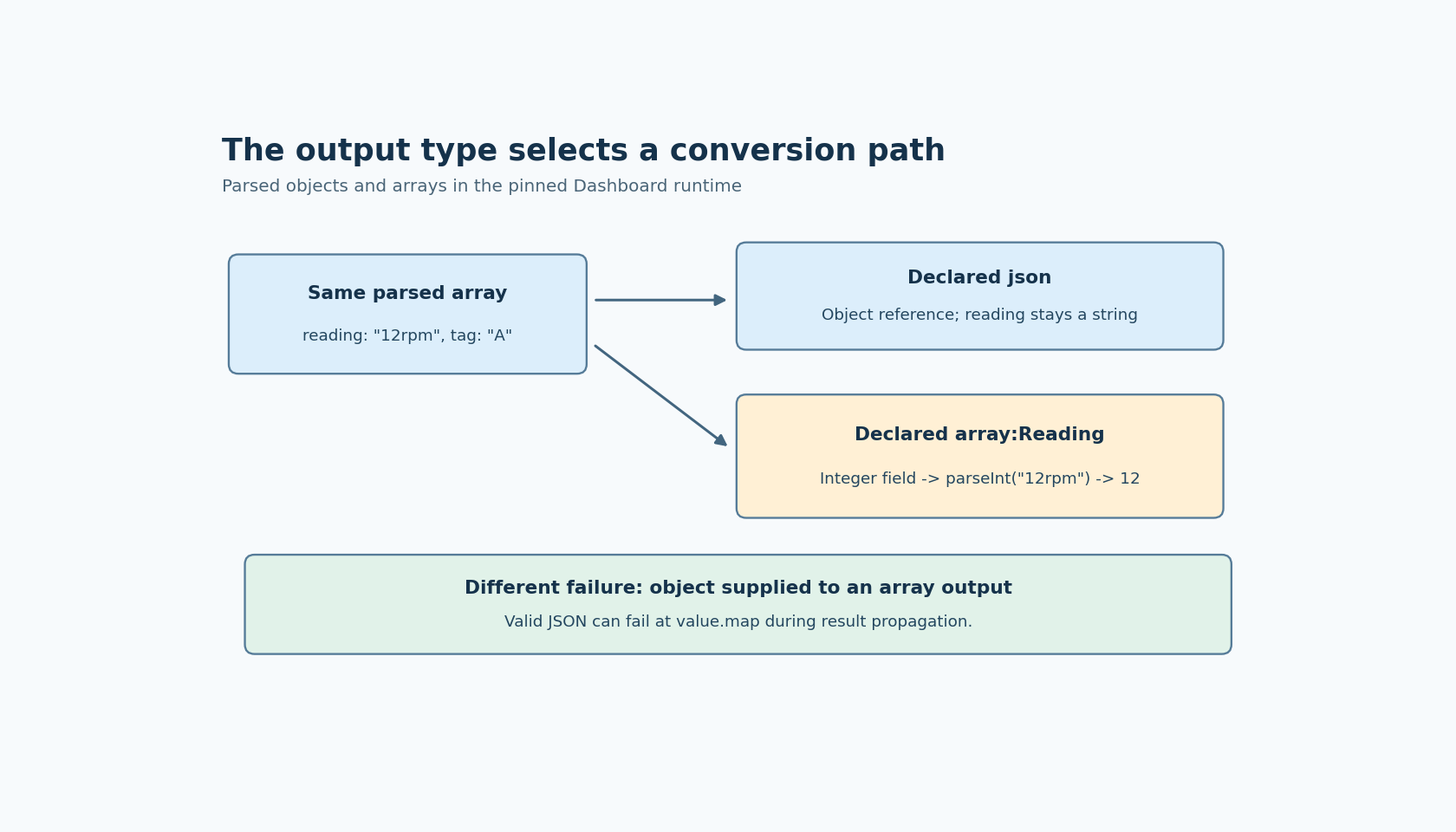
Define an illustrative Reading structure with an integer reading field and a string tag field. Use this JSON text as the Value expression's string result: [{"reading":"12rpm","tag":"A"}].
With result declared json, the inspected object path does not apply the structure-field mapper. The reading member remains the JavaScript string "12rpm" at that boundary. With result declared array:Reading, the mapper iterates the array, visits the structure's declared fields and fetches each property by field name.
For a string assigned to an integer field, that code calls Number.parseInt. The source-derived expectation is therefore integer 12, even though the original string contains a suffix. A float or double field instead uses Number.parseFloat. Neither call in this mapper is accompanied by a whole-string numeric-format check.
This is a useful diagnostic fixture because a clean string such as "12" can conceal the difference: a formatted display may look identical before and after conversion. Observe the raw field value and its runtime type before another expression, assignment or display formatting changes the evidence.
The structure mapper also enumerates declared fields rather than copying every property from the source object. Treat that as a concrete mapping rule; it is not evidence that all possible input shapes receive comprehensive validation.
A parse error can originate after parsing
Now keep the array:Reading output but change the input text to {"reading":"12rpm","tag":"A"}. That is valid JSON with an object at the top level. The declared array branch nevertheless attempts value.map, which an ordinary parsed object does not provide.
The resulting JavaScript exception can reach JSONParse's catch because result propagation is inside the same try block as JSON.parse. An error from this action therefore does not by itself prove that the text was syntactically invalid.
Keep the cases separate: a non-string Value fails the initial gate; malformed JSON fails parsing; a mismatched object/array shape can fail conversion. Also distinguish thrown JavaScript exceptions from runtime helpers that report an error and return normally. This inspection does not prove identical sequence behavior for every error-reporting branch.
Inspect the output that was actually compiled
Build the small fixture with two otherwise identical JSONParse actions and deliberately different result declarations. Verify those declarations in the compiled project's output metadata, then record the raw result and error text from each path. Test the array text first and the object text second.
If the installed build behaves differently, compare its conversion implementation and output metadata with this pinned version before changing the input format. The practical decision is where to preserve the original JSON representation and where to request typed conversion. Make that decision explicitly, especially when numeric strings must retain their original spelling or suffixes.