BLE Characteristics Missing After OTA? Check GATT Cache, Service Changed and Bonds
A phone that worked before OTA may reconnect successfully yet show an old service list or receive no telemetry. Resist the first temptation to erase the bond: that destroys part of the history needed to explain the failure. This procedure establishes whether the problem is a stale database reference, lost subscription, security mismatch or application error. It is a diagnostic plan; no phone-specific failure rate or completed test result is claimed.
Confirm What Changed During the Update
Preserve the failing device and phone before changing their state. Record hardware revision, old and new firmware build identifiers, Bluetooth stack version and configuration, phone model, exact OS build and app version. Save the upgrade method, whether the phone was connected during it, and the first operation that failed afterward. Distinguish a reproducible baseline from a user’s recollection.
Compare server database manifests. Did the update add a characteristic, remove a descriptor, change handle allocation, tighten permissions or only change a business value? Export the actual configured database, not just a source header containing UUIDs. Record declaration and value handles separately. If a fresh installation works and an existing phone fails, history is a useful discriminator; it is not sufficient proof that the operating system cache is wrong. App-owned persisted identifiers can create a similar symptom.
Separate Link Failures from Discovery Failures
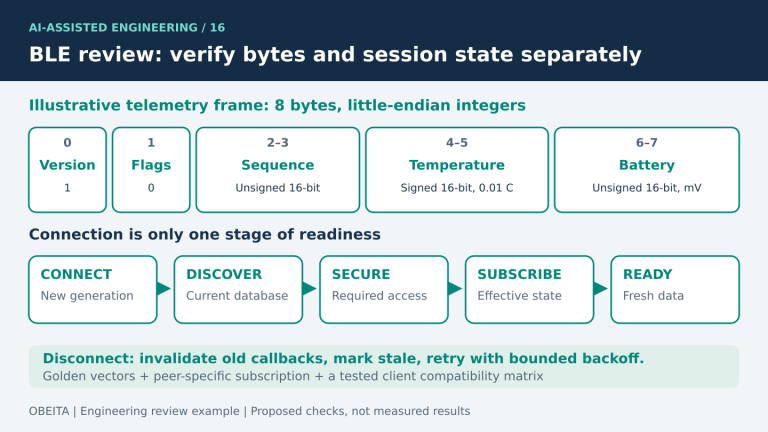
Mark each completed boundary: connection, discovery, security required for the target operation, subscription and business transaction. Do not make encryption a universal prerequisite for service discovery. A security failure while reading a protected value belongs to a different branch from a missing characteristic. Preserve the numerical status, operation type and relevant handle rather than reducing every failure to “Bluetooth error.”
| Observed symptom | Evidence to collect first | Next branch |
|---|---|---|
| Cannot establish a connection | Connection callbacks, reason, advertising identity | Link or identity diagnosis |
| Connection succeeds; characteristic missing | Server manifest versus returned discovery list | Registration, filtering or cache |
| Read/write targets an obsolete handle | Requested handle and current database mapping | Reference invalidation and rediscovery |
| Protected read is rejected | ATT error and negotiated security state | Security or permission mismatch |
| Discovery and reads succeed; no notifications | CCCD state, producer activity, app callback registration | Subscription or data path |
A generic scanner is a useful independent observation, but running it can change the connection state. Capture the original app failure first, and record every diagnostic connection afterward.
Trace the Service Changed Sequence
Trace the entire sequence rather than searching for one log line. Service Changed carries an affected handle range and uses indications; bonded peers also require change tracking across disconnection. Consult Core 6.3 GATT §§2.5.2 and 7.1 for the applicable requirements. Its presence in a database does not prove that the intended peer was subscribed or that the app replaced its old references.
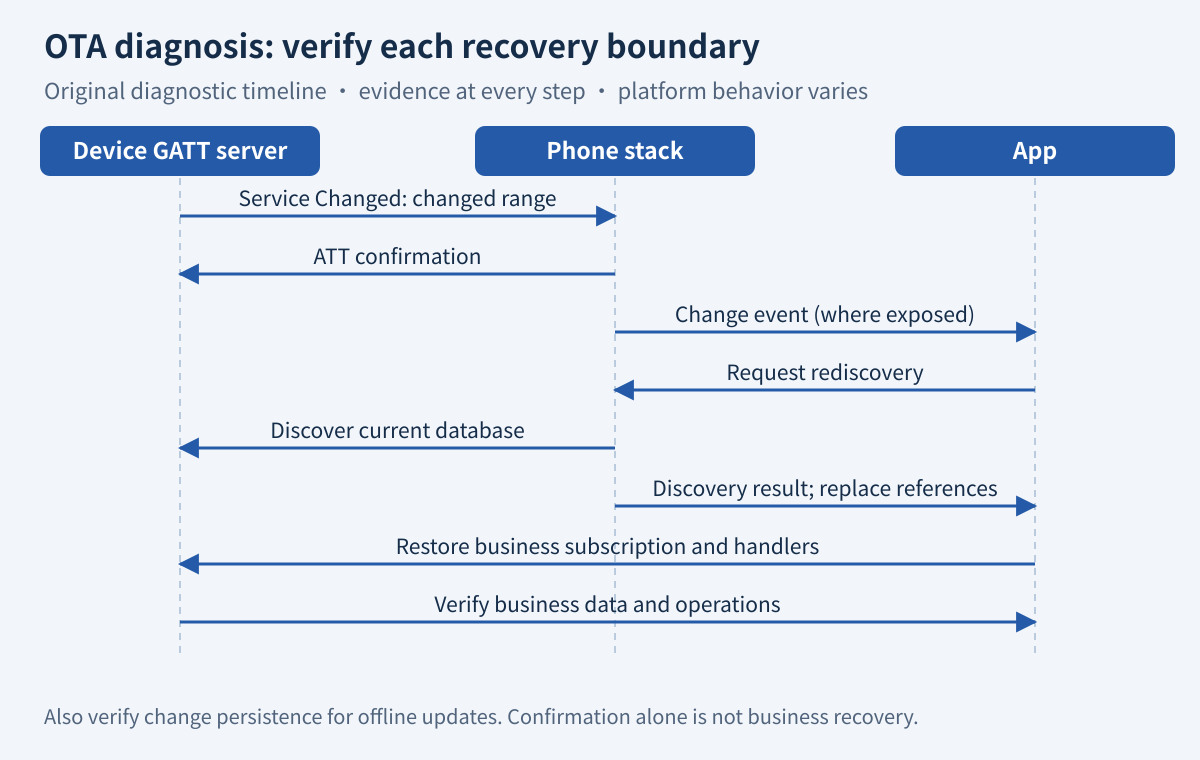
Check the characteristic in the old build, its CCCD state, the changed range, transmission, confirmation and subsequent client activity. Also inspect the case where the phone was offline throughout the update. A confirmation establishes a protocol event, not completion of the app’s business recovery.
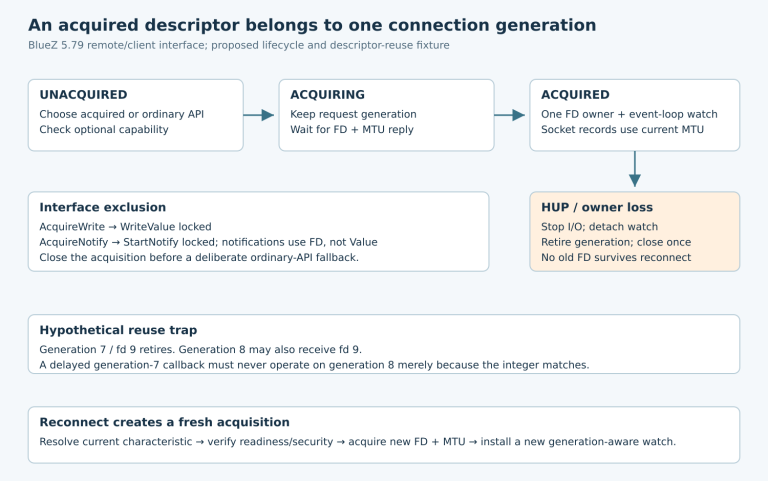
On Android, onServiceChanged was added in API 31; the official callback documentation directs the client to call discoverServices. Queue that work through the app’s connection state machine and record its completion. Do not generalize this callback to older Android releases or iOS.
Check Database Hash and Robust Caching Support
Record whether Database Hash and Client Supported Features exist, whether the client advertises Robust Caching support, and what it actually reads. Database Hash represents specified database-definition inputs, not changing sensor values. Robust Caching can report Database Out Of Sync, 0x12, under its specified conditions. See Core 6.3 GATT §§2.5.2.1 and 7.3. Support must be established on both sides, not inferred from a phone’s age.
For a controlled comparison, separate a firmware change that leaves the database definition unchanged from one that deliberately changes it. Record the hash before and after where available. If no hash read appears in the trace, do not invent one from the app’s successful connection callback. If an error is visible only at HCI level, document that limitation instead of expecting every mobile API to expose the same numeric value.
Inspect Bond and Subscription Persistence
Maintain three separate observations: bond material and peer identity, server subscription state, and application callback state. A bond can survive while the app has lost its handler; a handler can exist while the server is no longer configured to send data. Record storage restoration after reboot and any migration of the nonvolatile settings partition.
For Zephyr 3.7 with Bluetooth settings enabled, service registration order matters when restoring CCC configuration; the fixed GATT API documentation describes the registration and settings-load constraints. Verify the actual initialization sequence rather than treating a compile-time option as proof that state was restored.
A one-sided bond deletion changes the security experiment. Preserve evidence first, obtain the owner’s permission where necessary, and label a clean-pair comparison separately. Recovery after deleting both bonds may narrow the hypothesis, but it does not prove which state was broken or repair the retained-history path.
Build a Minimal Controlled Reproduction
Use one phone, one app binary and two firmware builds initially. Keep the actual upgrade path and a safe peripheral workload. The goal is to change one explanatory variable at a time, with a baseline that another engineer can repeat.
- Run the old firmware with the existing app; save discovery, one protected operation and one subscribed data sequence.
- Upgrade while retaining the defined bond and app state. Reproduce the original failing operation without cleanup.
- Repeat with an unchanged-database control build if available; distinguish firmware changes from schema changes.
- Create a separately identified clean-state comparison only after archiving the retained-history failure.
- Align device logs, app events and available HCI or air traces using a shared event marker; retain timing uncertainty.
Do not prescribe hidden Android cache-refresh APIs as a portable fix. Missing captures should be named in the report. Repeated restarts without a state ledger can erase the difference between an intermittent failure and an accidentally cleaned test.
Map Evidence to a Fix and Regression Test
Assign the fix to the failed boundary. A wrong server manifest calls for registration or build-configuration repair. Incorrect persistence belongs to firmware storage and initialization. Successful rediscovery followed by old-object access belongs to client reference management. Correct data delivery followed by bad units belongs to the protocol parser, using the interface compatibility contract.
Retest the original retained-history sequence first. Keep any clean-state workaround in a separate result column, then expand coverage through the OTA compatibility acceptance matrix. For related implementation checks, see the existing BLE client review guide. A useful diagnostic handoff contains both databases, exact versions and sanitized traces, with unknowns left explicit. Do not call the issue resolved until the intended user path recovers without unplanned cleanup.