RAUC Local Bundles: Diagnose Unsafe File Access Before Installing from Removable Media
Diagnose the file-access failure before changing the bundle or its permissions. A local bundle can have the expected signature yet still be unsafe to consume if another actor can change its contents. For removable-media updates, qualify where the installer reads the file, who can write it, and which operation is failing.
This guide is pinned to RAUC 1.13 and its tagged source. It addresses normal verification paths for local files, primarily plain bundles. It is not a command sequence for modifying device permissions. No installation, mount, capability change or permission change was performed for this article.
1. Understand the protection being exercised
With a plain bundle, signature verification precedes filesystem access. Changing the payload afterward can invalidate that earlier assurance. The 1.13 protection guide describes checks on ownership, permissions, filesystem suitability, underlying device ownership and existing access. If necessary, RAUC attempts ownership and permission repair, checks again, and refuses an unsafe result. Such ownership changes are not automatically reverted.
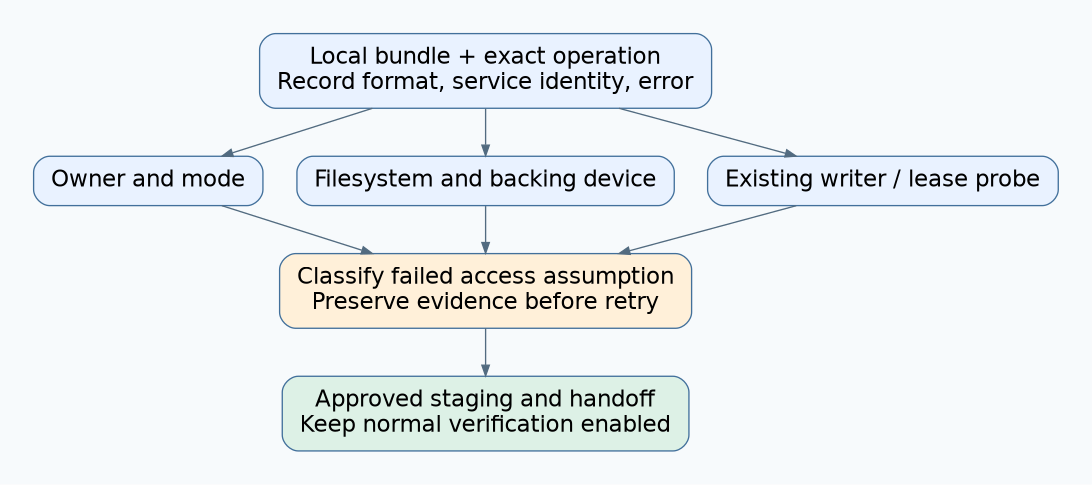
Record the bundle format, complete error chain, RAUC build, service identity, resolved file location and backing mount. Capture these before retrying so an attempted repair does not erase the initial evidence. A generic “permission denied” summary is insufficient when the actual problem may be an unsupported consistency assumption on the storage path.
2. Classify the failing check
The v1.13 implementation checks a regular file’s owner and mode, then relevant filesystem and device properties. It explicitly trusts the root filesystem for the mount classification; other paths follow source-specific branches. It also probes a read lease, verifies it, and releases it. That probe is not a permanent lock held throughout installation.
| Observed failure class | Evidence to collect | Safe decision |
|---|---|---|
| Unsafe owner or mode | Effective service identity, numeric owner, mode and intended staging owner | Review the staging contract with its administrator; do not apply a blanket permission recipe |
| Unsafe or unknown filesystem | Actual mount type and whether it is the root filesystem | Use an already approved, qualified staging location or hold the operation |
| Mounted device cannot be established or accepted | Mount-to-device mapping and device ownership | Investigate namespace and storage configuration rather than replacing the firmware |
| Lease probe fails | Exact error, writer lifetime, filesystem support and service restrictions | Finish the producer’s handoff or investigate the environment; do not bypass the check |
| Ownership repair fails | Original check, repair error, read-only media and caller privileges | Preserve evidence and select a qualified workflow with explicit permission to modify files |
A file browser showing a padlock does not establish the relevant properties. The installer may run in another mount namespace, use another identity, or encounter a writer that opened the file before the visible permissions changed. Similarly, changing the directory name does not change the backing filesystem.
3. Keep the producer-to-installer handoff explicit
Define when a download, copy or service-tool producer has finished writing the staged artifact. The installer should not compete with an unfinished producer. Include successful close, complete expected length, the approved artifact identity and a publication step within the staging workflow. Preserve the original service-media file when it is needed for audit or recovery.
If copying to a qualified local staging area, allocate enough capacity and avoid replacing an existing approved artifact in place. Give the copy a fresh identity until the transfer and required verification complete. Treat interrupted copying as incomplete staging. Copying a file does not authenticate it; retain all normal bundle verification and compatibility checks afterward.
Do not use a broad recursive ownership or mode change on a USB volume. It may affect unrelated data, fail under the filesystem’s permission model, or leave an already-open writer unaffected. Any deliberate configuration correction belongs to an approved, scoped service procedure with rollback and evidence, not an automatic response to an updater error.
4. Distinguish plain installation from verity operations
The verity format reference explains that installation authenticates filesystem blocks through the kernel’s verity mapping. Other commands that consume the filesystem without that mapping can require exclusive access before checking payload data. Therefore, a successful verity signature inspection is not a promise that every later extraction or payload-check operation will accept the same location.
In the tagged source, default plain verification enforces exclusivity before verifying the detached signature. Local inline-manifest verification can retain an access-check error instead of failing that signature step; a later explicit payload check rejects missing exclusivity. This is why the test record needs both format and operation, rather than one “RAUC accepted this USB drive” checkbox.
Do not change formats merely to suppress an error. A format migration has its own target-kernel, configuration, build and recovery prerequisites. Nor does block authentication make all removable-media behavior safe: removal, unreadable sectors and unavailable data can still interrupt the operation.
5. Qualify a controlled access matrix
Use non-sensitive development bundles and disposable copies, never the only release artifact. First test the approved local staging baseline. Then vary one condition at a time: an unfinished writer, a different approved service identity, read-only media, a filesystem outside the qualified set, and the exact intended extraction or installation path.
Keep writes and active installer tests on recoverable development devices with an explicit data-preservation plan. For each case, record whether failure occurred during access checks, signature verification, payload checking, mounting or installation. A rejected unsafe case is an expected protection result, not a failed security test.
After a repair-capable test, inspect the disposable file’s owner and mode again. Verify that the service procedure explains any persistent change and does not mislead the technician into assuming the original media state was restored. Also confirm the producer cannot continue modifying an artifact after its handoff.
6. A hypothetical technician-copy failure
Suppose a technician starts copying a plain bundle to local staging and launches installation before the copy tool closes its destination. The installer reports an exclusive-access failure. The appropriate investigation begins with the producer’s state and the exact error, not a replacement signing key or disabled verification.
After the producer has completed, the technician follows the approved handoff and repeats qualification using the finalized artifact. If the failure remains, the evidence matrix directs the next check toward ownership, mount classification or the service environment. It does not justify repeatedly changing permissions until an error disappears.
Release the workflow only when the same documented staging contract works under the real service identity and its negative cases fail clearly. The useful deliverable is a diagnosed access boundary with recoverable handling, not a claim that every correctly signed file is safe to install from any local path.