Power Measurements with a Debugger Attached: Identify the Features That Keep the MCU Awake
Qualify the MCU’s debug state, the probe’s electrical connections, and the firmware’s instrumentation independently. Closing the debugger window does not prove that all three returned to their production condition. On nRF52840, a debug power request can change the meaning of a System OFF experiment, so the resulting current cannot simply be corrected by subtracting a fixed “debug overhead.”
Applicability: the concrete device is Nordic Semiconductor nRF52840. The hardware contract is checked against Product Specification v1.8, sections 4.8.4 and 5.3.3.1, and corroborated by the current official online chapters. This is a proposed controlled measurement procedure; no current, battery-life, or wake-time result was measured.
1. Identify the hardware mode that the debugger requests
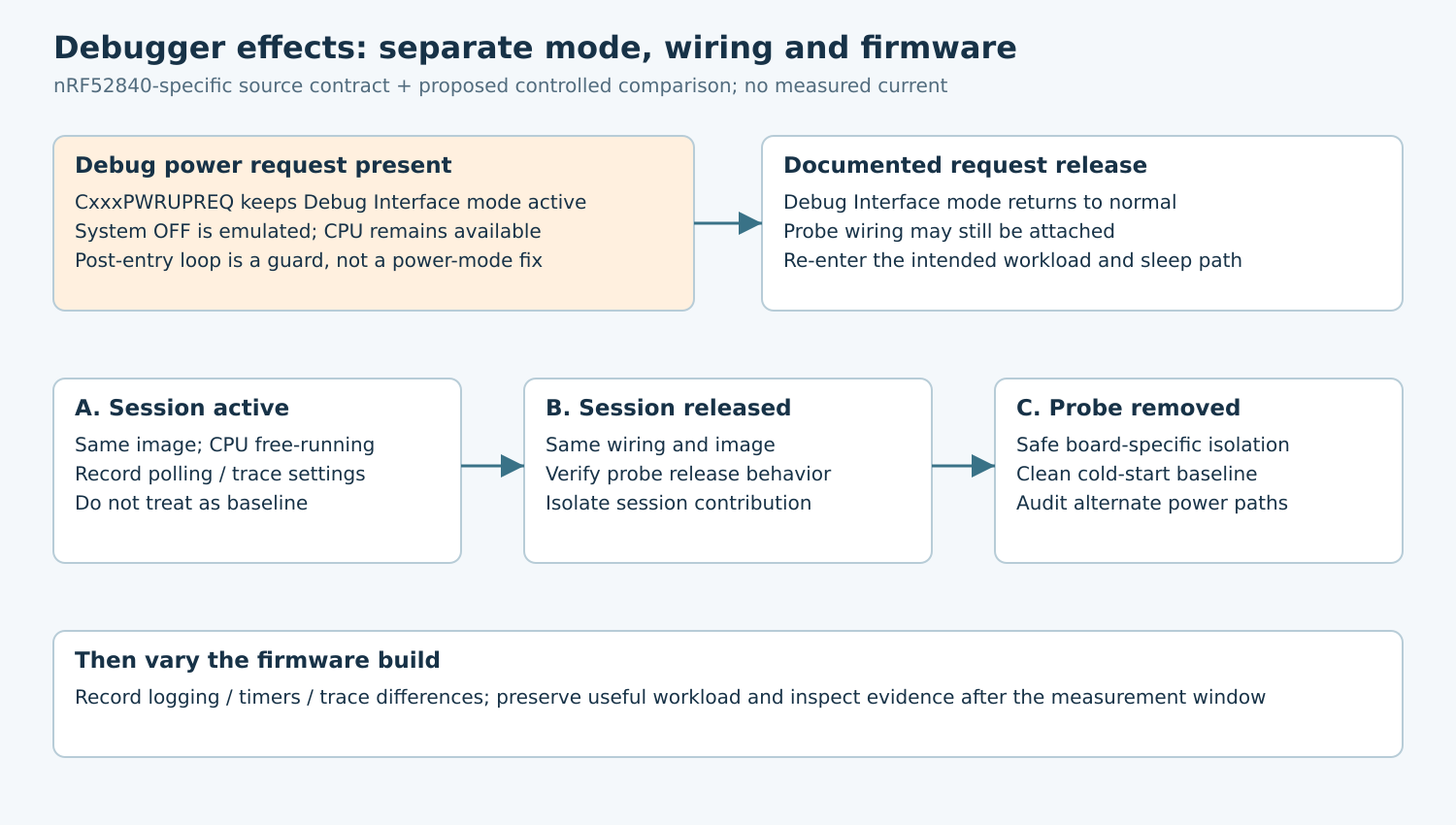
Nordic’s Debug and trace chapter explains that the debugger requests power through CxxxPWRUPREQ in the SWJ-DP. The device remains in Debug Interface mode while that request persists and returns to normal mode when it stops. A request arriving during System OFF can wake the device and set RESETREAS.DIF. Nordic explicitly requires the debugger to leave the device in normal mode when a session ends.
Translate this into a testable setup requirement: document how the chosen probe and debugger release their power request. “Disconnected” in an IDE is only a user-interface observation until its target-side behavior is understood. Do not infer that every probe firmware uses the same shutdown sequence.
Keep two separate labels in the worksheet: physical probe attached and Debug Interface mode requested. A cable may remain connected after a clean release; a session may remain active after the engineer stops single-stepping. Collapsing these into one boolean makes the comparison ambiguous.
2. Recognize emulated System OFF
The nRF52840 Product Specification v1.8 describes emulated System OFF while Debug Interface mode is active. Resources needed for debugging, including the CPU and its supporting memory and clock resources, remain available. Because the CPU can continue executing, the specification recommends an infinite loop after the System OFF entry operation to prevent unintended execution beyond it.
This is a functional distinction, not merely a slightly higher reading from the same sleep state. A breakpoint reached after the entry operation can be consistent with emulation. It does not demonstrate that ordinary System OFF failed under production conditions, nor does it certify a representative sleep-current measurement.
Review the SDK’s actual low-power entry path before adding application code. Preserve its required sequencing and error handling. A protective post-entry loop prevents fall-through; it does not remove the debug power request or turn emulated operation into a valid low-power baseline.
3. Use a staged comparison rather than changing everything
Start with a single firmware image, board, supply, wake trigger, and measurement boundary. Run a development session with the CPU free-running, not halted at a breakpoint. Record the probe model, probe firmware, debugger version, connection script, and whether live register polling is enabled.
Next terminate the session through its documented release procedure while leaving wiring unchanged. Then repeat with the probe signal connections removed under the board’s safe connection procedure. Finally establish a clean cold-start baseline without the probe attached. Preserve the same intended application sequence in each case.
These stages isolate different causes. A change after session release points toward debug mode or debugger traffic. A further change after removing wiring suggests an electrical or board-boundary contribution that needs investigation. A change only after cold start suggests retained setup or startup history. None of those interpretations alone identifies the exact faulty component.
Repeat the stages in a sensible order and retain failed trials. An accidental application state change between runs can mimic a probe effect. Use a bounded external trigger and a repeatable quiet interval rather than an interactive debugger action to start the measurement.
4. Audit every path crossing the measurement boundary
Draw the supply path through the current instrument and identify everything powered downstream. Mark the probe’s target-reference connection, ground, reset, SWD signals, UART bridge, USB connection, LEDs, and any external sensor supply. Use the actual board schematic to decide which paths can supply or load the target; do not assume a generic debug header pinout.
A measured “MCU current” that includes a development-board interface processor is a different quantity from an isolated target rail. Conversely, an alternate supply path bypassing the instrument can under-report consumption. Record the boundary before interpreting either a large or a small result.
Do not remove required grounds, exceed pin ratings, or disable protection to obtain an attractive trace. If safe isolation requires jumpers or board modifications, use the board manufacturer’s instructions and retain their positions in the setup record. Electrical isolation and debug-session release are complementary checks.
5. Compare instrumented and production firmware explicitly
Only after the probe-state comparison is understood should the firmware build change. Compare a minimally instrumented production-equivalent image with the diagnostic image. List differences in logging transport, periodic timers, assertions, trace configuration, peripheral initialization, and shutdown policy instead of relying on the labels “debug” and “release.”
Keep the functional workload constant. A build that silently skips sensing or radio work is not an equivalent low-power result. Prefer a short retained event record or bounded external marker over continuous logging during the interval being measured, and account for the marker’s own electrical load.
Inspect evidence after the measurement window. Reattaching the debugger to inspect memory is itself a new event and can wake the nRF52840 through the documented debug path. Keep that inspection outside the energy interval and distinguish it from the product’s intended wake trigger.
6. Decide what the evidence actually supports
A hypothetical result showing high current during the active session and lower current after documented release would support further investigation of debug-mode retention. It would not supply a universal subtraction value or prove that all other board consumers are asleep. Analyze the complete transition and wake cycle as well as the quiet interval.
The release package should contain the exact device and board revision, firmware hashes, supply conditions, instrument settings, probe-state sequence, wiring diagram, raw traces, and functional wake results. State whether normal System OFF was established or only emulated behavior was exercised. A reproducible production-like setup is the prerequisite for a defensible power claim.