Mount Failure Is Not Permission to Format: Preserve Persistent Data for Diagnosis
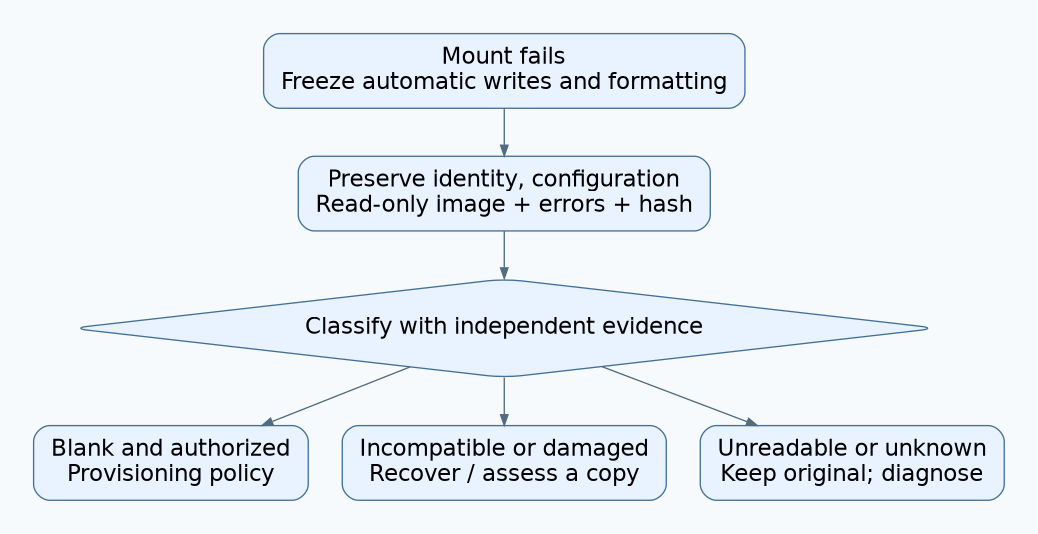
A failed mount tells you that the current software did not establish a usable filesystem. It does not tell you that the storage is empty or that its contents may be discarded. Stop automatic reinitialization, preserve evidence, and classify the failure before choosing recovery or an explicitly authorized format.
This procedure uses littlefs v2.11.2 as the concrete example. The preservation policy also suits other embedded stores, but their error codes, recovery behavior, and read-only modes differ. It is intended for engineering diagnostics and product recovery design, rather than a universal data-recovery recipe. A backup that has not been verified should not be treated as permission to erase the original.
1. Separate mount outcome from product policy
The littlefs v2.11.2 API exposes distinct mount and format operations and identifies errors including device I/O failure, corruption, and invalid parameters. Application code decides whether to call format after a failed mount. That policy should distinguish a new, provisioned blank device from an in-service device containing calibration, configuration, or records.
Remove the assumption that every nonzero mount result means “first boot.” A transient read failure, wrong partition base, unsupported disk version, or malformed configuration can all prevent access without establishing that the original data is worthless. Record the exact numeric return value and the first underlying driver failure; a generic “storage unavailable” message loses useful evidence.
2. Preserve the current state
Stop writers, log rotation, background maintenance, and retry paths that might initialize the region. Record the firmware identity, filesystem version and build options, complete geometry, partition map, device identification, power history, and the sequence that led to the failure. Include the previous known-good release and any recent manufacturing or update changes.
Acquire a read-only image using a verified acquisition path appropriate to the device. Retain the original image, an integrity hash, tool versions, read errors, and any unreadable ranges. Store experimental copies separately. If the transport cannot provide reliable reads, report an incomplete acquisition rather than silently substituting zeroes or erased bytes and calling the image complete.
Preservation has a hardware boundary. A software read-only flag does not prove that a programmer, controller, or startup routine never writes. Review the complete path. For a littlefs diagnostic build, LFS_READONLY removes modifying API availability in the versioned header, but lower layers and surrounding application code still need examination. See the read-only API guards.
3. Classify with independent evidence
| Candidate state | Evidence required | Next action |
|---|---|---|
| New blank region | Trusted provisioning history, correct region, reliable reads, and device-specific erased-state evidence. | Apply the approved first-provisioning policy after verifying that no valuable data is expected. |
| Existing but incompatible volume | Previous firmware/configuration and an intact image recognized by a compatible reader. | Plan supported extraction or migration on a copy. |
| Damaged filesystem metadata | Stable reads, correct geometry, and parser evidence of invalid structures. | Preserve the original; evaluate recovery from a copy and known backups. |
| Unreadable or unstable device | Transport errors, inconsistent repeated reads, or unresolved power/controller behavior. | Diagnose the read path before interpreting filesystem structures. |
| Unknown | Insufficient evidence to choose another category. | Keep the region unchanged and escalate with the evidence bundle. |
An erased-looking sample is insufficient to classify an entire partition. Sampling only the first page may miss data elsewhere; reading the wrong region may consistently return a plausible blank pattern. Conversely, nonblank bytes establish that something was written, but do not establish a recoverable filesystem. Use provisioning records and complete acquisition evidence together.
4. Test compatibility on a copy
Compare the current and previous partition bases, lengths, block counts, erase units, and configuration limits. Then try the known-good reader against a preserved copy in a controlled environment. Do not alternate firmware versions on the original merely to see which one boots: an older application may immediately rewrite data after mounting.
The v2.11.2 mount implementation explicitly checks the stored major and minor disk version and rejects unsupported versions. It also checks stored geometry and configured limits. Therefore an incompatibility finding should be tied to the exact check and version involved; it is not evidence that a format will safely repair the product.
If a compatible reader can extract files, validate their application meaning as well as their checksums. A syntactically valid calibration file for the wrong hardware variant is not a usable recovery artifact. Record which values came from the failing unit and which came from an authorized backup or default policy.
5. Make formatting an explicit terminal decision
Reinitialization becomes an option only after the data owner or the approved product policy permits discarding that specific region. Verify the target identity, exact partition, preserved evidence, recovery limitations, and the source of replacement settings. Keep calibration, device identity, credentials, and unrelated partitions outside the operation’s scope.
Do not present a single destructive command as a diagnostic step. The release implementation should log the reason for reinitialization and distinguish factory provisioning from field recovery. If the product must continue without storage, define a bounded degraded mode: which functions are disabled, which temporary values are used, and how the operator sees the condition.
Hypothetical incident walkthrough
A sensor gateway fails to mount its settings region immediately after a firmware update. An automatic format would restore a bootable empty store but destroy unit-specific adjustment values. The team instead freezes writes, captures the region, and compares partition maps. The new build points at a different base address. This is a hypothetical outcome, not a reported field case.
With the mapping corrected on a test copy, the previous data can be assessed without changing the original. If the copy still fails, the investigation continues through version and read-path checks. The initial mount error never authorized erasure, and the decision process remains useful even when the first suspected cause proves wrong.
The final evidence bundle should explain the classification, what was preserved, what remains unreadable, and why the chosen recovery is appropriate. A device that boots after losing its persistent data is not automatically a successful repair.