SquareLine Studio Event Order: Audit Noncommuting Actions Across the 1.6 Upgrade
Two actions attached to one SquareLine Studio event can produce different results when their order changes. Setting a slider to a baseline and then incrementing it is not equivalent to incrementing it and then resetting it. Both versions compile, and both can look plausible after a quick interaction.
That makes action ordering a behavioral migration concern. Inspect it explicitly when changing exporter versions or the Reverse event order setting, especially when one action reads a value written by another.
Record the version and setting together
The official changelog says version 1.6.2 exports events in their configured order. Version 1.6.1 introduced event-order configuration. The Project settings documentation describes Reverse event order as reversing the actions within added events.
Those facts do not establish that every earlier project exported the same reversed sequence, or that one checkbox value is correct for every migration. Record the source editor version, destination version and setting value, then inspect the generated handler that matters to the application.
Keep the LVGL version and the project's actions unchanged during the first ordering comparison. If you change the generator, library, screen structure and action list at once, a different result will not identify which change caused it.
The procedure here uses documentation labeled SquareLine Studio 1.6.2. It is a proposed migration experiment, not a report that particular exported files have been compiled or run.
Choose a test where order is observable
A pair of actions that independently updates two labels may give the same final screen in either order. That is a weak ordering probe. Choose actions whose effects do not commute.
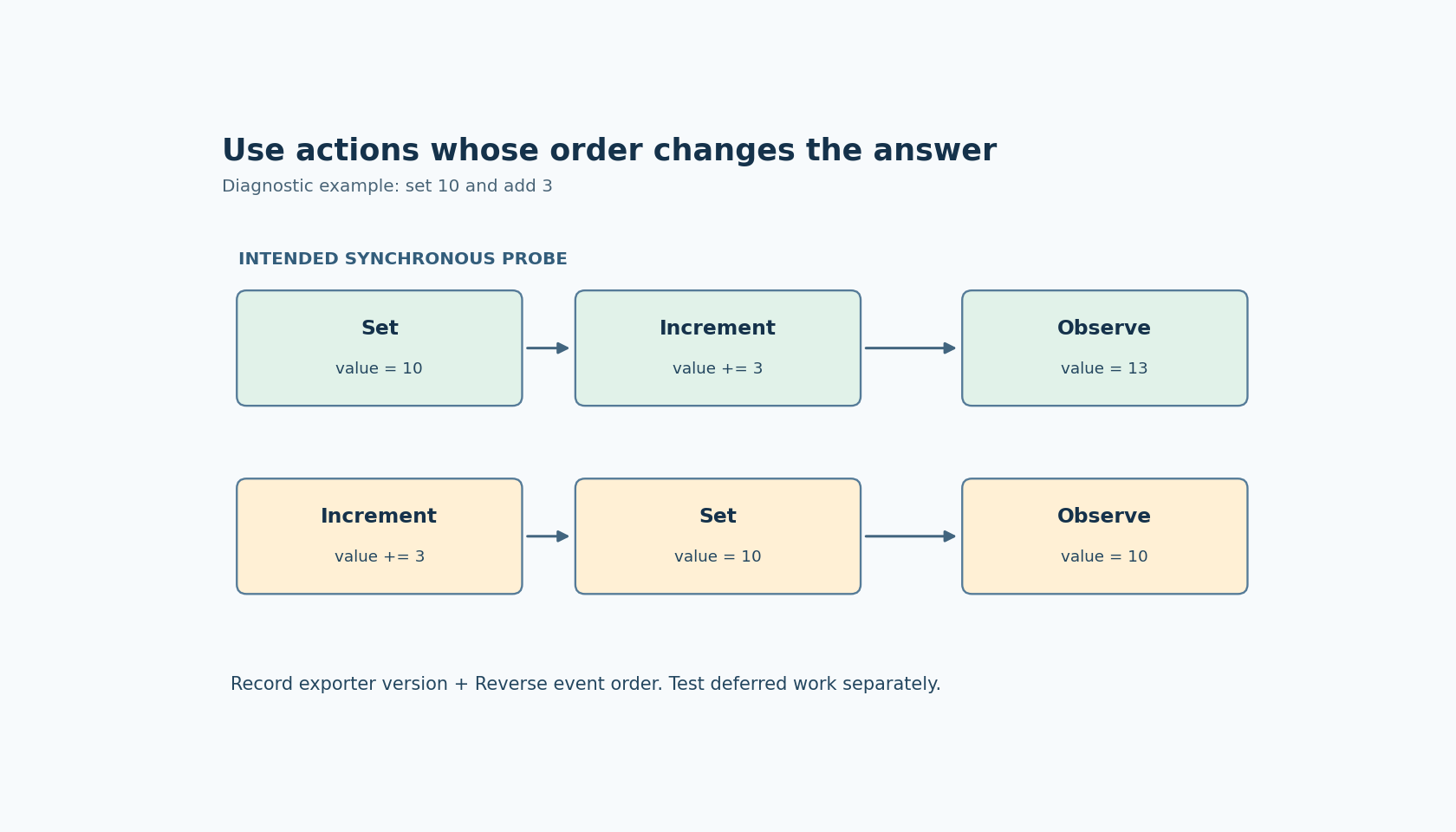
For example, create a diagnostic control with a first action that sets a slider to 10 and a second that increments it by 3. The intended final value is 13. Reversing those actions yields 10, provided the selected actions operate synchronously as expected in that generated path. The specific numbers are illustrative; use values comfortably inside the widget's configured range.
The official Events and Actions documentation describes property-setting and slider-increment actions, along with Call function actions. Inspect the actual generated code for your selected property rather than assuming a menu label proves the operation you intended.
Run the probe from more than one initial value. If the final result depends on an earlier test state, the experiment has another uncontrolled input. Reset the diagnostic state explicitly between runs and record the observed final value after each event.
Trace the handler as a sequence
Locate the generated handler for the diagnostic trigger. Identify each operation corresponding to the configured actions and write down their emitted order. Check whether an action invokes a helper, starts an animation, or calls handwritten code rather than performing an immediate assignment.
For synchronous actions, a simple trace counter can make the sequence visible. Record a short marker at each action boundary and include the relevant value before and after the operation. A final screenshot can distinguish 10 from 13, but the trace explains how the value arrived there.
Keep the trace outside generator-owned code where the integration provides a supported call boundary, or use a disposable generated copy strictly for diagnosis. Do not mistake a manual patch to one export for a durable change in the project configuration.
Compare the old and new exports using the same saved project input. If the action order differs, identify whether that difference matches the documented setting. Preserve both exports in the migration evidence so that the result is reviewable without relying on memory of the editor's visual list.
Source order is not completion order
An action that starts an animation can return while the animation is still running. A native callback can enqueue a device request and return before that request completes. In those cases, correct statement order does not imply that the first operation has finished before the second begins.
Separate these requirements in the acceptance record. “Start request A before request B” is a sequencing requirement. “Wait until A completes successfully before B starts” is a dependency requirement that needs an explicit completion path.
Avoid using an arbitrary animation delay as proof that a device operation completed. If the application's next action depends on completion, connect it to an observable result or deliberately serialized application operation. This is an integration design choice, not a capability established merely by rearranging the event list.
Test rapid repeated triggers as a separate case. Two correct per-event sequences can still interleave at the application level if the handlers schedule deferred work. Record whether repeated input is ignored, queued or allowed to replace an in-progress operation.
Migrate the meaningful event chains
After the small probe passes, inventory production event chains where one action depends on another. Useful candidates include setting a value before displaying it, preparing a target screen before navigation, and updating application state before invoking a callback.
Do not reverse every event preemptively. Review the intended sequence for each dependent chain and compare it with the generated output. Independent actions may need no change; a blanket reversal can introduce a new defect while fixing another.
The migration is complete when the saved setting, emitted order and observed behavior agree for the application's dependent sequences. Keep the small noncommuting probe as a regression test. It detects an ordering change that ordinary compilation and attractive screenshots can easily miss.
![A labelled flattened three-axis window maps requested offsets to exact element ranges; the adapter invariant is out[i] equals logical[offset+i].](https://obeita.com/wp-content/uploads/2026/10/n1000-20261019-1029-en-768x461.png)