SquareLine Studio Textarea Limits: Check Initialization Order Before Assuming Text Was Truncated
A SquareLine Studio Textarea can have a maximum length configured while its current text still exceeds that limit. One concrete cause to investigate is initialization order: assigning the text and then setting the limit is not necessarily equivalent to setting the limit first.
The SquareLine 1.6.2 widget documentation exposes Max text length as a character limit. It does not, by itself, establish the order of every generated call or subsequent application restore operation. Inspect the exported Textarea setup together with any code that restores saved text.
The mechanism below is verified against LVGL v9.5.0 Textarea source, fixed at commit 85aa60d18b3d5e5588d7b247abf90198f07c8a63. Use it as a specific investigation path, not a claim that SquareLine always generates a problematic order. No export or runtime experiment was performed for this article.
The limit setter does not rewrite existing text
In that implementation, lv_textarea_set_max_length asserts the object type and assigns the supplied number to the Textarea's max_length member. It does not shorten the label's existing text or reinsert that text through the acceptance logic.
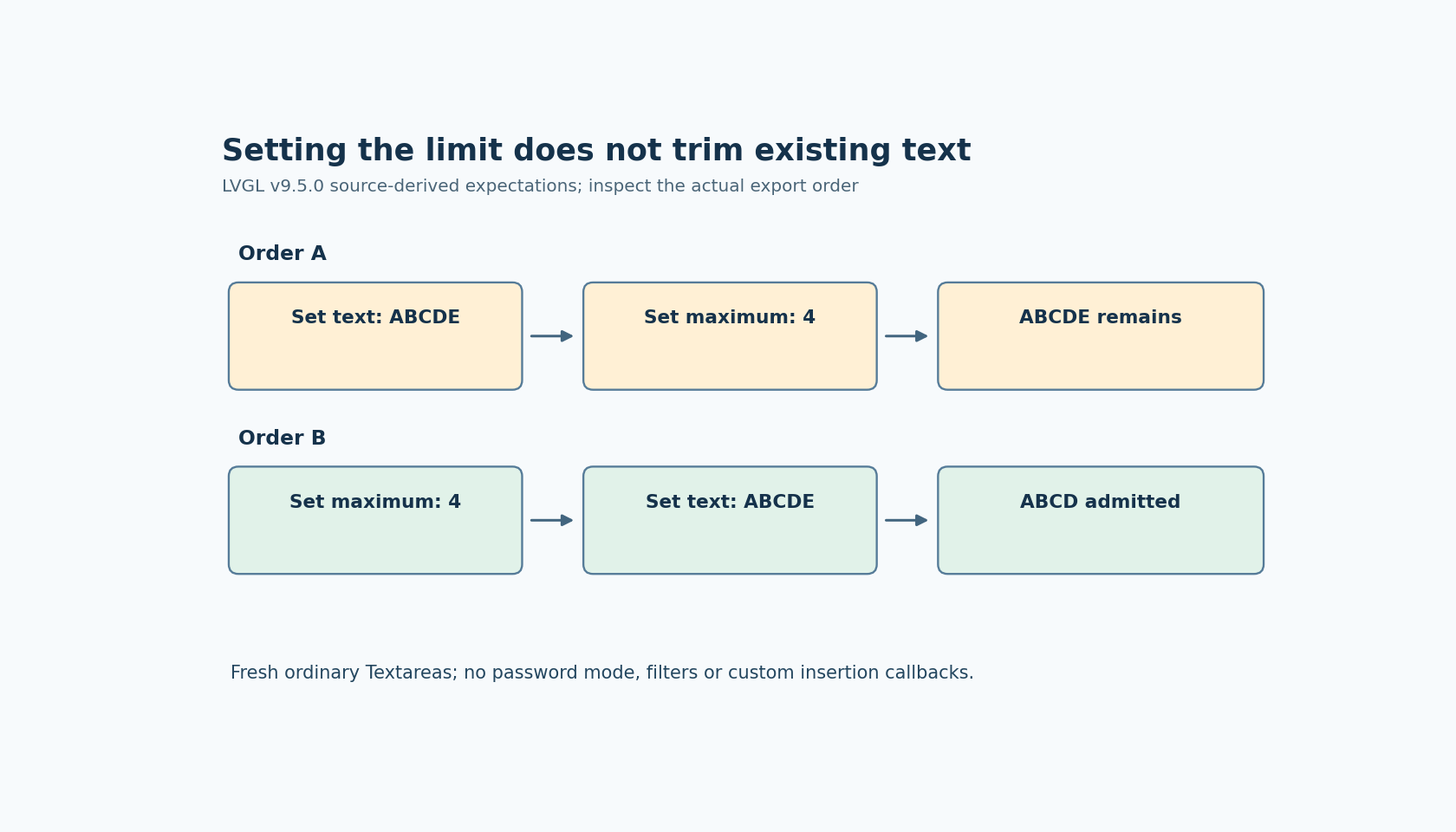
Suppose an ordinary, freshly created Textarea initially has no maximum and receives ABCDE. Setting its maximum to four afterward changes the stored limit. The setter contains no operation that would remove E from the text already present.
This explains a useful distinction when reviewing a generated UI: the configured bound describes an insertion rule, while the current string is existing state. Reading back a maximum of four does not prove that the current text contains at most four characters.
Setting text under an active limit takes another route
The same source gives lv_textarea_set_text a conditional path. When accepted characters or a maximum length are configured, it clears the label and walks the supplied text through the decoded-character insertion path. Each character reaches lv_textarea_add_char.
That insertion function calls char_is_accepted. For a positive maximum, the acceptance function rejects an insertion when the current encoded-character length has reached the limit. The LVGL 9.5 Textarea reference describes the maximum-length facility; the pinned implementation supplies the setter-order detail needed for this investigation.
Consequently, setting the maximum to four before assigning ABCDE is expected to admit ABCD in the simple fixture described here. Assigning ABCDE before setting the maximum is expected to leave ABCDE. These are source-derived expectations, not measured results from a SquareLine-generated application.
Trace the exported call sequence and the restore sequence
Search the generated screen creation function for the Textarea object and both relevant setters. Record which call occurs first. Then follow application initialization, screen-loaded handlers and saved-value restoration for later assignments to the same object.
A correct generated setup can still be followed by application code that temporarily removes the limit, loads text and restores the bound. Conversely, if the export sets the maximum first and every later assignment uses the inspected limited path, this particular explanation may not fit the symptom.
Keep the first diagnostic fixture narrow: password mode off, no accepted-character filter, no custom insertion callback, and two fresh Textareas. These conditions avoid attributing a filtered or callback-replaced character to the length rule. Use plain ASCII ABCDE so encoding details cannot explain the first result.
Read the string after each individual call, rather than only after the whole screen appears. In one object, assign text then set the maximum; in the other, reverse those operations. Log the current text and configured bound separately. If the predicted difference is absent, inspect the exact linked LVGL version and any wrapper that changes the operation sequence.
Choose a deliberate policy for already-loaded values
When a saved value exceeds a newly reduced limit, decide whether the application should reject that value, ask for correction or replace it with an explicitly shortened value. Merely updating Max text length does not implement any of those policies in the inspected setter.
Setting the bound before assigning a new value routes that assignment through the limited path under the stated fixture conditions. Do not blindly pass the Textarea's own internal text pointer back into a setter that clears or reallocates its storage; use a separately owned copy when the application deliberately reloads existing content.
Finally, the character limit is not a byte-capacity declaration for a native destination buffer. Keep byte-length and terminator checks at that copy boundary. That separate concern should not obscure the immediate diagnosis: determine whether the current overlong text was present before the maximum was established.