EEZ Studio LVGL Groups: Wire the Target Input Device Before Initializing the UI
Keyboard or encoder navigation can work in the EEZ Studio simulator while the generated target UI receives no focus changes. One concrete integration step to inspect is the association between the target LVGL input device and the generated group.
The pinned EEZ LVGL group editor includes code guidance for that association. It also labels the keyboard and encoder default-group settings as simulator settings. The LVGL 9.5 Groups documentation explains that a group must be assigned to an input device before that device can navigate its widgets.
The EEZ source scope is editor v0.29.0 commit 3000161d09d40a5c1dc2477ddc30b38037b3a612. Use the generated functions and LVGL API version that actually belong to the target project; the LVGL reference here is explicitly version 9.5.
Follow the generated integration sequence
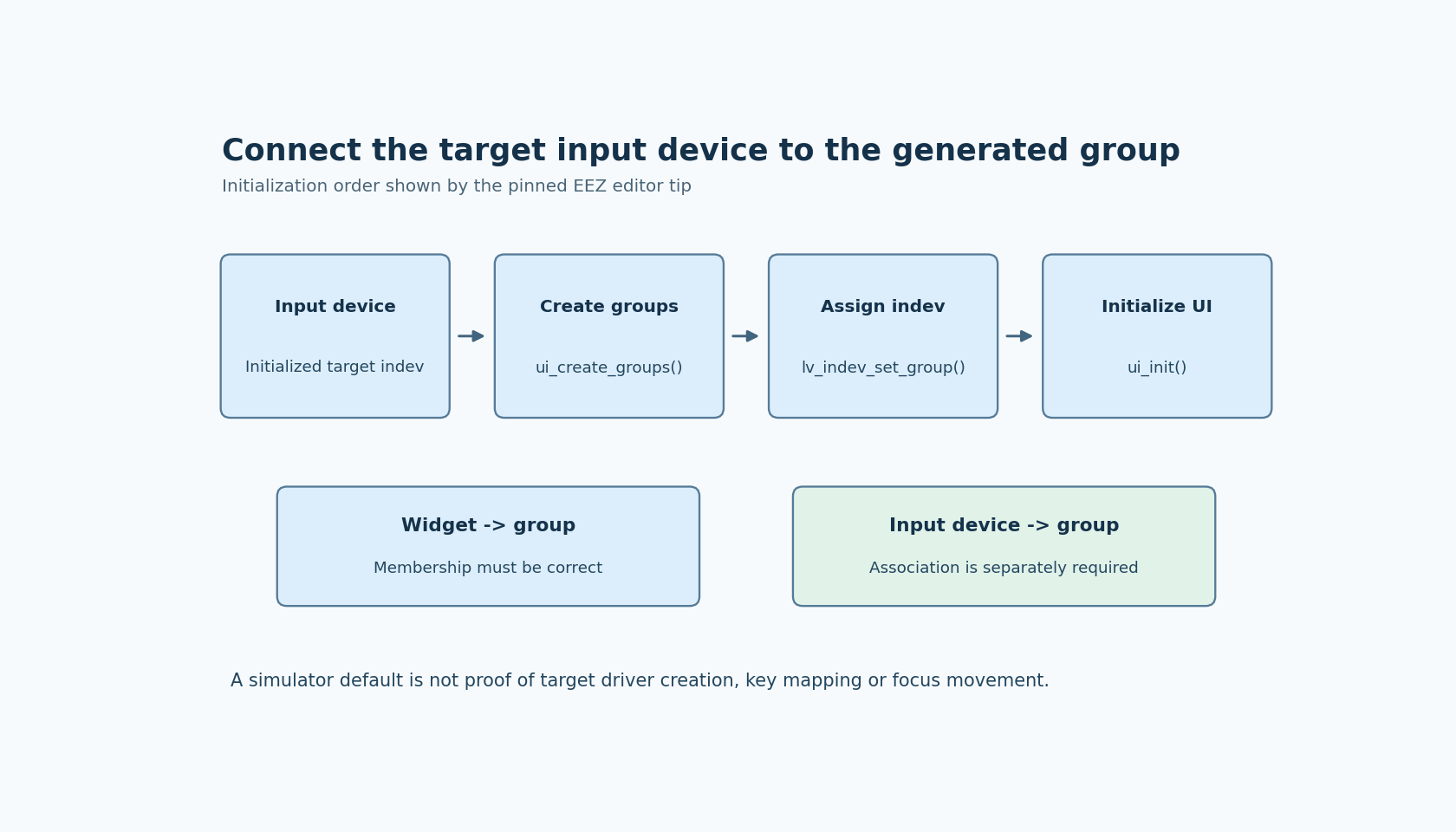
The editor's tip starts by requiring the input device to be initialized. It then calls ui_create_groups before ui_init, assigns the intended generated group to the input device with lv_indev_set_group, and finally calls ui_init.
That ordering gives the application a real input-device object and a real group before joining them. It also makes the association visible in the target integration code instead of assuming a simulator selection configures the board automatically.
Inspect the generated group declarations and use the intended group member. Do not copy a placeholder name literally or assume every project exports the same group identifier. The tip includes the generated screens header for group declarations, but the project output remains the authority for its names and include arrangement.
A default group does not assign an input device
LVGL's default-group facility can arrange for interactive widgets to be added to a group. The documentation still requires assigning one or more input devices to that group with lv_indev_set_group.
Those are separate relationships: widget-to-group membership and input-device-to-group association. A populated group can exist without the intended encoder being associated with it. Conversely, an input device can point to a group that does not contain the controls the operator expects to navigate.
The simulator's default keyboard or encoder group is another environment-specific choice. It is useful for preview interaction, but it does not identify the target's created indev object, initialize a board driver or supply the hardware key mapping.
Reduce the first target test to two controls
Use a minimal generated screen with two clearly focusable controls in the intended group. Confirm that the target input device exists, that group creation has occurred, and that the association is made before the UI initialization sequence described by the generated tip.
Then test next and previous focus movement. Observe the currently focused object rather than inferring focus from a style that might look similar in several states. Only after navigation works should the fixture introduce editable widgets and their edit-mode behavior.
If focus does not move, inspect the two relationships independently. Check the group's actual widget membership, then the group assigned to the actual input device. Reordering screen code or changing colors cannot repair an association to the wrong group.
Keep multiple devices explicit
A product with two input devices may intentionally assign them to the same group or different groups. LVGL supports multiple groups, but the product must choose those associations deliberately. Do not assume that selecting a simulator default transfers every target device into it.
Likewise, a group association does not validate the input driver's reports. If the driver sends the wrong keys or encoder events, a correct group can still receive unusable navigation input. Establish the association first, then test the driver's event contract as a separate layer.
No target firmware was built or run for this article. The acceptance evidence should identify the actual indev, the generated group, its intended widgets and observed focus movement. That closes a specific simulator-to-target gap without turning a working preview into a promise that the board's input integration is complete.