SquareLine Studio Component Overrides: Explain Why One Instance Ignores a Design Fix
A designer fixes a component's spacing in SquareLine Studio. Most instances update, but one card keeps its old padding. Before treating that as an export defect, determine whether the card inherits the component value, overrides that property locally, or has been detached into ordinary widgets.
These are three different sources of design intent. The remedy depends on which relationship is active, and changing the component repeatedly can make the inconsistency harder to understand.
Identify the owner of one property
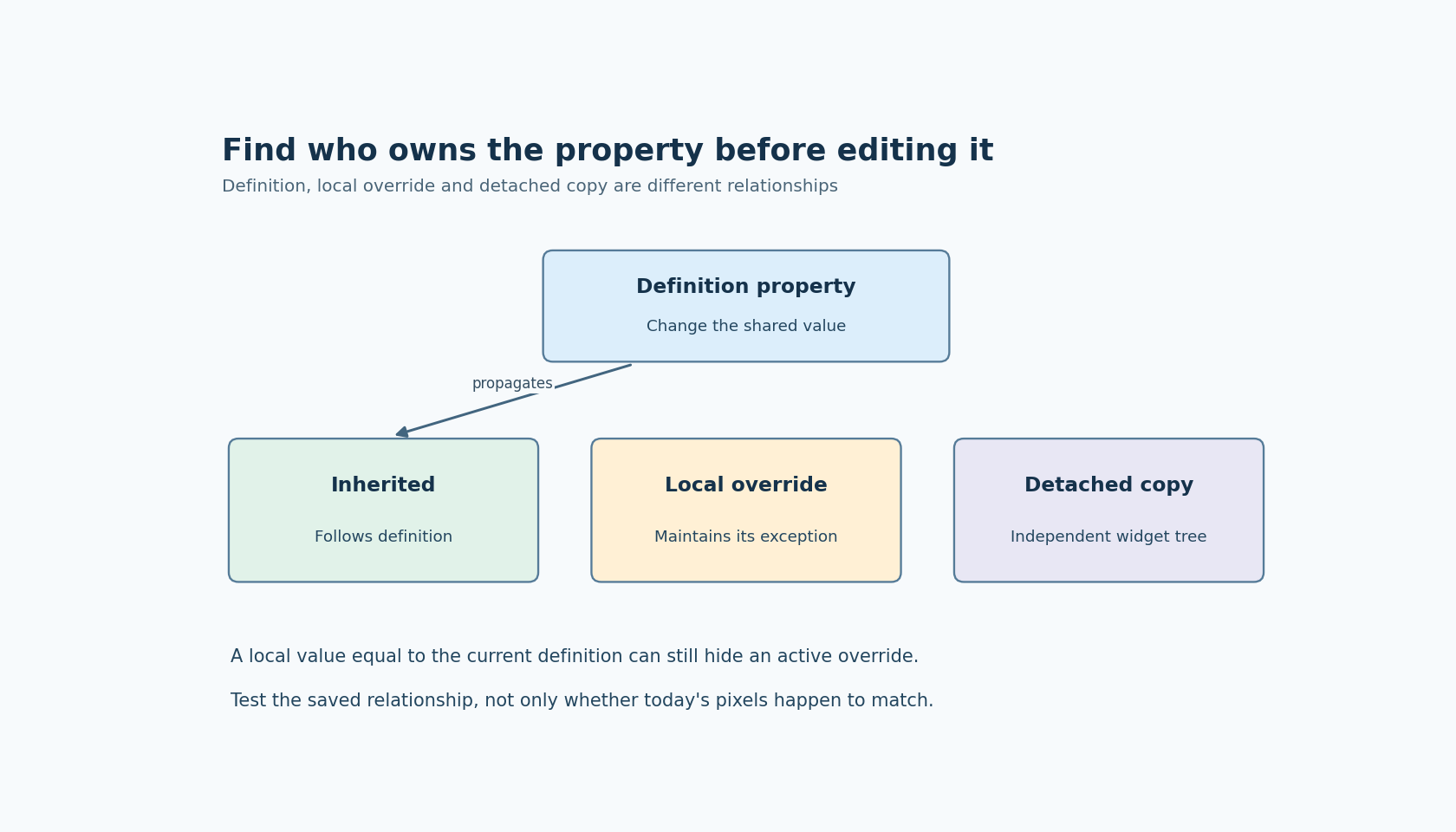
The official Components documentation describes shared component editing, local instance overrides and Detach. Editing the definition applies changes to instances; an enabled override supplies a local value for the selected property. Detach removes the instance's relationship with the component.
Investigate one concrete property first, such as a label's text color or a container's padding. “This component is different” is too broad because one instance can inherit some properties while overriding others.
Write down the definition value, the local override state and the effective value on the affected instance. Compare the same property on one instance that updated correctly. This small comparison often reveals whether the apparent failure is the configured override doing exactly what it was meant to do.
Use the editor's component-editing controls to establish whether the object is still an instance. A visually identical detached widget tree should not be expected to receive future definition updates. Its resemblance is not an inheritance relationship.
Build a three-case propagation check
In a disposable project copy, place three cards derived from the same component. Leave the first card's test property inherited. Set a deliberate local override on the second. Detach the third, keeping its current visual value.
Change the test property in the component definition to a clearly different value. The intended observations are that the inherited case follows the definition, the overridden case retains its intentional local value, and the detached case remains independent. Confirm those relationships for the exact property and version rather than generalizing from one successful style parameter.
Save and reopen the project before exporting. This separates the editor's live view from the persisted design state. Then export into a fresh destination and inspect the corresponding property setters or other generated representation for each case.
If the editor and export disagree, preserve the smallest three-case project and identify the first boundary where they diverge. Do not erase the evidence by repeatedly toggling overrides until the screen happens to look right.
The checks in this article are proposed experiments based on documentation labeled SquareLine Studio 1.6.2. They are not claimed simulator or target results.
Treat an override as a maintained exception
A local override should have a reason that survives the original designer's memory. For example, one card may need a longer caption or a distinct warning color. Record that exception beside the component's intended usage or in the review of the change that introduced it.
When a shared design fix arrives, decide whether each exception is still needed. Removing an obsolete override can be the correct fix; replacing it with the new definition value while keeping override mode enabled can preserve a hidden future divergence.
Test the difference deliberately. An instance whose local value merely equals the current definition can look inherited today while still refusing tomorrow's update. The important state is the inheritance choice, not just equality of the displayed number.
Avoid using Detach as an unexplained workaround for a difficult property. Detachment trades shared maintenance for independence across the widget tree. That can be a valid design decision, but it should be explicit because subsequent component fixes will no longer flow into that copy.
Distinguish layout constraints from lost propagation
A property can propagate correctly and still have a different visible effect because the instance sits in a different parent layout. The Inspector documentation explains that an enabled layout controls child positioning unless relevant exclusion flags are used, and that size settings can be expressed relative to parent dimensions.
If both instances contain the intended new value, inspect their parent layout, available space and relevant flags before changing override logic. Compare a problematic instance with the same component placed in a neutral test container. This isolates design-value propagation from the geometry that interprets the value.
For nested components, inspect the changed property at the level where it is defined and at the level where it is overridden. Do not assume that an override on a parent card explains every child difference. Keep the test to one property until its ownership is clear, then extend it to the other affected properties.
Review the generated difference without editing it away
A useful export review records which instances changed and why. If a shared property change affects no inherited instance, investigate the selected component definition and saved project. If an intentionally overridden instance changes unexpectedly, inspect the persisted override and the exact generated operation.
Keep application code that modifies the same property in mind during target testing. A correct generated initial style can be overwritten later by a runtime callback. Observe the property immediately after creation and again after the relevant event to distinguish initial generation from later mutation.
The final acceptance condition is understandable ownership: every affected instance either inherits the fix, retains a justified local exception, or is deliberately independent. A uniform screenshot is not always the goal. A design system that can explain its differences is much easier to maintain than one repaired by repeated manual copying.