LVGL Draw Layers: Budget Temporary Surfaces for Opacity and Transforms
Budget temporary drawing surfaces from their actual dimensions, format, stride and overlapping lifetimes. A small changed rectangle on the display does not establish the size of the intermediate surface used to composite a transformed widget. The useful evidence is a scene-to-layer allocation map, followed by a peak-live-surface trace.
Applicability: this article pins LVGL v9.3.0 with LV_DRAW_TRANSFORM_USE_MATRIX disabled and the software renderer supporting the tested operations. Matrix-capable backends can take another path. It covers transient compositing surfaces, excluding image-decoder caches, display buffers and persistent screen allocations. All numeric examples and tests are hypothetical; no target memory measurements are claimed.
1. Identify the property that actually creates a layer
Separate ordinary opacity from layered opacity. The 9.3 property reference describes opa as scaling drawing opacity, while opa_layered composites the widget through a layer. They can produce different results where component drawings overlap, so replacing one with the other is a visual design change, not a transparent memory optimization.
The tagged layer-type calculation classifies nonidentity rotation, scale or skew as a transform layer. Otherwise, non-covering opa_layered, a bitmap mask or a non-normal blend mode selects a simple layer. With none of these conditions it selects no layer through this classifier.
Inspect resolved styles for each relevant widget state. A pressed style or animated transition may activate a layer that the idle screen never uses. Record the owning object and parent chain, including children whose own transforms create another temporary surface.
Do not infer this behavior from the configuration template’s older comment about style_opa. For this exact release, the property reference and implementation distinguish opa from opa_layered. Also remember that the style classifier is not an exhaustive inventory of all renderer-created surfaces; instrumentation should capture allocations from other paths too.
2. Record the source surface, not just the visible damage
The non-matrix refresh path starts with object coordinates expanded by extra drawing size. For a transform layer it intersects the transformed bounds with the current clip, maps that region back, intersects with the object’s drawing bounds and adds a five-pixel rounding margin on each side. Simple layers use an ordinary intersection instead.
Consequently, distinguish widget coordinates, extra drawing bounds, destination clip and source-layer area in the ledger. A shadow can expand the drawing bounds, while rotation changes how the destination region maps back. Do not assume either that every transform allocates the whole widget or that its surface equals the display’s dirty rectangle.
For each created layer, capture parent identifier, owner or diagnostic scene identifier, buffer area, color format and the moment storage is actually allocated. The creation of a layer descriptor and allocation of its pixel buffer are different events.
3. Calculate the right byte quantity
The tagged layer allocator calculates pixel storage from height multiplied by the format’s resolved row stride. It allocates on demand and tracks live layer-buffer bytes. The refresh path selects ARGB8888 where alpha is needed; otherwise it can use the native format. Read the chosen format rather than multiplying every surface by the display’s bytes per pixel.
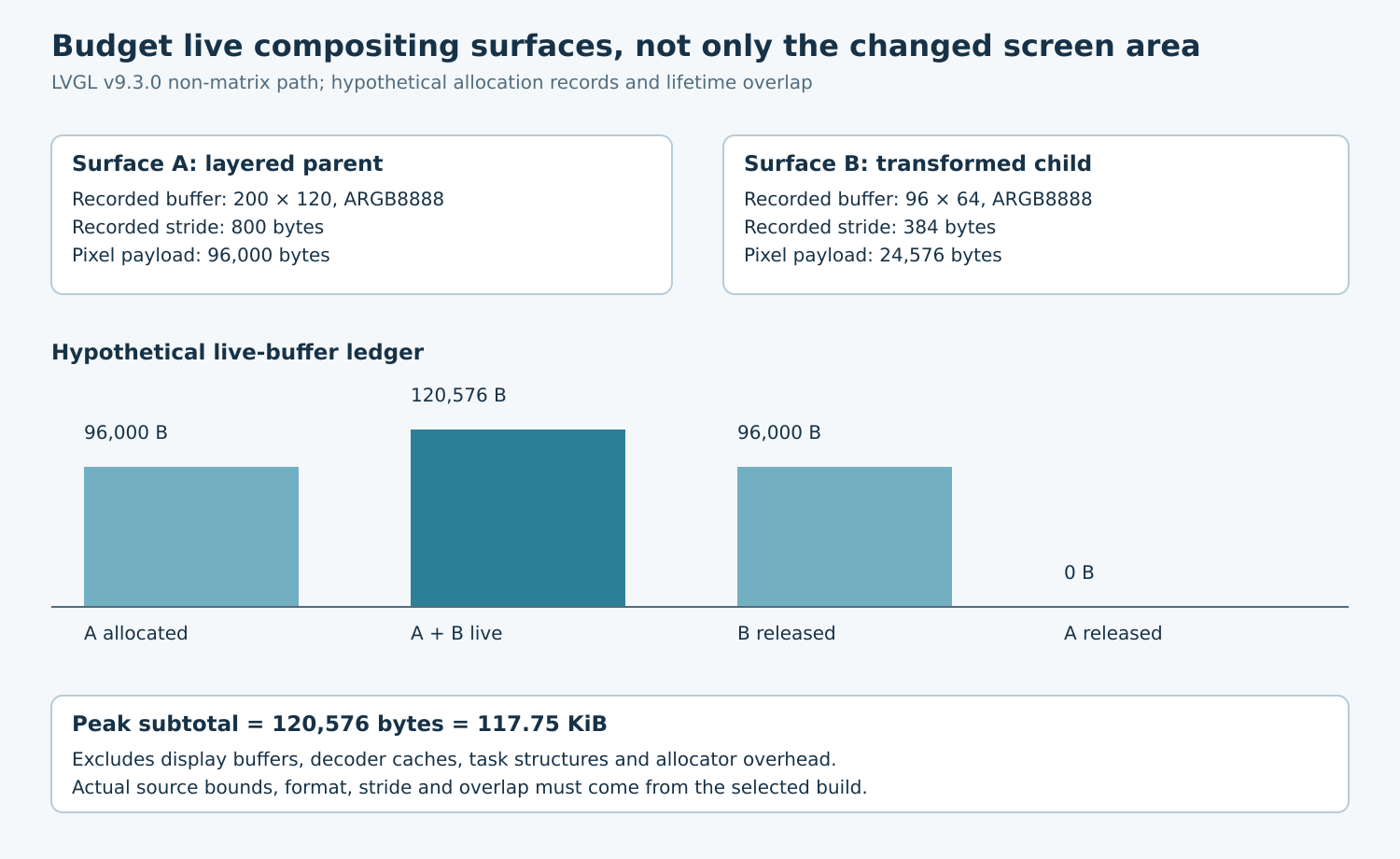
Consider two hypothetical allocation records: surface A has width 200, height 120, ARGB8888 and stride 800 bytes; surface B has width 96, height 64, ARGB8888 and stride 384 bytes. Their payloads are 96,000 and 24,576 bytes. If both are alive together, the layer-payload subtotal is 120,576 bytes, or 117.75 KiB.
Those dimensions are assumed records, not a prediction that a 200-by-120 widget always produces that exact surface. Add allocator overhead, layer/task structures, alignment effects outside the recorded payload and other memory classes separately. Avoid counting the same allocation once as a layer and again as generic graphics workspace.
4. Distinguish chunk targets from peak limits
In the selected refresh path, simple layers may be subdivided vertically using LV_DRAW_LAYER_SIMPLE_BUF_SIZE. Transform layers do not take that chunk-sizing branch. A smaller simple-layer target therefore does not establish a smaller transformed-surface requirement.
The configuration also provides LV_DRAW_LAYER_MAX_MEMORY. In the allocator, a nonzero limit is checked against the current live layer-byte total before accepting another buffer. It is not a complete application heap budget and does not prove that the scene can make progress under an arbitrarily small limit.
Choose a target that can accommodate the required row geometry and test the resulting strides and allocations. Treat failed allocation or repeated deferral as a failed qualification case. Do not claim that lowering a limit automatically degrades an effect gracefully or makes an oversized transform safe.
5. Measure simultaneous lifetime through nested scenes
- Start with a fixed card containing solid shapes and text, without image decoding. Capture a full redraw with no layered opacity or transform.
- Enable only layered opacity on the card. Record created surfaces, chunk dimensions, chosen formats and peak live bytes.
- Restore the baseline, then rotate the card through the product’s intended angles. Include angles with different clipped bounds.
- Add a transformed child inside the layered parent. Record whether parent and child buffers coexist, rather than adding their separate peaks blindly.
- Repeat with a small child update, full invalidation, partial off-screen placement and the relevant animated states.
Use monotonic allocation identifiers and log allocate/free events into bounded storage. Calculate the running sum from the trace and verify it returns to the expected layer baseline when drawing finishes. Compare it with the allocator’s overall high-water mark, but keep the two quantities named separately.
A hypothetical trace can rise from 96,000 bytes for A to 120,576 while B is live, fall back to 96,000 when B is released, and finally reach zero. Actual scheduling may produce a different overlap. The trace, not the widget tree alone, decides the peak.
6. Make a bounded design decision
If the transformed source area dominates, reduce the transformed group’s extent or move static content outside it, then recheck the visual result. If nested overlap dominates, reconsider which element needs group opacity or rotation. If alpha changes the format, verify whether the design truly needs uncovered pixels rather than forcing an opaque assumption into the renderer.
Keep before-and-after images beside allocation ledgers. A memory reduction that changes overlap opacity, clips shadows or drops child content is not an equivalent result. Accept the scene only when peak memory fits the complete product budget, allocation failures are absent in the tested workload, and the intended compositing remains correct. Preserve the exact release and configuration with that conclusion.