EEZ Studio Flow Conversion: Audit Generated Templates Before Fixing native_vars Link Errors
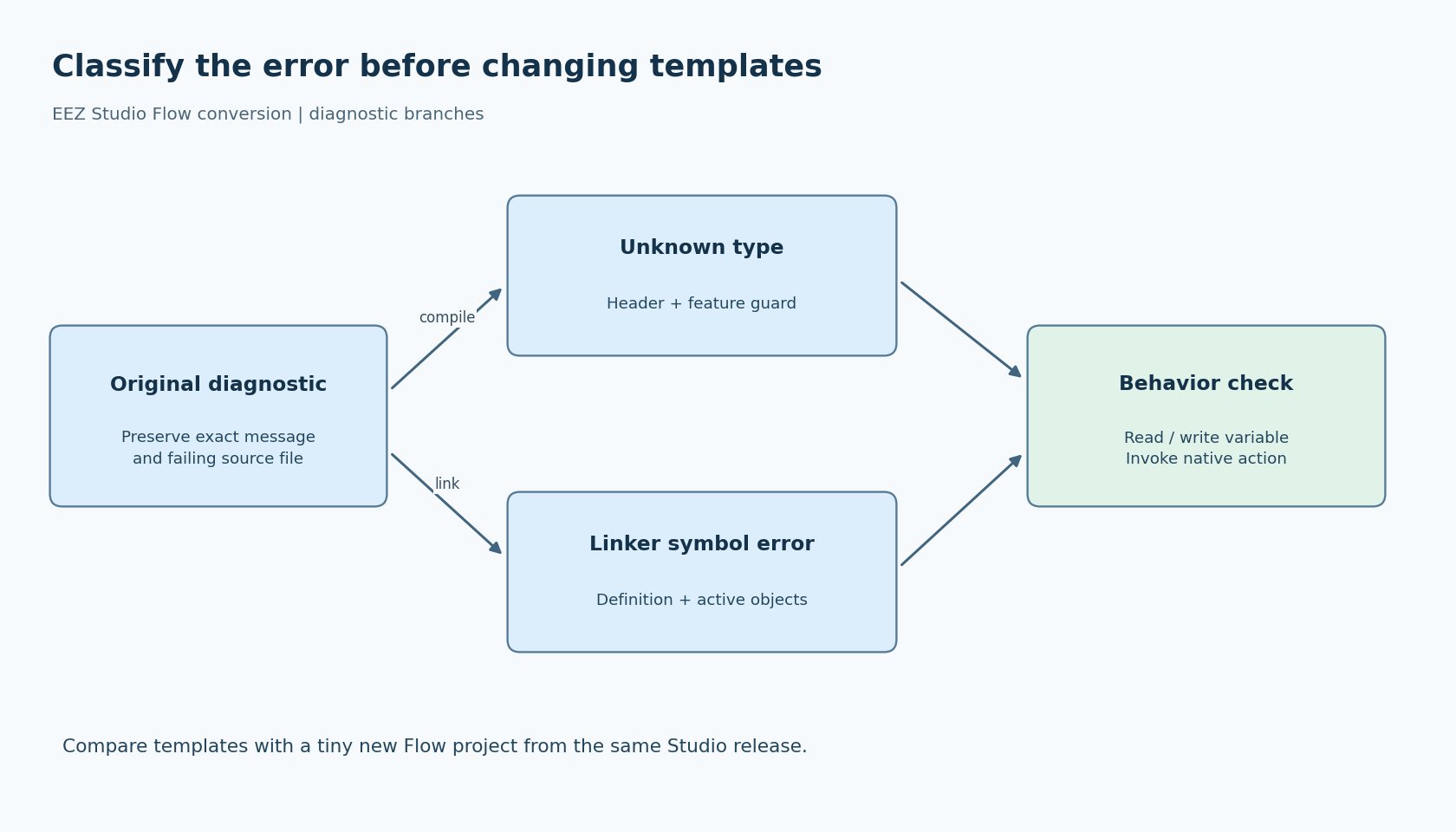
Enabling EEZ Flow on an existing LVGL project can expose a confusing boundary between editor settings, generated files and the native build. An unresolved native_vars symbol points toward a missing definition at link time. An unknown ActionExecFunc type is a compile-time visibility problem. Treating both as “the framework is broken” wastes the information in the diagnostic.
Start by preserving the last working project and its generated output. Then investigate one failing translation unit or symbol at a time. The goal is a coherent Flow-enabled project, not a build that becomes quiet after adding a dummy table or an unrelated typedef.
First classify the failure
For an unknown type, inspect the source file and preprocessed include chain reported by the compiler. Determine which header should declare the type, whether that header is included, and which preprocessor conditions control it.
For an undefined reference, determine which object references the symbol and where its definition should come from. A declaration can make compilation succeed while still leaving nothing for the linker to resolve. Conversely, a source file visible in the IDE's project tree may not be compiled into the selected firmware configuration.
For multiple definitions, look for a mixture of newly generated files and retained output from an older template set. Do not remove whichever file happens to make the error disappear until you know which artifact is authoritative.
These branches lead to different fixes. Keep the original error text with the project revision so a later change can be evaluated against the same failure.
Use the FAQ as a clue, not a filename rule
EEZ's integration FAQ describes older or converted projects missing a flow_def.c file or the LVGL_NATIVE_VARS_TABLE_DEF template section. It recommends comparing the project's templates with those of a newly created Flow project. That is useful historical troubleshooting guidance; it does not mean every version must place the table in a file with that exact name.
The official with-Flow example's generated ui.c illustrates the distinction. In the inspected snapshot, the native-variable table and action table are defined in ui.c. Searching only for flow_def.c would misdiagnose that example. Search for the actual symbol definition and inspect the template that emits it.
Make a tiny reference project using the same installed EEZ Studio version as the project under repair. Select LVGL with Flow, add one native integer variable and one native action, and build it into a separate destination. This reference is a comparison fixture, not a replacement for the production project.
Compare the file templates, generated declarations, emitted definitions and framework-related settings. Keep application-specific edits visible. Blindly pasting all new templates can discard intentional customization or introduce a second implementation of something the application already supplies.
Check the feature guard in the failing build
The EEZ framework LVGL API header places ActionExecFunc inside the EEZ_FOR_LVGL feature guard. The FAQ also calls out this configuration when that type is unknown.
Inspect the effective compiler command for the file that fails. A define set for one library target does not necessarily apply to a neighboring generated-source target. Check the actual include path as well: a stale framework checkout can provide a different header from the one you inspected in an editor.
Record the framework revision, relevant compile definitions and resolved header location together. If a build system configures these through a generated configuration header, inspect the preprocessed result rather than assuming the header was found. Do not add an ad hoc local typedef just to bypass the missing declaration; that can hide a wider feature-configuration mismatch.
This source was read as an unversioned official snapshot. For a product fix, repeat the inspection against the framework revision actually linked into that product.
Follow the table into the final image
Once the generated native-variable table exists, check that its source file is in the active build. If the table references getter and setter functions, verify their declarations match the handwritten implementations and that those implementations are compiled too.
Use your toolchain's symbol browser or link map to answer two concrete questions: which object defines native_vars, and which objects supply the referenced adapters? There should be one intended definition of each. A table filled with null entries merely to satisfy the linker is not evidence that the project's variables are connected.
Next, remove stale build products by using a separate clean build directory. This avoids relying on old objects while preserving the source artifacts needed for diagnosis. Compare the resulting errors with the initial record. If the error moves from a missing table to a missing getter, that is useful progress along the dependency chain, not a reason to revert to dummy symbols.
Finish with a small behavioral proof
Exercise the reference variable through the generated UI. Change its native model value and check that the displayed value updates. Then edit a writable value through the UI and confirm the intended setter receives it. Trigger the native action once and verify one invocation reaches the application.
Finally, regenerate the repaired project and perform the clean build again. A repair that exists only in an exported file will not survive that step. Review the saved project and templates so another developer can reproduce the same definitions.
This procedure is a proposed diagnostic workflow, not a claim that current EEZ conversion always fails or that a particular firmware has been tested. Its acceptance criterion is specific: the selected Flow mode, generated interfaces, compiled framework configuration and linked native adapters form one consistent integration.