EEZ Studio Regeneration: Keep Native Actions Outside Generated File Ownership
A button's native action works on the device. A designer changes its position in EEZ Studio, rebuilds the UI, and the next firmware build loses the action's implementation. The layout change is harmless; the problem is that generated output and handwritten application code share ownership of the same file.
The durable fix starts in the EEZ project, not in the latest exported screens.c. Give generated files a replaceable destination and put native implementations behind the declarations that EEZ generates. Then make regeneration a testable operation instead of a step that depends on remembering which files to rescue.
This workflow applies to EEZ Studio LVGL projects. The generator behavior discussed here was inspected in Studio v0.29.0. The native-action interface is illustrated by EEZ's official no-Flow example; use your own generated headers for the exact declarations.
Find the actual owner of each file
Open Settings, then Build, and inspect both the destination folder and the Files list. The official project settings documentation describes these entries as source-file templates used during generation. A filename such as actions.c does not, by itself, make that file a protected user extension.
The v0.29.0 file generator provides a useful concrete check: generateFile substitutes EEZ section markers in the stored template and writes the resulting content to the output path. That path is produced from the build destination and configured filename. This operation is not a merge with handwritten edits already present in the output file.
For each source file, record one owner:
- EEZ owns the file, so it must be reproducible from the project, templates and assets.
- The application owns the file, so no generated output may target its path.
- A project template contains intentional custom source, so the template itself is the reviewed source of truth.
The third arrangement is legitimate, but it needs a different review habit. Editing the emitted copy is still temporary. Changes belong in the template and must survive a subsequent generation from that template.
Introduce a small native adapter
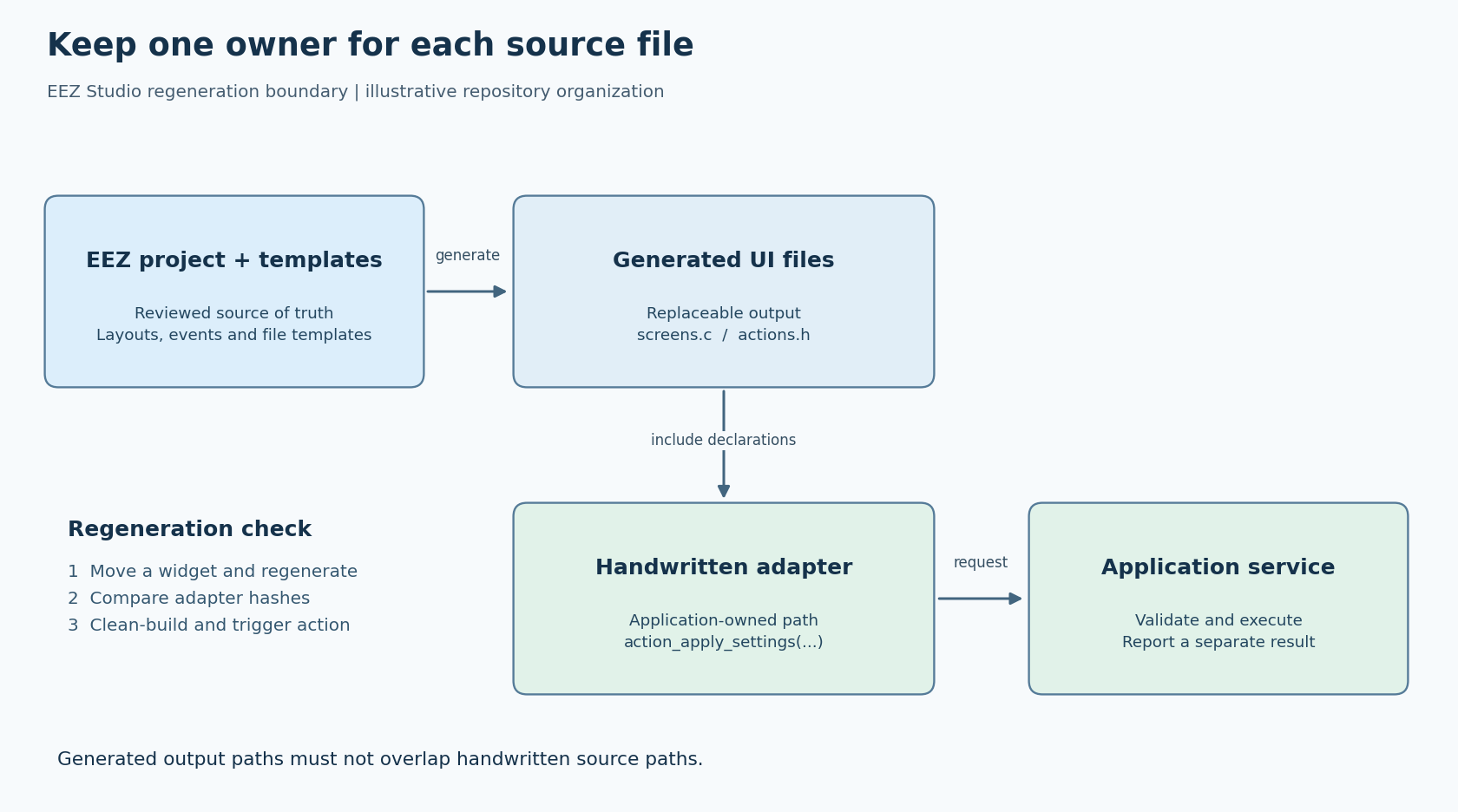
For a project without Flow, EEZ's native-interface example documents user actions declared in generated actions.h, with implementations allowed in an ordinary C file. For an action named apply_settings, the interface follows the form void action_apply_settings(lv_event_t *e).
An illustrative repository layout puts replaceable output in src/ui_generated/, handwritten action functions in src/ui_adapter/actions.c, and device behavior in a separate application module. The adapter includes the generated action header. It translates a UI intent into an application request; it should not become a second copy of the screen construction code.
Include the generated declaration in the implementation translation unit rather than manually reproducing a prototype elsewhere. That gives the compiler a chance to detect incompatible declarations after project edits. Check the build's source list too: the adapter must be compiled exactly once, and an obsolete generated implementation must not provide a competing definition.
Keep the action short. For example, it can validate a proposed setting and submit a command to the existing application service. Waiting synchronously for a slow device operation inside the callback makes the ownership boundary tidy but leaves the UI unresponsive. LVGL's threading guidance also matters when that service runs elsewhere: returning a result does not authorize a worker to modify LVGL objects concurrently.
Prove that a harmless UI edit stays harmless
Use a disposable worktree or a backed-up development copy. Do not start by deleting the live output folder, because it may contain the very handwritten work this audit is meant to find.
- Build the current project and firmware. Record the EEZ version, project revision and actual LVGL version used by the compiler.
- Save a list of application-owned files and their hashes. Keep this evidence outside the generated destination.
- In EEZ Studio, change one visible property that does not change behavior, such as a button's position. Save and build the project.
- Compare the handwritten-file hashes. They should be unchanged. Review the generated diff separately and confirm it contains the intended UI change.
- Build firmware from a clean build directory. Trigger the button and verify that the same application request reaches the same handler.
- Build the unchanged EEZ project a second time. Review any further generated differences rather than assuming identical output is guaranteed by every tool or asset converter.
A hash match proves that the tracked adapter bytes survived. It does not prove that the adapter is still linked or that the button still calls it. That is why the test includes both a clean link and an observable action result.
Make interface changes deliberately visible
Next, make a controlled action rename in the disposable project. Regenerate and inspect actions.h. Update the adapter to the new declaration and verify the event still targets the intended action. Search the source tree and link map for the old symbol so an unused implementation cannot quietly accumulate.
This is a different test from moving a button. A layout-only change should preserve the native interface; an intentional interface change should produce a small, reviewable adapter change. Do not require every rename to fail at link time: unused functions, source-list mistakes and different linkage arrangements can hide obsolete code.
If a team wants to keep implementations in EEZ file templates, repeat both tests with the template as the editable artifact. Include the template change in code review, regenerate, and confirm the emitted function matches it. Choose that arrangement explicitly rather than drifting between template edits and output edits.
Use a release gate that catches ownership drift
Before accepting a UI change, require the saved project, relevant assets, template modifications and regenerated output to agree. Confirm that each native action has one intended implementation and that generated paths do not overlap handwritten paths. Re-run one representative action on the target or a native integration harness.
These are proposed integration checks, not reported test results. Their value is narrow and practical: a future designer can rebuild the UI without needing private knowledge of edits hidden in exported files. The generated code remains replaceable, while the application logic has a stable place to evolve.