A Filesystem Image Copied to Larger Media: Distinguish Physical Capacity from Usable Layout
Copying an existing filesystem image to a larger device preserves the image’s logical layout. Extra physical bytes become usable only when every intervening boundary permits them: driver addressing, region ownership, filesystem geometry, and application policy. Diagnose the first unchanged boundary before attempting a resize.
The concrete filesystem example is littlefs v2.11.2 with unchanged logical block size. This is a capacity-migration decision method, not a universal in-place resize recipe. It does not authorize formatting existing media or assume that a raw NAND chip image can be copied between devices without accounting for their separate mappings and bad-block handling.
1. Draw the complete capacity map
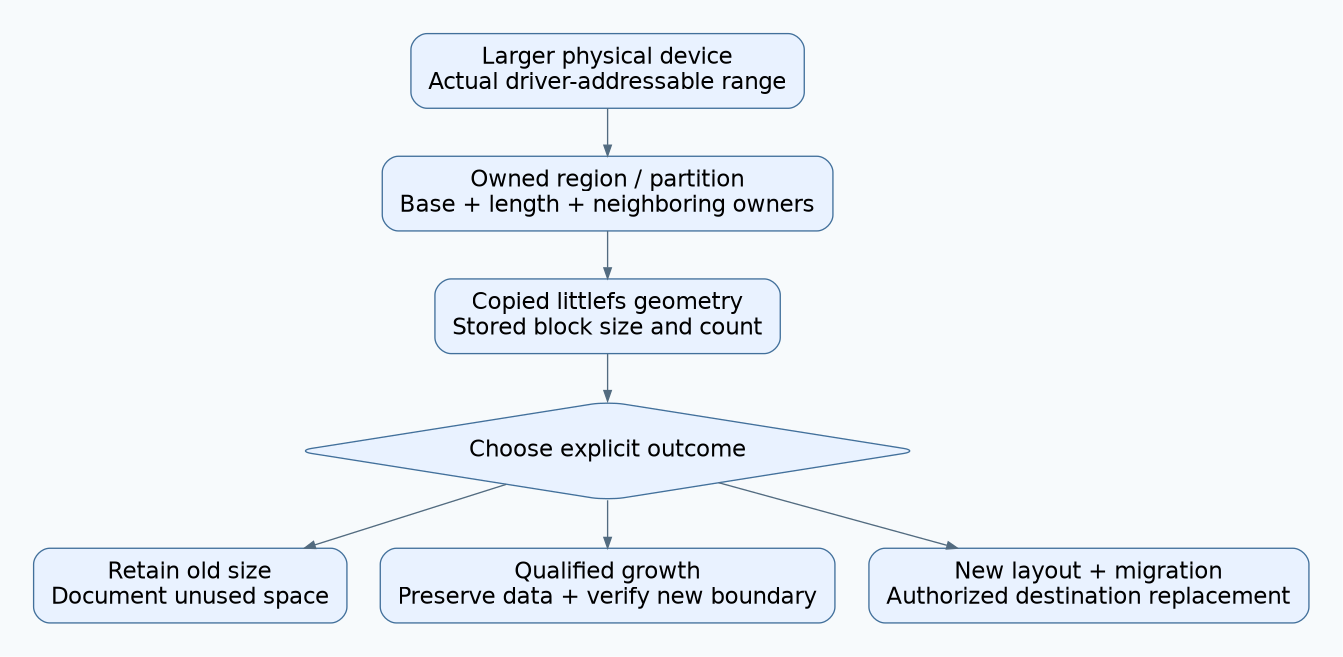
Record each layer in bytes and, where applicable, blocks. Keep the physical part’s identity and addressable range separate from the partition or region assigned to this filesystem. A larger part can still be intentionally partitioned exactly like the smaller one.
| Layer | Evidence | Possible reason extra capacity is unavailable |
|---|---|---|
| Physical device. | Exact part and supported driver addressing. | The driver still exposes the old range. |
| Owned storage region. | Base, length, alignment and neighboring owners. | The filesystem partition was never enlarged. |
| Filesystem geometry. | Stored block size/count and deployed configuration. | The copied image still describes its original capacity. |
| Reported usage. | API, units and whether the field means total or allocated blocks. | The display interprets an allocation count as capacity. |
| Application admission. | Quotas, reserved space and fixed record limits. | A product-level cap remains unchanged. |
Identify the first mismatch between expected and observed capacity. Do not change all layers simultaneously; that makes a successful result difficult to explain and a failure harder to recover from.
2. Read the existing littlefs geometry
The v2.11.2 API provides lfs_fs_stat() with filesystem block size and count. In contrast, lfs_fs_size() reports a best-effort allocated-block count. They answer different questions; subtracting or displaying them without understanding their contract can create a false capacity diagnosis.
The configuration’s block_count value of zero means use the count stored on disk. It does not mean scan the entire chip and automatically grow the filesystem. In the mount implementation, an explicit nonzero configured count must match the stored count, and stored block size must match the configuration.
Therefore changing a nonzero count from the old size to the new size before mounting an unchanged image can produce a compatibility error rather than expansion. An error at that point is not permission to format. Preserve the image and compare the exact stored and configured values.
3. Choose among three explicit outcomes
- Keep the old filesystem size: useful when replacement availability, rather than capacity growth, motivated the larger part. Document the unused range and keep other owners away from it.
- Use a supported growth operation: appropriate only after the underlying region and driver can safely support the new count and all required readers are compatible.
- Build a new layout and migrate data: appropriate when geometry, ownership or compatibility prevents the desired in-place change. Preserve and validate the source before any authorized replacement.
The littlefs growth API updates the filesystem’s superblock count. It does not enlarge a partition, discover physical capacity or move neighboring data. The implementation’s limited optional shrinking behavior is outside this article; do not treat a growth plan as a reversible shrink plan.
Before selecting growth, prove that every newly admitted block maps to the intended device region. Check the first and last new block and the exclusive end boundary. Arithmetic must use overflow-safe types and the actual base address, not just total chip capacity.
4. Preserve data and plan failure recovery
Capture a usable backup or image according to the storage stack’s supported acquisition method. Verify that files can be read and that application-critical values have the expected identity and meaning. A backup file existing somewhere is not enough if its restore procedure has never been checked.
Conduct the first growth or rebuild on a disposable copy. Record the original geometry, requested new geometry, tool/library build and exact operation result. Growth changes persistent metadata. If it fails or is interrupted, classify the resulting state before retrying; do not assume the in-memory object and on-media state remain identical.
A rebuild may discard the destination region, so it requires an explicit data-preservation condition and authorization covering that exact target. Keep source preservation, destination creation and application-data import as separate stages. No destructive commands are provided here.
5. Qualify every reader that can return
Include the bootloader, recovery image, maintenance tool and permitted rollback firmware in the compatibility matrix. A newer application can understand the expanded filesystem while an older recovery build still insists on the old nonzero block count.
For each reader, record its block-size/count configuration and the physical range its callbacks permit. Test whether it can mount and inspect an expanded copy without writing outside its permitted ownership. Do not discover this incompatibility only after a field rollback.
Update factory programming and replacement procedures too. If manufacturing continues to install the old image, decide whether expansion is an explicit provisioning stage or whether the old capacity is intentional. Keep that policy visible rather than relying on an undocumented first-boot side effect.
6. Use a capacity-boundary acceptance fixture
Prepare known files and hashes in a small disposable image. Acquire baseline filesystem statistics, copy it through the supported workflow, and confirm the unchanged image initially reports its stored capacity. Then perform only the selected authorized migration path.
Afterward, remount using a fresh runtime instance, verify the intended geometry, reread all preserved files, and allocate enough synthetic data to exercise blocks beyond the old boundary. Check neighboring-region sentinels and all supported readers. A changed capacity field without successful new-range use is incomplete evidence.
Also inject an operation failure and an interruption in a suitable test environment. Require a documented recovery result and truthful migration status. These are proposed tests; no littlefs growth, format, image migration or target operation was executed for this article.
Hypothetical unchanged capacity
A copied image contains 512 blocks of 4,096 bytes, or 2 MiB. Its replacement region is 8 MiB, enough for 2,048 such blocks. Mounting with a zero configured count still adopts the stored 512-block count; the extra region does not become available automatically.
The team first verifies the 8 MiB ownership boundary and driver mapping. It then qualifies an explicit growth path on a copy and checks older recovery firmware. The final capacity decision is supported by geometry, preserved-data verification and new-boundary tests, rather than the larger capacity printed on the flash package.