LVGL Hit Testing: Make Irregular and Transparent Controls Match Their Visible Shape
Define an interactive shape explicitly, then reject points that are inside the object’s rectangular click area but outside that shape. A transparent corner or hole is a rendering property; it should not be assumed to make the corresponding input region transparent. Verify target selection separately from the pixels you draw.
Applicability: the source boundary is LVGL v9.3.0. The worked example uses an untransformed, clickable base-object leaf with custom ring artwork, normalized display coordinates and no clickable descendants. It does not use an image widget’s specialized hit-test behavior. Hardware calibration, display rotation and touch accuracy are outside this procedure. The geometry and input tests below are proposed, not executed.
1. Specify the shape and its boundary rule
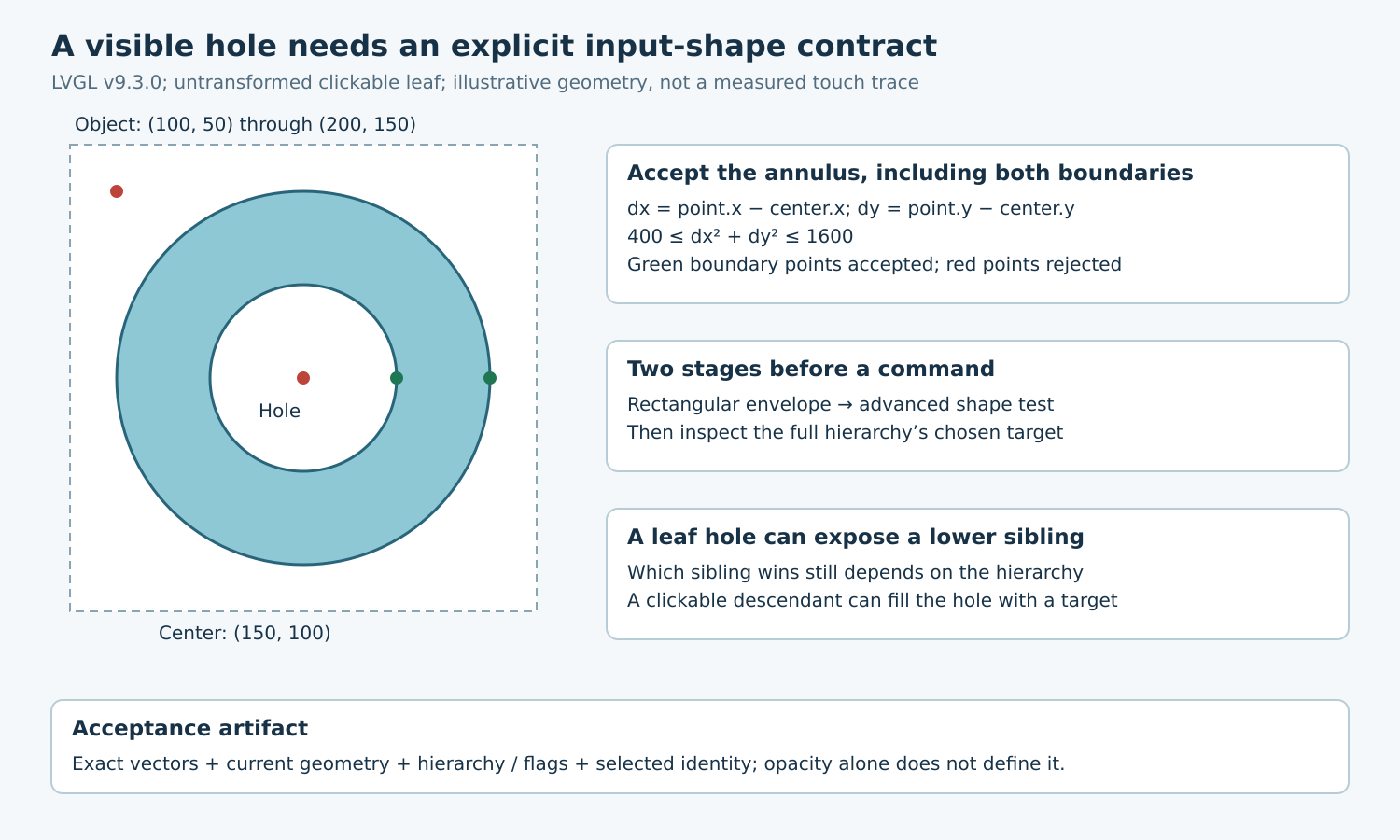
For a hypothetical ring-shaped control, choose an object rectangle from (100, 50) through (200, 150), inclusive. Its center is (150, 100), outer interactive radius is 40 pixels and inner excluded radius is 20 pixels. These are illustrative interface dimensions, not recommended minimum touch-target sizes.
Let dx and dy be the point’s displacement from that center. Accept the point when 20² ≤ dx² + dy² ≤ 40². The boundary circles are included by this product policy; the central disk strictly inside radius 20 is excluded. Squared distances avoid a square root, but the implementation still needs a sufficiently wide signed intermediate type before subtraction and multiplication.
Keep the hit shape in the same model as the artwork. If visual dimensions change, update the interactive geometry in the same UI-owned operation. Otherwise a newly enlarged ring can display one shape while retaining yesterday’s input region. Decide whether antialiased edge pixels are interactive; matching every fractional alpha value is rarely a clear product requirement.
2. Respect the rectangular admission gate
The pinned lv_obj_hit_test implementation first rejects non-clickable objects and points outside the object’s click area. Only a surviving point reaches LV_EVENT_HIT_TEST when LV_OBJ_FLAG_ADV_HITTEST is enabled. The initial result is true. An advanced callback can narrow that admitted region; it cannot accept a point that was rejected before the callback ran.
Register a callback specifically for the hit-test event and obtain its information through lv_event_get_hit_test_info. Evaluate the supplied point and write the result according to the shape contract. Do not change layouts, create objects, issue business commands or retain the temporary information pointer from this query. Target selection should be a predictable read of existing geometry.
If the desired touch region extends beyond the object rectangle, review the extended click area deliberately. It changes the preliminary envelope, not the meaning of the custom shape. Keep parent clipping and search eligibility in the analysis: enlarging a child’s click envelope does not guarantee that the input search will visit that child from every surrounding point.
3. Keep coordinates in one space
For the untransformed fixture, compare the supplied point with the current object coordinates, not a hard-coded assumption that every event point starts at local (0, 0). Subtract the current object origin if the shape is defined in local coordinates. Complete pending layout before collecting the fixture’s final coordinates.
The input search implementation applies inverse object transformations during traversal. Therefore adding rotation or scaling creates a new applicability case. Do not blindly apply a second inverse transform in the hit callback. Inspect the exact transform path and test asymmetric reference points before extending the simple fixture to transformed controls.
Moving the example object ten pixels right should move every acceptance vector ten pixels right. Resizing requires a separate policy: retain fixed radii, scale them with the object, or reject unsupported dimensions. A stale center can pass one screenshot inspection while failing as soon as responsive layout changes the control’s position.
4. Treat transparent input as a hierarchy question
In v9.3.0, the input search rejects hidden subtrees, searches eligible children in reverse child order, and prefers a matching child before returning the current object. The object flags distinguish hidden, clickable and advanced-hit-test behavior. Changing visual opacity alone is not a substitute for the intended flag and shape policy.
Place a second clickable sibling behind the ring in the proposed fixture. At the center hole, the front leaf should reject the point and the search can continue to a lower eligible sibling. Assert the actual selected identity. A rejected ring does not promise that a particular background control wins: other overlays, clipping or a non-clickable background can change the outcome.
A parent rejecting its own shape does not universally reject its children. The search can still inspect children when the point lies in the parent’s traversal region. Keep the ring a leaf for the first test. If the production control contains a clickable label in its hole, test that descendant explicitly or change the hierarchy so the label cannot accidentally refill the hole with an input target.
5. Use exact edge and overlap vectors
| Display point | Squared distance | Ring result |
|---|---|---|
| (150, 100) | 0 | Reject central hole |
| (169, 100) | 361 | Reject just inside inner boundary |
| (170, 100) | 400 | Accept inner boundary |
| (190, 100) | 1600 | Accept outer boundary |
| (191, 100) | 1681 | Reject outside ring |
| (110, 60) | 3200 | Reject rectangular corner |
First test the membership calculation independently. Then test the object’s hit query, and finally inject complete press/release sequences through the input device to check selected targets and commands. A directly sent click bypasses hit testing and cannot validate a transparent hole.
Repeat after moving the object, changing the drawing geometry, hiding it, disabling clickability and changing sibling order. Include parent-edge points and the deliberately added clickable-descendant case. Keep direct geometric-query results distinct from full input-search results; they exercise different gates.
6. Preserve a reviewable interaction artifact
Record the exact object rectangle, shape parameters, boundary inclusivity, hierarchy, flags, transform settings and expected target for every vector. A visual overlay showing accepted and rejected points is useful, but the numeric table makes the result reproducible. Pass the control when shape membership and final target identity agree with the product policy across those changes, not merely when one center tap works.