LVGL Spinboxes for Engineering Units: Keep Display Digits and Numeric Range Consistent
Choose the integer unit first, then derive the spinbox range, displayed decimal position and editable digit steps from that same unit. A decimal point changes presentation; it does not convert the stored value. Verify sign crossings and rollover explicitly before treating the widget as an engineering setpoint editor.
Applicability: this article is pinned to LVGL v9.3.0 with spinbox and textarea support enabled. It covers the integer-value APIs and controlled increment/decrement paths, not arbitrary free-text insertion or floating-point protocol decoding. The temperature editor is hypothetical; no LVGL application or physical process was tested.
1. Write a fixed-point contract
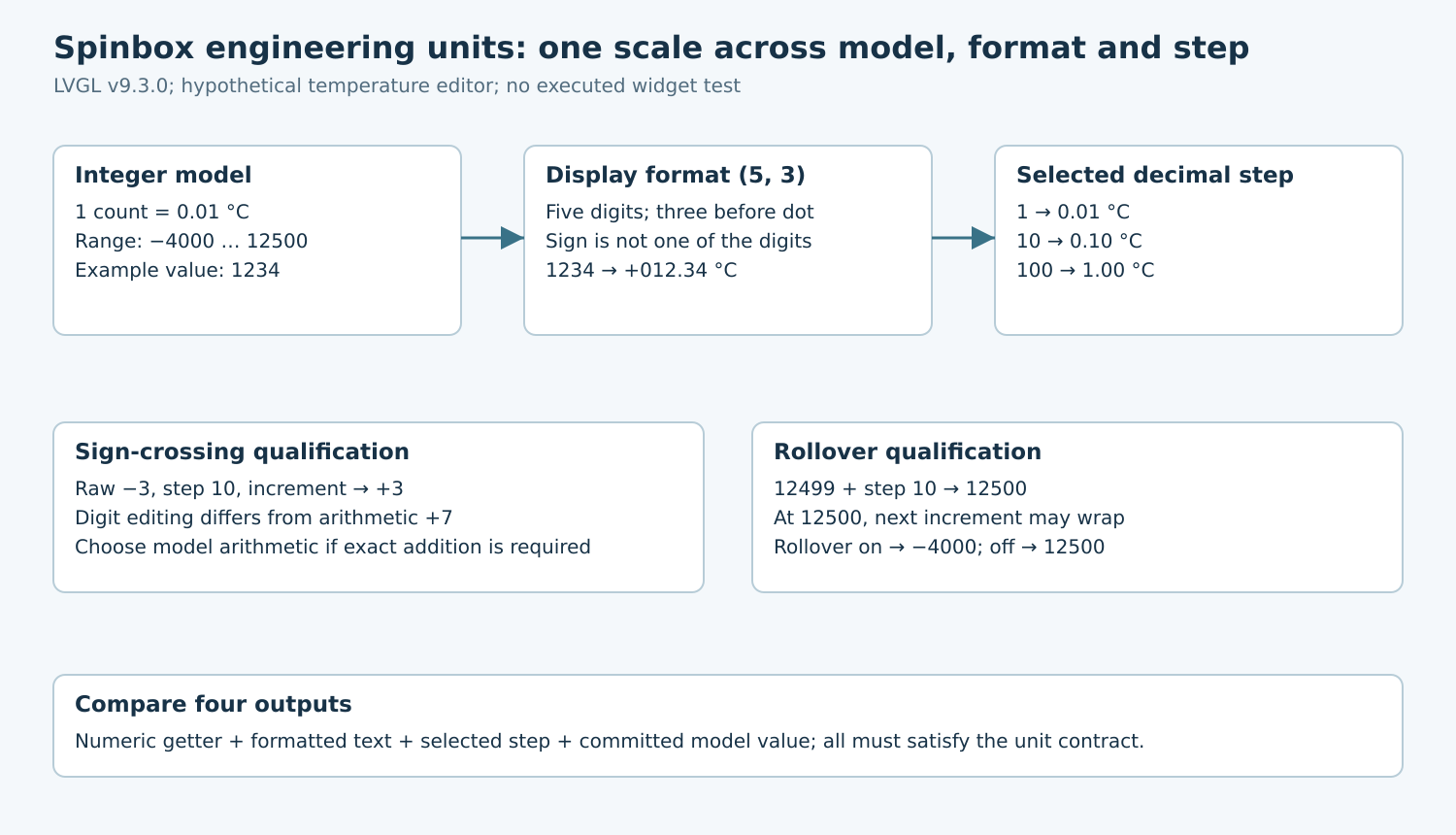
Suppose a product permits a temperature setting from −40.00 to +125.00 degrees Celsius in hundredths of a degree. Define one stored count as 0.01 degree. The integer model range is therefore −4000 through 12500, and a stored value of 1234 represents 12.34 degrees.
Record that scale in the model interface and persistence format. Avoid passing an unlabeled integer called temperature between layers: one subsystem may interpret 1234 as degrees while another interprets it as hundredths. A typed wrapper or unit-bearing field name makes code review much easier.
Decide how external values with finer precision enter the model. Round, truncate or reject according to a documented policy, including negative inputs and ties. Validate before narrowing to the integer type. This conversion belongs at the application boundary, not in a guess based on how many characters the widget displays.
2. Derive the visible format
The v9.3.0 spinbox header defines digit count without the sign or decimal separator, and separator position as the number of digits before the decimal point. For five digits and separator position three, there are two fractional digits. A separator position of zero suppresses the decimal point.
For this example, configure five digits with the separator after three. Expected displays include −040.00, +000.00, +012.34 and +125.00. The sign is a separate character; do not count it as one of the five numeric positions. Keep the unit label adjacent to the editor rather than inserting a suffix into its numeric storage.
The versioned spinbox guide describes the integer value, range, step and format APIs. Read the value through the numeric getter when applying a setting. Parsing the formatted text again adds a second conversion path that can disagree about leading zeros, signs or decimal placement.
3. Configure a valid state throughout initialization
For a new widget whose initial zero value fits the proposed format, set the digit format, the validated integer range, the rollover policy, the selected step and finally the desired value. Check that minimum is no greater than maximum and that every permitted magnitude fits the chosen numeric positions before making these calls.
Do not depend on a setter sequence to repair an internally inconsistent configuration. The tagged implementation clamps values against its range, while digit-format changes can restrict range bounds. A later range change can again establish bounds incompatible with the display width. Validate the complete tuple in application code.
Reformatting an existing widget needs more care than startup. Plan intermediate values and ranges so each update remains representable, or rebuild the editor from a validated snapshot. Test reducing digit count while the current value is large; a visually plausible final state does not establish that every intermediate update was valid.
4. Distinguish digit editing from arithmetic addition
Choose steps from the supported decimal digit powers: 1, 10, 100 and so on. With this scale they correspond to 0.01, 0.10 and 1.00 degree. Cursor position zero selects the least-significant digit. Use the step getter in diagnostics to verify that the visible selection matches the intended engineering increment.
There is a significant sign-crossing detail in v9.3.0: incrementing raw −3 with step 10 yields +3, rather than arithmetic +7. Decrementing +3 with step 10 yields −3. The implementation deliberately preserves digit-oriented behavior around zero. In this editor those transitions are −0.03 to +0.03 and the reverse.
If the product requires every button press to add exactly 0.10 degree, that behavior is a mismatch. Perform validated arithmetic in the model and set the resulting value, or choose a different interaction. Do not advertise a constant physical increment while delegating it to digit-editing semantics that have a different sign-crossing rule.
5. Make endpoint behavior a product decision
Set rollover explicitly even when the default matches the requirement. For a bounded process setting, saturation is often easier to explain than wrapping from the highest value to the lowest, but that remains a product decision. Cyclic quantities can have different expectations.
In the pinned implementation, an overshooting increment first saturates at maximum; enabled rollover applies when incrementing from maximum itself. The analogous rule applies at minimum. Therefore test both approach-to-endpoint and already-at-endpoint operations, rather than checking a single boundary screenshot.
| Proposed raw-value fixture | Expected outcome |
|---|---|
| Set 1234 with format (5, 3) | Numeric 1234; display +012.34 |
| −3, increment step 10 | +3 under digit-editing semantics |
| 12499, increment step 10 | 12500, even with rollover enabled |
| 12500, increment with rollover off | 12500 |
| 12500, increment with rollover on | −4000 |
| −4000, decrement with rollover on | 12500 |
6. Validate the editor-to-model round trip
For each vector, record numeric getter result, displayed text, selected step, rollover state and committed model value. Add positive and negative zero-adjacent cases, exact endpoints, out-of-range programmatic values and every permitted digit selection. Test after restoring a saved setting as well as after manual editing.
Exercise touch selection, dedicated increment buttons and the supported keyboard or encoder path separately. An input method can change the selected digit, so a test that calls increment directly does not validate the whole operator workflow. Keep any hold-to-repeat policy separate from the numeric-step policy and inspect the final command values.
Finally reject inconsistent configuration at the application boundary: invalid range order, insufficient digits, unsupported step and overflow-prone conversions. The release artifact should be a unit/format worksheet plus boundary vectors that prove the displayed quantity and committed integer mean the same thing. A correct-looking decimal point is only one part of that contract.