Discovering 6 GHz Access Points: Separate Discovery Support from Association Support
A client can support the radio and security mode needed for a 6 GHz connection yet fail to discover that AP through the scan path its product actually uses. Investigate the chain from discovery advertisement, through scan selection and on-channel observation, to a fresh BSS result. Only then evaluate association. A missing list entry is not enough to blame either credentials or the 6 GHz radio.
This guide uses Linux 6.12 cfg80211/nl80211 and hostapd 2.11 discovery configuration. It does not require Wi-Fi 7 or MLO; 6 GHz operation and those features are different capabilities. The actual channel set and operating mode must already be permitted for the deployment jurisdiction and approved hardware. This is not a country-code or power-limit workaround.
Inventory the discovery mechanisms separately
| Mechanism | Evidence to collect | Remaining question |
|---|---|---|
| Reduced Neighbor Report on another band | Received RNR describing the intended 6 GHz AP | Did the client use the hint and observe that AP? |
| Preferred Scanning Channel coverage | Requested and actually visited PSC channels | Was the AP on one of those covered channels? |
| In-band FILS Discovery | AP transmission and client reception/processing | Did it produce usable discovery state? |
| Unsolicited broadcast Probe Response | Actual in-band response and fresh BSS result | Does the profile subsequently associate? |
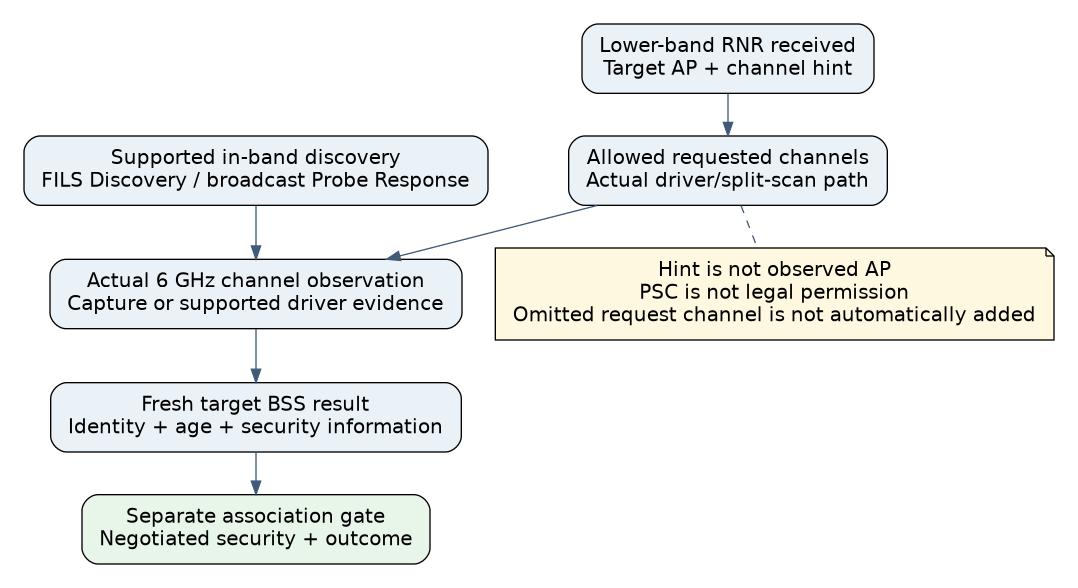
Linux 6.12’s NL80211_SCAN_FLAG_COLOCATED_6GHZ describes using RNR information received from 2.4/5 GHz APs to focus 6 GHz scanning. The requested channel set still matters. This flag is not a promise to find every 6 GHz AP regardless of what was advertised, what was scanned or what the driver supports. Linux 6.12 colocated-AP scan flag
Preferred Scanning Channels are a discovery classification, not a separate radio band or a guarantee of permission to transmit. The pinned cfg80211 helper identifies PSCs from the 6 GHz channel number. An AP on a non-PSC channel is not therefore unsupported; it needs an applicable discovery path and lawful scan behavior. Linux 6.12 cfg80211_channel_is_psc()
Inspect the split-scan implementation before generalizing
The Linux 6.12 WIPHY_FLAG_SPLIT_SCAN_6GHZ capability enables separate legacy-band and 6 GHz scan stages. In the corresponding cfg80211_scan_6ghz() path, discovered colocated information contributes channel and AP parameters. Entries on disabled channels or outside the original requested channel set are excluded. The implementation also applies SSID and BSSID matching where requested. Linux 6.12 cfg80211_scan_6ghz()
Do not describe this as the behavior of every FullMAC firmware scan. Establish whether the target uses this split path, handles discovery internally or exposes only a vendor summary. Preserve the effective request flags, initial channel set and completion status. A channel omitted by the caller cannot be assumed to appear later simply because a neighbor report mentions it.
The source contains a further optimization: in a directed single-SSID case, matching colocated information indicating the whole ESS is colocated can suppress the additional PSC sweep. Consequently, “PSC channels are always scanned” is too broad even for this pinned path. Record the relevant advertisement and request instead of inferring coverage from the channel category alone.
Verify AP advertisement, not just its settings page
Hostapd 2.11 exposes unsol_bcast_probe_resp_interval for 6 GHz in-band discovery and FILS Discovery interval settings for the supported HE configuration. Their documented defaults leave those transmissions disabled. The settings require matching driver support and a valid AP operating configuration; setting a value is not evidence that a frame was transmitted. hostapd 2.11 discovery configuration
FILS Discovery frames are discovery evidence. Do not confuse their name with proof that a particular FILS authentication exchange occurred. Likewise, an RNR entry is a report about another AP, not proof that the client has already visited that AP’s channel or completed authentication.
Use an authorized capture point capable of observing the relevant bands, or equivalent supported AP/client diagnostics. A 2.4 GHz-only monitor cannot establish absence of a 6 GHz transmission. Match the advertised target identity and channel with the AP’s current configuration, particularly after channel changes or AP replacement.
Run an advertised-versus-found matrix
- Establish capability and legal scope. Record client hardware, firmware, kernel, driver and manager versions, plus the approved AP band/channel/security configuration. If 6 GHz operation is unavailable for that product or location, stop this discovery experiment rather than trying another country code.
- Start from known scan state. Distinguish cold discovery from a cached BSS or saved directed profile. Use supported cache handling or record entry age. Do not erase credentials merely to make the scan list empty.
- Test the intended out-of-band path. Verify that the client receives the lower-band advertisement containing the target’s RNR information, then inspect whether the effective 6 GHz scan visits the referenced permitted channel and yields a fresh result.
- Test the supported in-band path. With a valid AP configuration and suitable observation tools, establish which FILS Discovery or unsolicited Probe Response behavior actually occurs. Record client processing and BSS-result delivery independently.
- Compare PSC and non-PSC coverage where supported. Use only mutually supported lawful configurations. Keep security and application behavior fixed, and record the changed scan plan. Do not assume that a broad scan performs active probes on every channel.
- Attempt association only after classifying discovery. Record selected BSS, security negotiation and failure stage. A visible AP rejected for security compatibility is a different result from an unvisited discovery channel.
Include a standalone 6 GHz AP case if the product must support it. An integration that works only after receiving a colocated lower-band hint should not claim equivalent standalone discovery without evidence. Repeat after the AP changes its operating channel so stale hints cannot satisfy the test.
Interpret a hypothetical missing result
Suppose an AP’s lower-band RNR points to a permitted non-PSC channel, but the product submits a scan request restricted to a different set. The target remains absent while another client finds it. The pinned split-scan filtering explains a concrete hypothesis: the hint did not expand the caller’s allowed request set. Confirm the effective request before changing security profiles or reporting missing radio support.
No scan, association or RF capture was executed for this article. The implementation paths were inspected. Release evidence should identify the supported discovery mechanisms, cold/cached behavior, actual channel coverage and separate association results. That defines which 6 GHz networks the product can find without claiming that a capability label guarantees discovery in every installation.