NUCLEO-WBA55CG USB: Trace the ST-LINK Bridge Before Designing the Product Data Path
A NUCLEO-WBA55CG can exchange application bytes with a computer through its USB-C connector. That demonstration does not mean the WBA55 application is running a USB device stack. On this board, the USB connection belongs to the embedded ST-LINK, which can bridge traffic to a WBA serial peripheral.
The distinction becomes important when a product removes the development board's debugger. The application may still transmit the same UART bytes, but the component that presented them as a computer COM port has disappeared.
Follow the connector through both processors
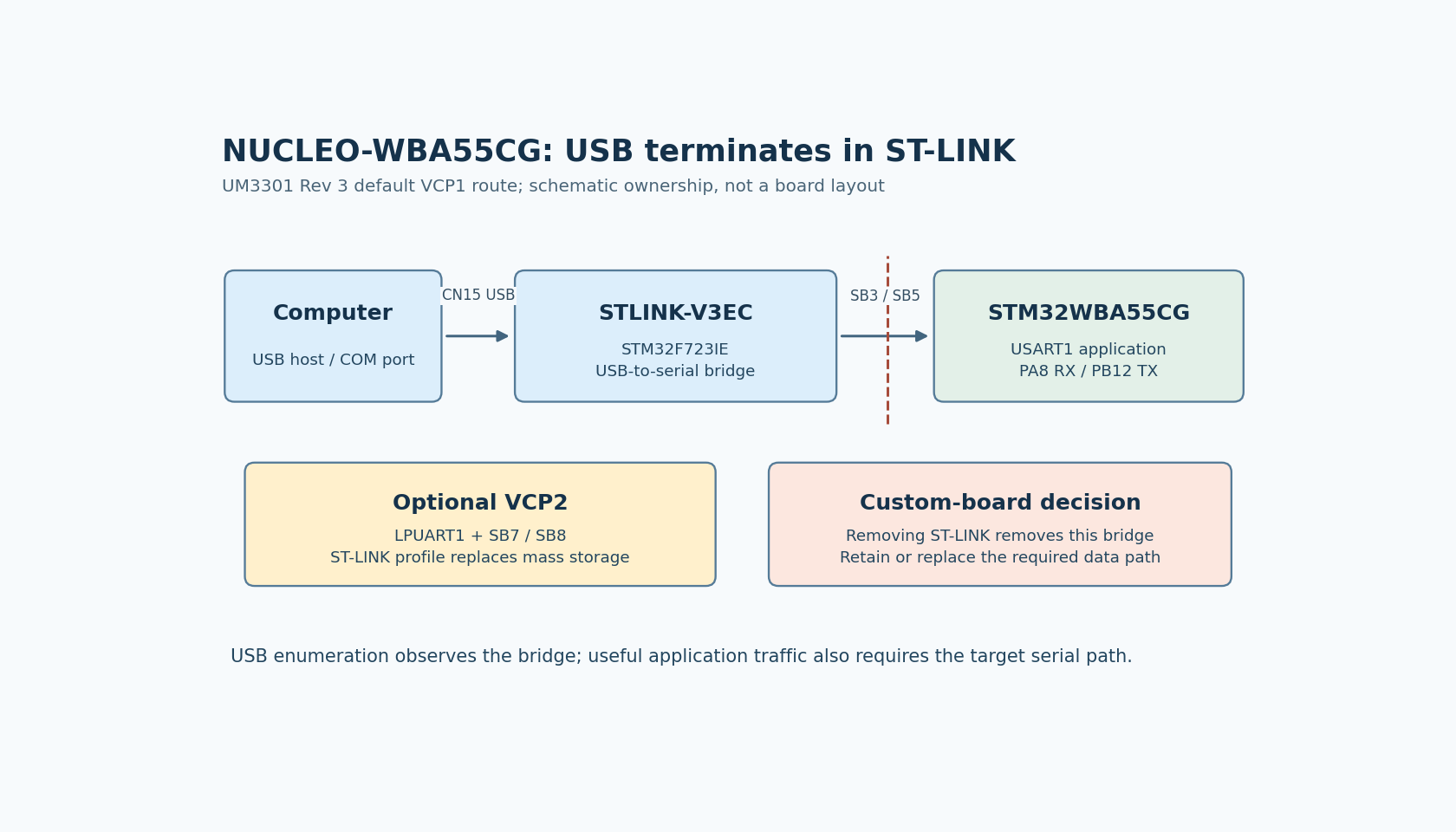
In UM3301 Rev 3, sections 7.4.3 and 7.4.4, connector CN15 provides USB access to STLINK-V3EC. Its data signals are STLK_USB_N and STLK_USB_P. The default virtual COM port, VCP1, then connects the ST-LINK processor, an STM32F723IE, to the WBA55's USART1.
The default serial route is specific. WBA PA8 is USART1 RX and receives the ST-LINK transmit signal. WBA PB12 is USART1 TX and drives the ST-LINK receive signal. Solder bridges SB3 and SB5 allow this serial connection to be disconnected. These references belong to the documented board assembly; preserve the board revision when recording them.
The WBA5 datasheet, DS14127 Rev 10, provides the complementary silicon view. Its WBA55 communication interfaces do not include a native USB peripheral. The USB capability visible on this Nucleo therefore cannot be assigned to WBA55 merely because application data reaches a USB cable. This conclusion is specific to WBA55, not every member of the wider WBA series.
A second COM port is another bridge configuration
UM3301 section 7.4.5 describes VCP2 through LPUART1. It is disconnected from the WBA by default. The documented setup requires SB7 and SB8 on MB1801 to be ON and a ST-LINK firmware configuration that replaces its mass-storage interface with the second virtual COM port.
This means two apparently reasonable changes solve different problems. Enabling LPUART1 in the WBA application cannot create the missing host-side VCP2 interface. Updating the debugger's USB personality cannot connect serial signals across open solder bridges. Both the physical path and the bridge firmware configuration must match.
Treat the second port as a board-level integration choice rather than a separate WBA USB endpoint. Record which ST-LINK interfaces are expected after the change, including the replacement of mass storage. A test script that previously depended on that interface may need its own adjustment.
Diagnose the boundary where the observation changes
A useful bring-up sequence separates host enumeration, serial routing and application behavior:
- Identify which USB device and interfaces the host enumerates. This observes the ST-LINK side of the connection, not whether the WBA application initialized its UART correctly.
- Check the documented bridge configuration and the actual board's solder-bridge state. Do this before changing application USB descriptors that the WBA55 does not own.
- Configure the WBA USART or LPUART and verify traffic at that serial boundary. Resolve baud rate, framing and pin routing there.
- Confirm that the intended application protocol survives the bridge in both directions. A COM port that opens successfully is not evidence that commands reach the WBA parser.
These stages also explain an otherwise confusing symptom: the computer may continue to see a debugger-mediated COM port while the target application is held in reset or has failed before UART initialization. Enumeration and useful application traffic are different observations. That is an architectural consequence of the two-processor route, not a report of a board test performed here.
Preserve the required product function
When moving off the Nucleo, name the host-facing requirement explicitly. If the product needs a serial service connection, a suitable external bridge may preserve that architecture. If it requires a native USB class implemented by the main application processor, device selection must include that capability. If USB was only supplying power during the demonstration, there may be no application data requirement at all.
Draw the production path with every conversion component included. Omitting ST-LINK from the bill of materials also removes its USB-to-serial service unless a replacement provides it. Conversely, keeping a USB-shaped connector does not replace that service.
No soldering, firmware upgrade or electrical test was performed for this analysis. The actionable result is the ownership map: CN15 USB belongs to ST-LINK; VCP traffic crosses a serial link to WBA55; the custom product must deliberately retain or replace the bridge function it needs.