EEZ Studio ExecuteCommand: Separate the Executable from Its Argument Array
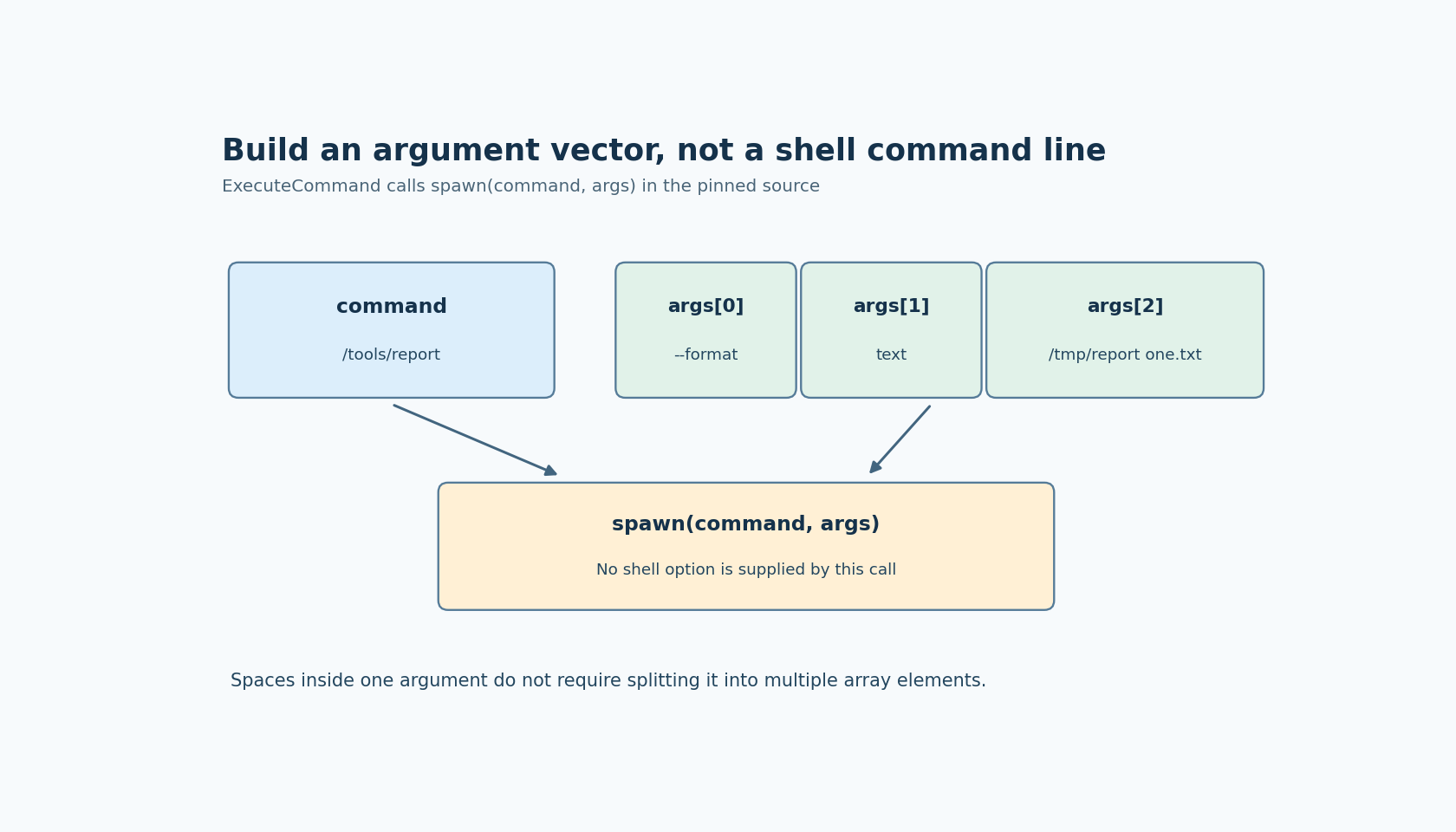
A command copied from a terminal is not necessarily valid input for EEZ Studio ExecuteCommand. The Dashboard action has a command field and an argument array. In the inspected implementation, those become separate inputs to Node's spawn function; they are not combined into a shell command line.
The ExecuteCommand guide describes the action. The pinned execute-command.tsx implementation validates a string command and an array of string arguments, then calls spawn with those two values. It supplies no shell option.
The code scope is EEZ Studio v0.29.0 editor commit 3000161d09d40a5c1dc2477ddc30b38037b3a612. The current Node spawn documentation explains the command/args interface and documents shell as false by default. That reference does not identify the exact Node version bundled with an arbitrary EEZ installation.
Preserve argument boundaries
Suppose a harmless local reporting tool accepts a format flag and an output path. The executable belongs in command. The format flag, its value and the output path belong in distinct array elements according to the tool's documented interface.
A path containing spaces should remain one argument element. Do not split it into several array items merely because the same path needed quotes in an interactive shell. Conversely, do not wrap the entire executable-plus-options string in quotes and put it into command, expecting spawn to discover the executable name and parse the rest.
The important artifact is the argument vector received by the child. A terminal screenshot showing a visually similar line can conceal a different vector because a shell interprets quoting and expansion before starting the program.
Shell syntax does not appear automatically
A pipe character, redirection operator or wildcard in an argument is not evidence that a shell pipeline, file redirection or glob expansion will occur. The inspected action calls spawn directly without enabling its shell option.
If the executable itself interprets a particular character, that is the executable's behavior. Keep that separate from shell interpretation. A tool may treat a leading dash as an option, for example, even though no shell is involved.
Do not solve an argument-layout problem by adding an explicit shell unless the application genuinely requires one and its security and quoting contract has been reviewed. Explicitly choosing a shell is a different execution design, not a harmless formatting fix. This article's fixture does not require it.
Direct spawning is also not a sandbox. The selected executable can read files, contact services or perform other consequential work within its permissions. Restrict the executable and accepted arguments to the application's intended operations rather than accepting arbitrary command strings from an untrusted source.
Inspect argv with a harmless child
Use an existing local diagnostic executable whose only purpose is to print its received arguments. Supply one simple token, one path containing spaces, and one literal wildcard or pipe character as separately chosen argument values.
Compare the child-reported elements with the intended elements. Numbering them makes a split or extra quoting character visible. Perform this before substituting a real export, flashing or device-control utility; those tools can create side effects while the argument contract is still wrong.
Repeat using the actual operating system and installed EEZ build. Executable lookup, script launching and platform-specific quoting rules deserve their own verification. Do not infer cross-platform equivalence from one successful Unix test, or assume a Windows command script is launched identically to a native executable.
Keep launch and result handling separate
The action exposes process output and completion mechanisms, but correcting argv does not establish that the requested operation succeeded. Observe the child tool's documented result, including its exit outcome and any required output artifact, rather than treating successful process creation as task completion.
No process was launched for this article. The source-level conclusion is practical: construct ExecuteCommand as an executable plus a deliberate string array. Verify the received argument boundaries first, then evaluate the tool's own success contract. This removes shell assumptions from a component that does not enable a shell in the inspected invocation.