EEZ Studio FileWrite and FileAppend: Put a UTF-8 BOM at the Start Only
A Dashboard export that requires a UTF-8 byte-order mark should add it when creating the file, not repeatedly when appending records. EEZ Studio's FileWrite and FileAppend actions make that distinction especially important because their inspected encoding options are not identical.
The official FileWrite guide and FileAppend guide describe the two operations. The implementation examined here is file.tsx at editor commit 3000161d09d40a5c1dc2477ddc30b38037b3a612, corresponding to the inspected EEZ Studio v0.29.0 source.
The proposed workflow below is limited to string content in a new disposable file. It is not an instruction to overwrite an existing production export, and it does not establish crash-safe log storage.
FileWrite has an explicit utf8-bom branch
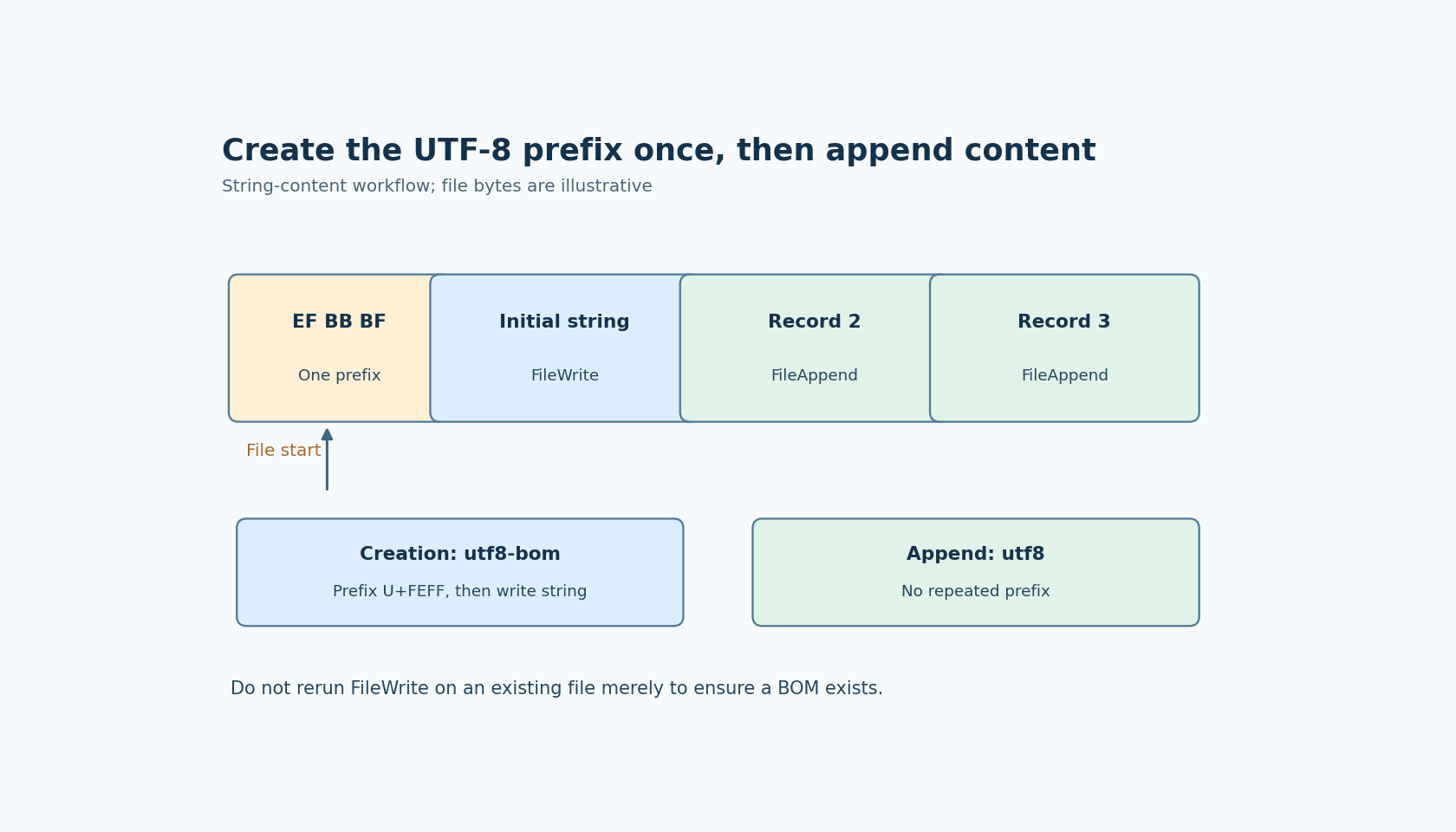
In the pinned FileWrite implementation, the special encoding value utf8-bom changes the effective encoding to utf8 and prefixes the content with U+FEFF. The action then writes the resulting content through fs.promises.writeFile.
That is an explicit content transformation, not a general promise that a filesystem or consumer detects the intended encoding automatically. For UTF-8 output, the prefix appears as the familiar three bytes EF BB BF at the beginning of the file.
Use this branch only with the content form you have verified. The example here uses a string. Do not extend its behavior to arbitrary blobs or application objects merely because other file-action paths can accept different content representations.
FileAppend does not accept the same special value
The pinned FileAppend action checks its encoding against an allowlist that includes utf8 and utf-8 but not utf8-bom. Its official documentation likewise lists ordinary UTF-8 among the accepted encodings without the special BOM option.
After validation, FileAppend calls fs.promises.appendFile. Therefore a straightforward string workflow is to create the intended new file with FileWrite using utf8-bom, then append subsequent string records using utf8. Passing utf8-bom to FileAppend is not a supported way to request “preserve the existing BOM” in this inspected implementation.
Nor should the application manually prefix every appended record with U+FEFF. A BOM belongs to the beginning of this file representation. Repeating that prefix at record boundaries inserts additional characters or bytes into the content, which a consumer may treat differently from the initial signature.
The behavior of a particular spreadsheet or text editor is a separate compatibility question. Do not advertise a BOM as a universal import fix. Some receiving formats prefer no BOM, and the application should follow the actual consumer's documented contract.
Creation and append are different lifecycle decisions
Decide whether the requested path is a new export, an existing log that may be continued, or an existing file that must not be changed. The correct encoding does not authorize the wrong lifecycle operation.
For a new file, write the prefix and initial content once. For an existing file, first establish whether it has the expected encoding and format before appending. Re-running FileWrite merely to “ensure the BOM exists” can replace content; it is not an idempotent header check.
A restart deserves an explicit rule too. If the Dashboard resumes appending to an existing file, it should not assume that the creation step must run again. Conversely, an append operation that creates a missing file will not magically acquire the special FileWrite BOM transformation when its encoding is ordinary utf8.
Keep file ownership clear if more than one operation can append. The inspected action does not define an application-wide record-ordering policy. Encoding choices alone cannot prevent two independent writers from producing an unexpected sequence of records.
Inspect the bytes, then test the consumer
Create a temporary file with a short initial string and two appended strings. Include a non-ASCII character so an accidental assumption that all text is single-byte is easier to notice. Inspect the resulting bytes and confirm one leading EF BB BF sequence, followed by the expected UTF-8 content.
Also inspect a negative fixture that deliberately attempts utf8-bom through FileAppend. Route the expected unsupported-encoding outcome through the component's supported error handling rather than treating the absence of a normal continuation as proof of successful append.
Finally, open a copy in the actual receiving application and verify the intended records and first field. A file can have the expected prefix while still containing wrong delimiters, missing line separators or invalid application data. Those are different acceptance checks and should not be hidden behind an “encoding fixed” label.
No file-action execution or receiving-application test was performed for this article. The source establishes the useful boundary: the special BOM transformation belongs to FileWrite, while later FileAppend operations use a supported ordinary encoding. Preserve that distinction through file creation, restart and append handling instead of treating the two encoding fields as interchangeable.