Zephyr OS West Manifests: Freeze Dependencies Without Mistaking Them for Workspace State
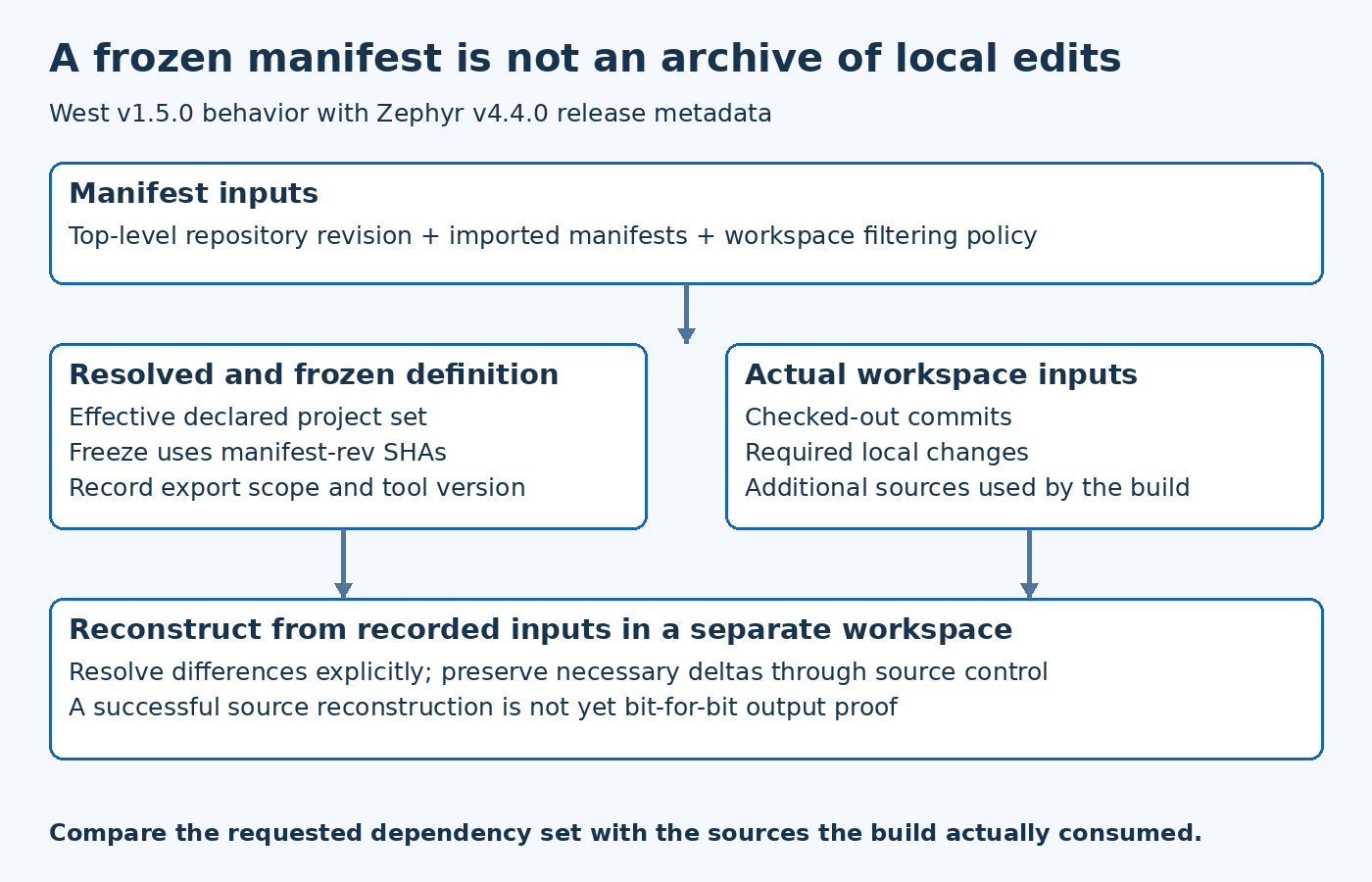
A frozen west manifest is useful release evidence, but it is not a complete snapshot of every local edit used to build firmware. Separate the resolved dependency definition from the actual checked-out workspace before claiming that another engineer can reproduce a Zephyr build.
This article checks west v1.5.0 implementation and a Zephyr v4.4.0 manifest as concrete references. West is a separately versioned tool; the presence of a Zephyr release tag does not establish the installed west version. The workflow below has not been executed against a product workspace.
Identify the manifest repository and imported inputs
Record which repository owns the top-level manifest and which revision of that repository is being used. Then identify whether it imports additional manifests. Reading only the top-level YAML can omit projects introduced by those imports.
The Zephyr v4.4.0 west manifest is an example of release-associated project metadata. A product may wrap or replace that structure, so inspect the actual product manifest rather than assuming upstream Zephyr alone describes every dependency.
Keep the manifest repository's identity in the release record separately from the project revisions it declares. The file that describes the dependency set is itself part of the evidence, and it can change independently of an application repository.
Resolve before interpreting the project list
Use the installed tool's supported manifest inspection commands to examine the effective project set after imports. Save the result with the tool version and relevant workspace configuration. This exposes decisions that are difficult to see by scanning several YAML files manually.
Do not assume that every repository directory visible in the workspace belongs to the resolved active project set. A developer may retain an old checkout, use a local extra repository or exclude groups for a particular build. Record which sources the build actually consumes.
When two project definitions interact through imports or overrides, inspect the resolved result before editing a guessed dependency version. A change in the wrong source manifest can leave the effective project unchanged while making the repository harder to understand.
Understand what freezing uses in the checked version
The west v1.5.0 project command implementation documents freeze as resolving project revisions to SHAs based on manifest-rev branches. This is an important boundary: those references represent the manifest update state, not an automatic archive of every working-tree change.
A developer can check out another commit or modify files after updating the workspace. Freezing the manifest must not be described as capturing those edits unless separate evidence establishes how they are included.
The west v1.5.0 manifest implementation provides the corresponding version-pinned serialization reference. Verify the installed version's behavior if the product uses another west release; do not extrapolate exact command options indefinitely.
Compare actual checkouts with the dependency record
For each relevant project, record the checked-out commit and whether local changes exist. Review deviations from the manifest-defined revision deliberately. A development patch can be necessary for the firmware while remaining absent from the frozen dependency description.
A hypothetical workspace might build successfully with a local driver correction, then produce a frozen manifest that still identifies the original dependency commit. Another engineer can reproduce the declared workspace yet miss the correction. The gap is the unrecorded delta, not a mysterious difference in compiler behavior.
Preserve required product changes through the project's normal source-management process. A patch record or maintained commit can provide an auditable input; an unexplained dirty tree cannot. Do not discard local work merely to make the workspace look clean before recording what was used.
Make filtering choices visible
Record which projects or groups are active for the build and whether a manifest export deliberately limits itself to active projects. An intentionally reduced dependency set can be useful, but the release record should state its scope.
Do not silently change workspace filtering just to make an inspection command succeed. Understand the installed tool's limitations and choose an export that accurately describes the intended build inputs. A smaller file is not automatically a more complete release description.
Also distinguish dependencies that are fetched from dependencies that are compiled. A workspace can contain projects that the selected board or configuration does not use. The source inventory and the final firmware component inventory answer related but different questions.
Check recovery from the recorded inputs
Create a separate controlled workspace using the retained manifest evidence and authorized source locations. Apply only the documented product changes, then inspect the resulting project revisions before building. Record any missing repository, inaccessible revision or undeclared local input.
This exercise tests whether the source description is sufficient. It does not by itself prove bit-for-bit output reproducibility, which also depends on toolchains, configuration and other build inputs. State the observed result at the appropriate level.
If a repository can no longer serve a pinned commit, retain that as an availability gap and resolve it through the project's source-preservation process. Changing the commit merely to make checkout succeed would change the release being reconstructed.
Keep the release evidence layered
A useful record includes the manifest repository revision, resolved or frozen project definitions, actual checkout identities, required local deltas and tool versions. Attach the build configuration and artifact identifiers needed to connect those inputs to the firmware under test.
The essential distinction is between what the manifest requests and what the workspace actually supplied. West helps make the requested dependency set explicit. Comparing it with real checkout state closes the gap that a frozen manifest alone can leave, particularly in a product workspace with imports and ongoing local development.