Zephyr OS Modules: Trace Missing Kconfig and CMake Integration from module.yml
Checking out a repository does not automatically integrate its code into a Zephyr firmware build. When a library or driver appears on disk but its options or source files remain absent, trace module discovery and build integration separately. The repository's presence is only the first piece of evidence.
This article uses Zephyr 4.4.0 tagged documentation and source. It proposes a diagnostic path for an external component, without claiming that a particular third-party module has been built or approved for a product.
Separate a west project from a Zephyr module
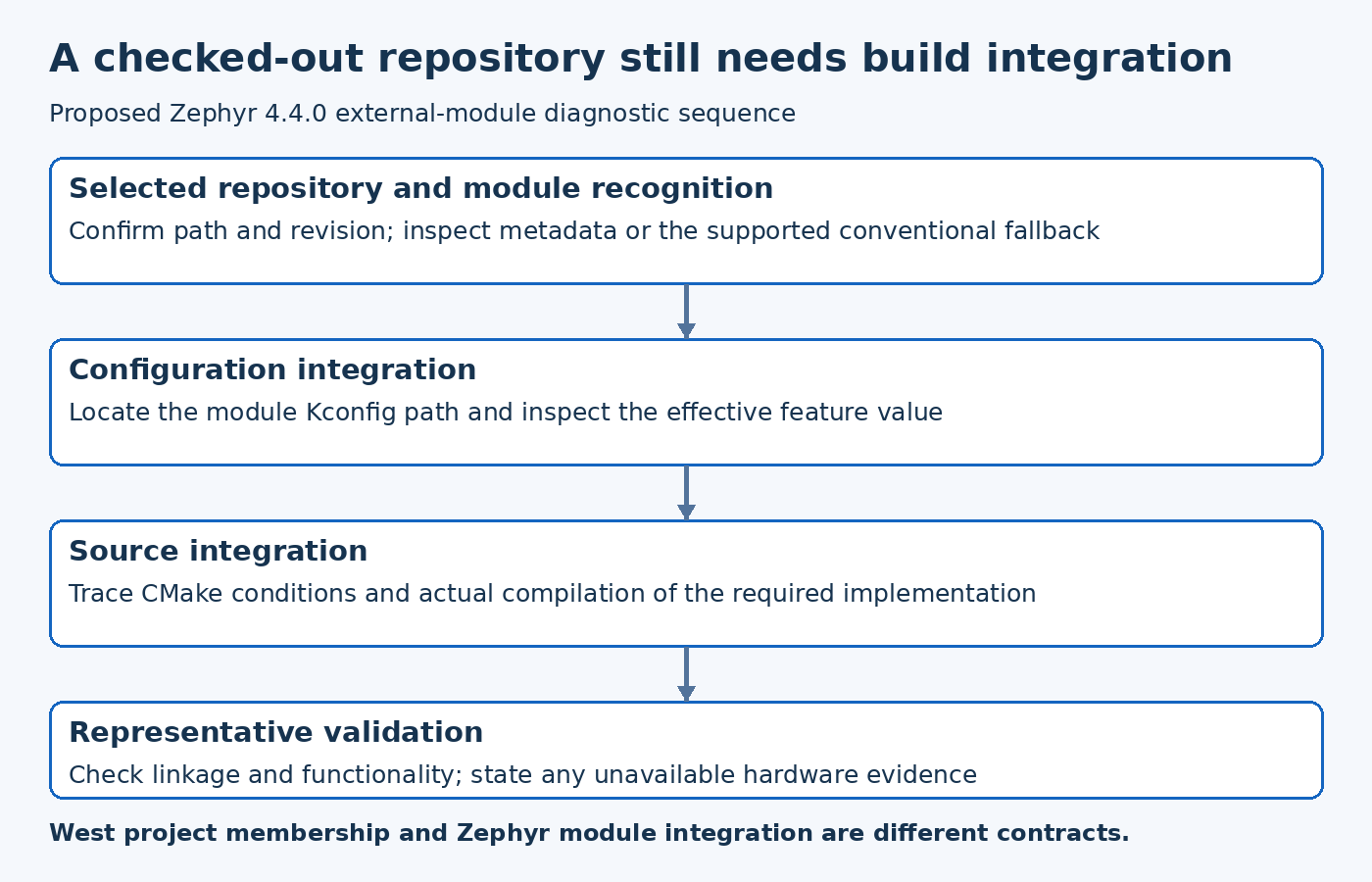
A west project describes a repository managed in a workspace. A Zephyr module provides integration that the build system can consume. Some repositories are tools or other support projects and are not intended to become part of the firmware.
The version-pinned Zephyr module guide makes this distinction explicit. Start by deciding whether the missing component is supposed to be discovered as a module, added directly by the application or used only as a host tool.
This avoids a common wrong turn: changing manifest revisions when the real omission is build integration. Fetching a newer checkout cannot repair a missing integration contract unless that newer revision actually supplies the required metadata and build files.
Establish which repository path the build considered
Record the component's actual path and revision, then inspect how the build obtains its module list. A custom module path, a workspace selection or an explicit configuration can affect which repositories are considered.
Do not assume that a similarly named directory is the one selected. A developer may have a local checkout alongside a workspace-managed copy. If the build uses one while the editor changes the other, both Kconfig and source changes can appear ineffective.
Keep discovery evidence with the build configuration. If a fresh configuration is used during diagnosis, compare the selected module paths before and after the change rather than concluding only that cleaning the build fixed it.
Inspect metadata and the supported fallback
The Zephyr 4.4.0 module-processing script accepts valid module metadata and also includes a fallback for a repository containing both the conventional Zephyr CMake and Kconfig files. Therefore, absence of module.yml alone is not sufficient proof that a repository cannot be discovered in this release.
For metadata-based integration, check the actual file, its syntax and the paths it declares. Inspect validation errors rather than copying a metadata file from another component and changing only its name.
If the integration uses the conventional fallback, verify both required files and their contents. A file that exists but does not include the intended driver or configuration still leaves the feature absent. Discovery and meaningful integration remain separate checks.
Trace Kconfig and CMake independently
A component can expose configuration options while failing to add the expected sources to the build. It can also compile support code without presenting the option the application author expects. Review the Kconfig inclusion path and CMake inclusion path as two related contracts.
For a hypothetical driver module, identify the symbol controlling the driver and the build condition that adds its source file. Confirm the symbol's effective value and whether the source was actually compiled. Do not infer compilation solely because the option appears in a menu.
Conversely, a compiled source file does not prove that every optional feature in the module is enabled. Follow the relevant conditions for the function the product needs, and distinguish an integration failure from an intentionally disabled feature.
Check paths relative to the integration contract
Review metadata path meanings and the component's directory layout against the pinned release's tooling. Moving a CMake file or configuration file can break integration even when the code itself is unchanged.
Inspect generated integration output or configuration logs to see which files were selected. This is more reliable than assuming an absolute path from a previous developer's machine will remain meaningful in CI.
A maintainable module should not depend on an undocumented neighboring checkout or a hard-coded personal directory. If external files are required, record them as explicit build inputs through the supported mechanism rather than relying on a workspace accident.
Verify the source revision and API compatibility
Once discovery and build inclusion are correct, check whether the module revision matches the Zephyr APIs and toolchain used by the product. A newly visible compiler error can be progress: the build may now be reaching code that was previously omitted.
Do not hide that incompatibility by disabling the source file again while leaving the feature advertised as available. Identify the required integration change or supported version combination and preserve the evidence.
The appropriate validation depends on the component. A pure utility library may need focused unit tests, while a hardware driver also needs device-specific checks. A successful link establishes neither complete runtime compatibility nor the correctness of every optional integration path.
Exercise a small representative configuration
Create a bounded test that enables the intended module feature and calls or otherwise references the relevant functionality. Confirm discovery, effective configuration, source compilation and linkage in that order. Record what was actually checked.
Include a negative case where an optional feature is disabled, if the module claims to support that configuration. This can reveal unconditional source dependencies or missing guards that a fully enabled development build hides.
When the component depends on proprietary hardware or unavailable equipment, state the runtime limit clearly. Build integration can be verified without pretending that hardware behavior was exercised.
Keep the integration record useful
Retain the selected repository revision, module metadata or fallback mechanism, Kconfig path, CMake path and representative validation result. Explain any product-specific adaptation so a future update does not remove it unknowingly.
The core diagnostic sequence is repository selection, module recognition, configuration inclusion, source inclusion and functional verification. Each stage has its own evidence. Following that sequence makes an invisible external component a tractable integration problem instead of a reason to repeatedly clone repositories or enable unrelated options.