EEZ Studio Native Actions: Test Studio Run and Target Firmware as Separate Paths
A Native action in an EEZ Studio Flow project can appear to work in the editor even when the device-side implementation has not been exercised. The reason is a documented feature: EEZ lets a Native action also have a Flow implementation, and that implementation is used when running the project with the editor's Run button.
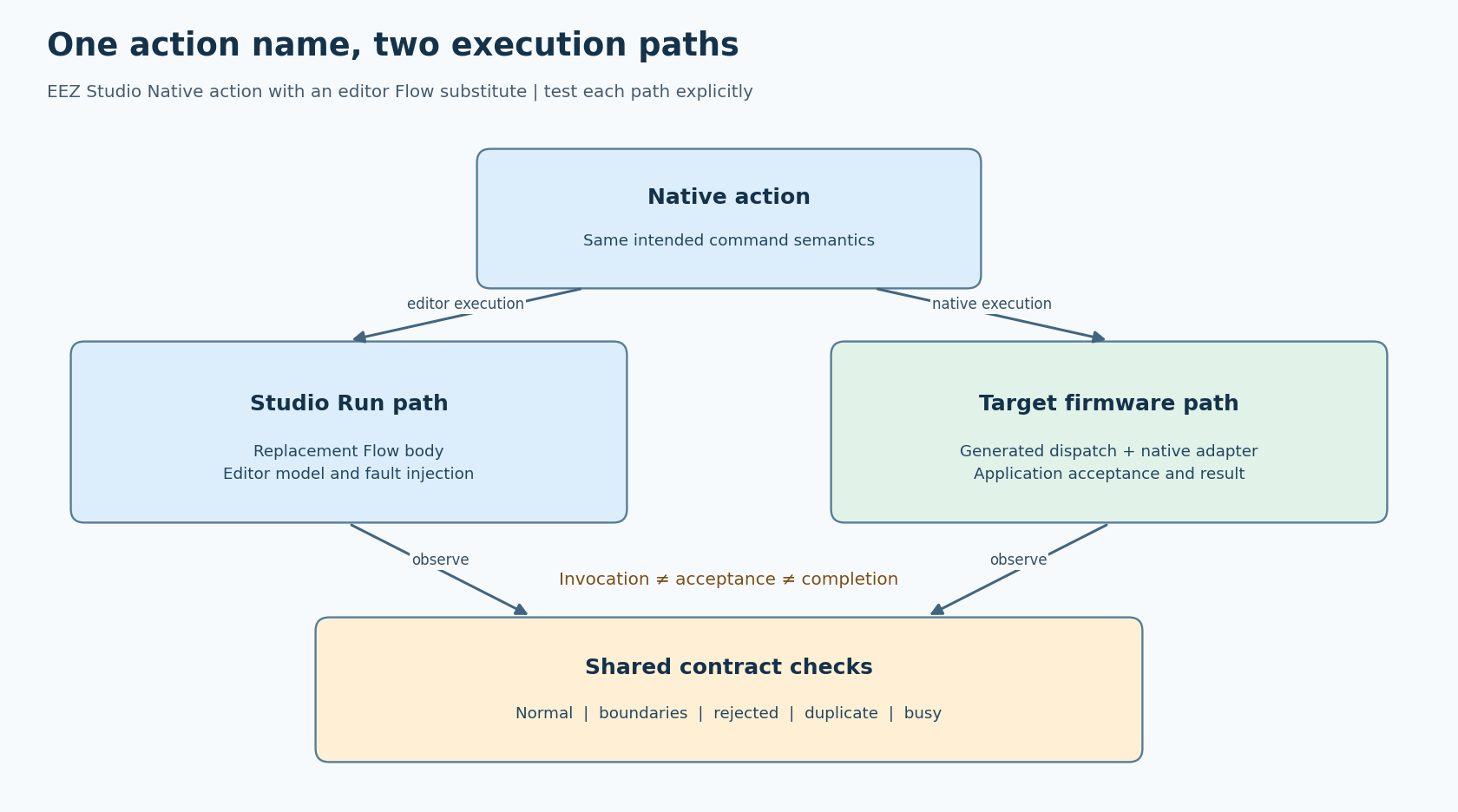
That makes a useful prototype. It also creates two execution paths that need a shared behavioral contract. Treat the editor path as an intentional substitute and test the target path separately, rather than treating a successful preview as evidence that a C or C++ function is correctly linked and connected.
The distinction below follows EEZ's official native-interface example. The review baseline is EEZ Studio 0.29.0; generated declarations and your selected framework revision remain authoritative for a particular firmware build.
Identify what the Run button is exercising
Open the action in the project and inspect its Implementation type. In the official LVGL-with-Flow example, the type is set to Native while a Flow body can still be supplied for the editor. On the target, the corresponding implementation is a C or C++ action whose declaration appears in generated actions.h.
Write down the two routes before testing. For example, a hypothetical apply_setpoint action might increment an editor counter in its Flow body, while the target native action validates a requested value and queues a controller command. Both can make a green status label appear, but they have not necessarily performed the same operation.
This article concerns that documented substitute-Flow path. It does not assume every EEZ simulation feature uses the same execution arrangement. If your development setup uses another simulator or custom integration, identify the code it actually runs.
Define one command contract, with separate observations
Choose a simple action with a meaningful outcome. Suppose the application accepts a setpoint in integer engineering units. Define the valid range, the behavior for an out-of-range request, and what a second request means while the first is pending. Use values appropriate to your product; a demonstration range is not a device specification.
Distinguish at least three observations:
- The UI action was invoked.
- The application accepted or rejected the request.
- The operation completed, failed, or remains pending.
These are separate states even when a fast editor surrogate makes them appear instantaneous. A label that changes at invocation time should not be named “applied” if the device has not confirmed application.
Create a small set of cases: a normal value, both range boundaries, one invalid value, a duplicate request and a request while busy. Record the expected state transitions for each case. The same table drives both paths, although the observation mechanisms can differ.
The editor substitute can model acceptance and rejection using Flow variables and branches. The native path should report the application's real decision. Neither path should silently normalize an invalid input unless normalization is part of the agreed contract.
Trace the native path before testing its behavior
Generate the project, then inspect the declaration for the selected action in actions.h. Check the function's exact name and signature against the handwritten implementation. Include that header in the implementation file so mismatches can be diagnosed during compilation.
Inspect the generated dispatch or event handling that references the action. Do not attach a second handwritten callback merely to make the test pass: that could bypass the connection you are trying to verify or invoke the operation twice. The test should enter through the same widget event and generated route as the product.
Next, verify the build inputs. EEZ's integration FAQ states that Flow integration requires C++ compilation and the EEZ framework. It also describes initializing and ticking the generated UI. Confirm the project's selected setup rather than inferring correctness from the presence of generated files on disk.
For a test build, add an invocation counter or breakpoint at the native action entry and another observation at application acceptance. A linker map can establish which object provides the symbol. These checks localize a failure: no native entry suggests routing or linkage; native entry without acceptance suggests validation or service handoff.
Run the same cases through both routes
Begin with deterministic state. Reset the editor model and target application model to the same relevant values. Record which implementation is active in the test log, so an editor trace cannot later be mistaken for a hardware trace.
Exercise each case through the UI, not by calling the business function directly. Check the action invocation count and final application state. For a rejected request, verify that the previous accepted value remains unchanged and that the UI reports rejection. For a duplicate, verify the defined policy rather than assuming either repetition or suppression is universally correct.
Then make the surrogate deliberately less forgiving. Model a pending interval and a failure result. Confirm that controls and status text respond correctly while completion is delayed. This is a proposed fault-injection technique; it does not simulate a particular driver's timing or prove a maximum response time.
On the target, repeat the pending and failure cases using a controlled application test seam or safe device fixture. Avoid triggering an irreversible physical operation merely to prove that a callback is connected. A recorded command request can establish routing before a separate hardware test establishes the physical result.
Keep asynchronous results inside the UI ownership model
If the native action hands work to another thread, the eventual result must return through the application's synchronization design. It must not race screen deletion or write LVGL objects from an unrelated execution context.
LVGL's 9.4 threading documentation describes a gateway-thread arrangement in which one thread owns ordinary LVGL operations and other workers pass data to it. Apply the same ownership discipline to your generated UI integration. The visual editor does not remove the target firmware's concurrency obligations.
Accept the integration when both routes implement the stated command semantics, and the native route has independent evidence of correct dispatch, acceptance and completion handling. Keep the limits visible: these proposed checks do not establish hardware performance or electrical behavior. They establish something more specific than “the preview works”: the editor substitute and the linked native implementation agree on what the action means.