LVGL Style Selectors: Resolve Conflicting State and Part Rules Systematically
Resolve an unexpected style one property, part, and current state at a time. First discard selectors that cannot match, then compare state precedence and equal-state ordering. Inspect local styles and active transitions separately. Reordering every style or adding another default-state override often hides the real conflict without changing the winning rule.
Applicability: this procedure pins LVGL v9.3.0 source and the LVGL 9.3 style documentation. The border-width fixture is hypothetical and has not been executed. Vendor forks, other releases, custom drawing, and renderer effects need their own checks.
1. Name the property and rendered part
Begin with a precise observation such as “the knob border is wider while the slider is focused and pressed.” Identify the widget, property, part, current state bits, and observation time. A screenshot alone cannot show which property supplied a visible edge.
The style documentation combines a part and state into a selector. A setting on LV_PART_MAIN does not automatically configure LV_PART_KNOB. Confirm that the chosen widget actually draws the part you are investigating.
For a non-inherited property such as border width, trace the requested part directly. Do not expect a main-part border setting to supply an absent knob border. A child label is also a separate object, not merely another part of its parent button.
2. Build a property-specific candidate ledger
List every attached style that defines the property, its selector, attachment order, and whether it is a local or transition style. Include styles installed by the theme and later application customization. An attached style that does not contain the property is not a candidate for that property.
Use the current state from the actual object, not the state the input handler was expected to create. Focus, checked, pressed, disabled, and application user states can coexist. A stale application assumption about one bit can completely change the eligible selector set.
Keep the ledger reproducible by constructing a minimal widget with only the necessary styles in a controlled fixture. Remove theme contribution only in that fixture, where the resulting appearance and defaults are understood. Do not erase a production theme merely to make the symptom disappear.
3. Apply subset matching before precedence
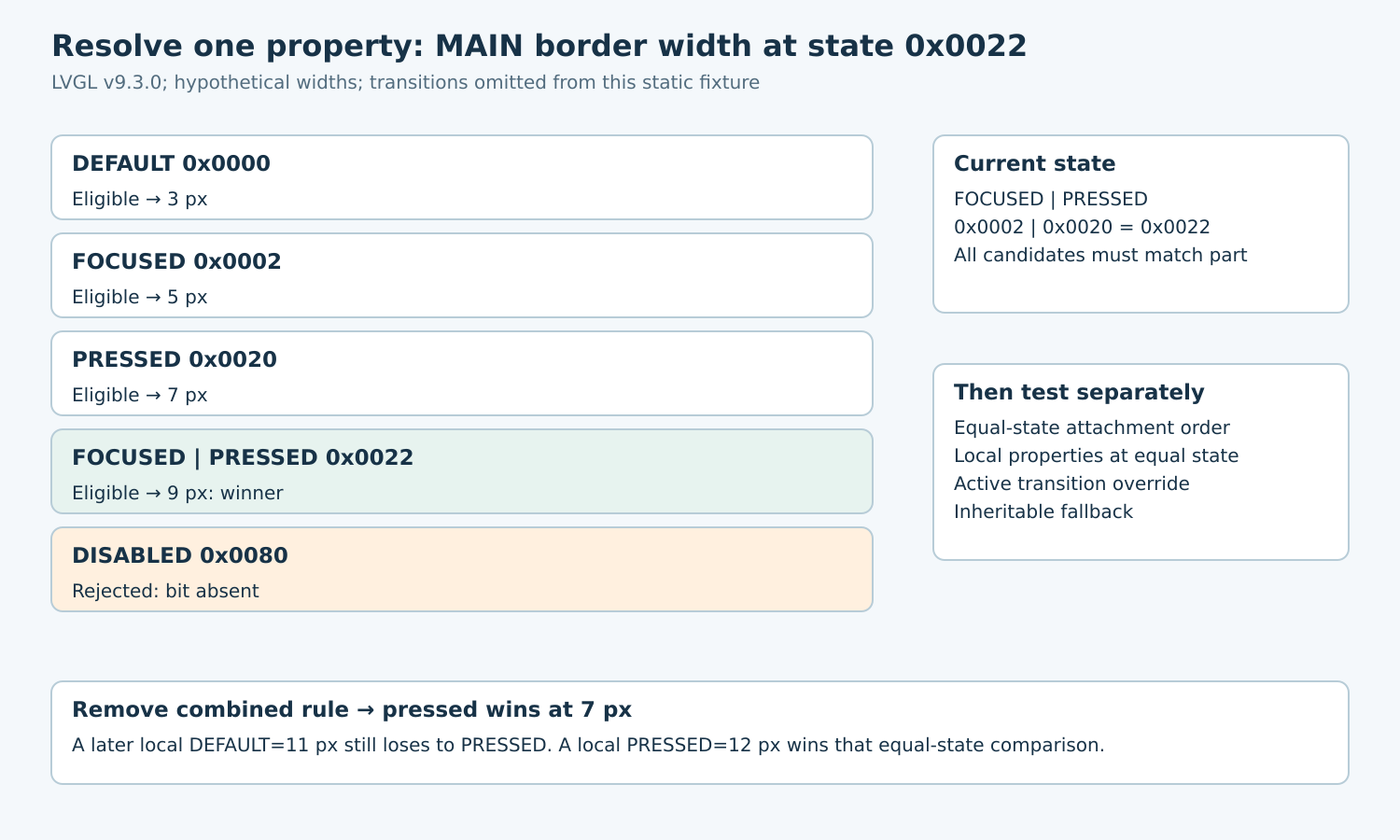
The v9.3.0 get_prop_core implementation rejects a selector when it requires state bits absent from the current state. Among eligible candidates containing the property, it favors the higher numeric state value. This is not a count of how many bits are set.
The tagged state definitions give FOCUSED=0x0002, PRESSED=0x0020, and DISABLED=0x0080. For current FOCUSED|PRESSED, the state is 0x0022. Default, focused, pressed, and their combined selector can match; disabled cannot.
Suppose hypothetical main-part styles define border widths of 3, 5, 7, and 9 pixels for those four eligible selectors, plus 1 pixel for disabled. The combined 0x0022 candidate supplies 9 pixels. Remove only that candidate, and pressed 0x0020 supplies 7. The ineligible disabled rule never wins merely because 0x0080 is numerically larger.
Repeat this reasoning independently for background, border, text, and other properties. One winning style for border width does not imply that the same style supplies every property drawn on the widget.
4. Use attachment order only after matching state precedence
For equal matching state weight, later-added normal styles take precedence in this implementation. Adding a newer default-state style does not defeat an older better-matching pressed rule. This explains why a default customization can appear correct at rest and seem to vanish during interaction.
Local properties are considered before normal styles at equal state precedence. They still participate in state matching. In the hypothetical fixture without the combined rule, a local default border width of 11 does not defeat the pressed width of 7. A local pressed width of 12 does win the equal-state comparison.
Search for object-local setters in generated UI code, initialization helpers, and event handlers when a shared style appears ineffective. Removing or changing the relevant local property is a different action from removing a shared style. Keep the selector exact so a repair does not unintentionally alter other parts or states.
5. Separate transitions from the settled result
The tagged implementation checks an active transition style before ordinary candidates for the same part and property. During a transition, the queried value can therefore be an intermediate value rather than the endpoint predicted by the static selector ledger.
Define two observation points: immediately after a state change and after the intended transition has settled. In the minimal precedence fixture, omit transitions initially. Once static resolution passes, restore the transition configuration and test its time-dependent behavior separately.
Do not manually edit internal state or transition structures to force a screenshot. Use supported state operations through the UI owner and controlled time advancement in the chosen harness. Record whether the reported value was sampled during animation or at rest.
6. Check inheritance only when the property permits it
The documentation limits inheritance to eligible properties, commonly text-related ones. The source first attempts the requested object’s matching styles; inheritable fallback can then inspect the main part and ancestors using each ancestor’s own current state.
A child with its own default text color can block parent inheritance even if the parent has a visually important focused or pressed color. Before changing the parent’s rule, check whether the child already supplies the property. Conversely, do not diagnose missing border inheritance as a failure when that property is not inheritable.
Use the property getter for the actual widget and part, such as the generated border-width getter, to observe the resolved result. These getters use the object’s current state. Keep raw style contents distinct from the final resolved value.
7. Turn the ledger into a small regression matrix
Propose cases for default, focused, pressed, focused-plus-pressed, and disabled states. Add equal-state styles in both orders, introduce a local default then a local pressed override, and test a style that omits the property. Include the wrong-part negative control.
Assert resolved property values first, then inspect rendering. A correct getter with an unexpected visible edge suggests another drawing property, clipping, opacity, or custom draw behavior. A wrong getter keeps the investigation in selector resolution.
The release artifact is the candidate ledger, state/part matrix, expected values, and observed results when executed. It should explain exactly why one rule wins, rather than relying on a growing pile of overrides that happen to produce one acceptable screenshot.