SquareLine Studio Custom Aliases: Preserve an Intentional Widget Interface Through Layout Refactors
A harmless layout refactor can become a large firmware diff when application code uses every automatically generated SquareLine Studio object name directly. Renaming a screen or replacing a decorative component can change names whose structure reflects the design hierarchy rather than the widget's application role.
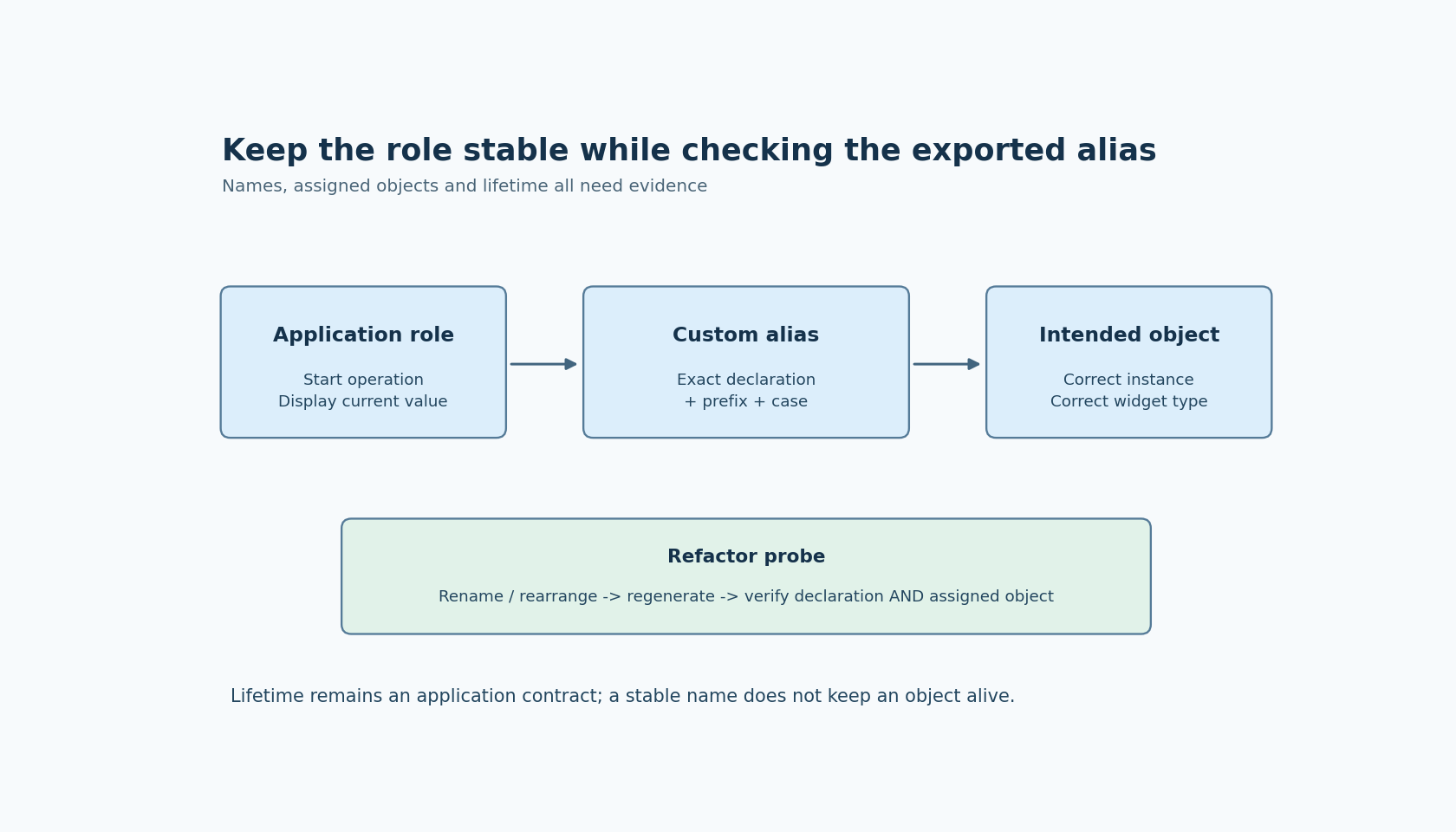
Custom variable aliases offer a narrower interface for selected objects. Use them deliberately: an alias can decouple a meaningful application reference from part of the designer's naming scheme, but it cannot make a deleted widget remain alive or make duplicate semantic roles unambiguous.
Define the application-facing objects first
Choose the small set of UI objects that handwritten code actually needs to address. Examples might include a current-value label, a progress indicator and the button that starts a device operation. Most decorative descendants do not need to become application interfaces.
Assign names based on role rather than incidental styling. A name describing the primary operation is more durable than one describing the current rounded-card component that happens to contain its button. Keep enough screen or function context to distinguish two genuinely different controls.
The official Inspector documentation states that a custom alias produces a direct object-pointer declaration in ui.h, including for selected children of components. This provides a documented place to inspect the exported interface; it is not a guarantee that all ordinary generated names disappear.
Build a short interface list containing the alias, expected widget type, owning screen or component, and the application code that uses it. This list helps reviewers decide whether a design change preserves the intended role, not merely the same spelling.
Understand which part of the name you are editing
SquareLine's documented FILL interaction offers partial and fuller editing of a proposed alias. The shared prefix is configured separately in Project settings. The Project settings page also describes automatic object naming and forced lowercase export.
Before adopting aliases across a project, export a small example and inspect the resulting declarations. Record the exact name that reaches C, including prefix and case. Do not assume that the white editable portion shown in one field is the complete external symbol.
Keep the global prefix stable unless changing it is an intentional application-interface migration. A project-wide prefix edit can affect many references at once, even when the individual aliases remain unchanged in the inspector.
Deleting the custom name removes generation of that custom alias, according to the Inspector documentation. Treat that as an interface deletion. A designer clearing a field to restore a default appearance should not inadvertently remove the name used by application code without review.
The behavior described here is scoped to the documentation labeled 1.6.2. The proposed refactor tests have not been run against an installed exporter in this article.
Exercise one structural refactor at a time
Start with a tiny screen containing one aliased control and one ordinary control. Export it, identify both declarations, and compile a small application reference to the alias.
Then rename the screen in a project copy. Re-export and inspect the alias declaration, its assignment during creation, and the ordinary object's generated name. Repeat separately with a component-instance rename or a layout reorganization that preserves the aliased widget's role.
Do not declare the alias stable based only on an unchanged declaration. Confirm that the pointer is assigned to the intended object. A preserved symbol that now addresses the wrong instance is a more subtle interface failure than a compiler error.
Use an observable target operation, such as changing a diagnostic label through the alias, and verify which widget changes. Keep this test independent from the production device action so that a naming problem cannot trigger real equipment behavior.
Record the result for each kind of refactor. The evidence supports those tested transformations; it does not establish that arbitrary replacement of widget types or component structures is safe.
Test duplication and role changes separately
Duplicating a screen or component can create two candidates for an application role that was previously unique. Inspect the aliases in the copy and the new exported declarations before connecting backend logic to both.
Choose whether the two controls are separate interfaces or two views of the same operation. If they are separate, give them distinct names and explicit routing. If they intentionally drive one operation, keep their object identities distinct while sharing application behavior through a function or model.
A widget-type change is another separate review. A name ending in “value” might remain readable after a label becomes a roller, but the functions application code calls through that pointer may no longer be appropriate. Compare the intended widget class and allowed operations, not just whether a generic object pointer compiles.
For reusable components created dynamically, a single global alias may not be the right way to identify every instance. Use the component's instance-specific access contract where appropriate rather than expecting one global variable to represent an arbitrary number of runtime objects.
Keep lifetime outside the naming promise
An alias is a pointer reference produced by the export. Its name does not establish when the object exists, whether the screen is temporary, or whether application code has retained an old pointer after destruction.
Define when the application may use each alias and which creation or teardown boundary controls that permission. Verify the selected version's generated behavior instead of assuming an alias automatically protects every cached copy held elsewhere.
A successful alias interface has three properties: the symbol is intentional, it resolves to the intended live object, and application code uses that object's actual contract. Naming stability is valuable, but it is only one part of keeping a layout refactor from becoming a hidden behavioral change.