STM32WB55 to STM32WBA55: Redraw the Wireless Firmware Delivery Boundary
Moving a product from STM32WB55 to STM32WBA55 changes who executes the wireless software and how that software reaches the device. A build that recreates the application's screens and sensors can still omit the new radio integration. Start the migration by identifying the firmware owners, rather than by replacing peripheral initialization calls.
The scope here is the WB55 dual-core model and the WBA55 library-based BLE integration described in ST's documentation. The comparison uses DS11929 Rev 18, DS14127 Rev 10, AN5289 Rev 18 and the WBA build guide snapshot. It is not a pin-compatible substitution assessment or a measured performance comparison.
Separate the application image from the wireless installation
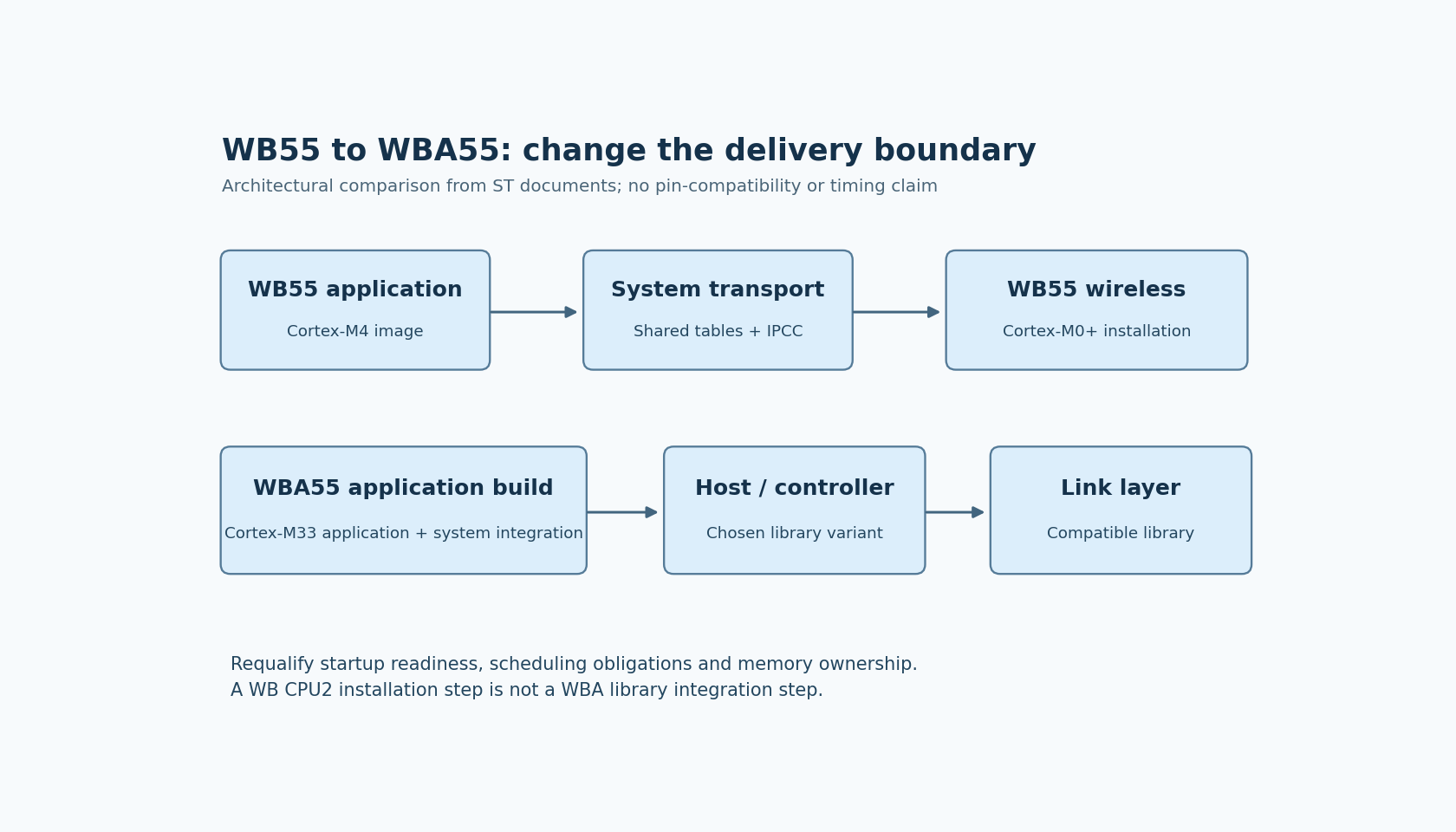
The WB55 datasheet describes a Cortex-M4 application processor and a dedicated Cortex-M0+ wireless processor. That separation appears in the software delivery process: the M4 application uses interfaces to software running on CPU2, while FUS manages the supported CPU2 wireless firmware installation.
A WB release package therefore needs to identify more than the application ELF. It must say which wireless binary and service configuration the application expects, how those components are installed, and how a serviced device is returned to a usable application state. A factory station that programs only the M4 image relies on an already-correct CPU2 installation, whether or not that dependency appears in its job description.
The WBA55 datasheet describes a Cortex-M33 device. The WBA BLE build guide requires an association of link-layer and host/controller libraries in the application project. The corresponding migration is not “install the WB CPU2 binary at a different address.” It is a change in the application build's wireless dependencies.
Redraw the startup handoff
AN5289 describes WB shared-memory reference tables, system transport initialization and CPU2 readiness notification. Enabling CPU2 and receiving its ready event are separate steps. Application code that assumes the radio is usable immediately after setting a boot control can race this handoff.
For WBA, start from the initialization sequence in the chosen WBA example and package. The application must integrate the selected libraries and their system services. An old WB ready-event wait is not evidence that the WBA integration reached the equivalent milestone; the old event belongs to a different execution model.
Create two short startup traces. The WB trace should show application reset, transport setup, CPU2 activation, ready-event dispatch and stack initialization. The WBA trace should show the package's actual library and system initialization stages. Match each product operation to the first documented stage that permits it. Do not invent a universal WBA order from a WB diagram.
Reassign scheduling and memory responsibilities
The WB architecture gives application work and wireless processor work different execution owners. That does not mean their resources are independent: AN5289 documents shared flash, clocks, peripherals and hardware-semaphore protocols. Those protocols belong in the WB baseline, not in a generic application portability layer without explanation.
On WBA, verify the chosen package's link-layer processing, background work and interrupt requirements as part of the application integration. A CPU core capable of running faster does not establish that a long application critical section is harmless to radio scheduling. The relevant evidence is the WBA integration contract and the final application's behavior under its intended workload.
Likewise, rebuild the memory budget. A WB linker layout that stops below CPU2's secure boundary describes a different ownership arrangement from WBA's linked libraries and application-provided buffers. Copying the old available-RAM number into a new spreadsheet can omit required WBA buffers or preserve reservations that no longer describe the system.
Make the release package explain the transition
A useful migration record has four product-specific rows:
- Wireless implementation: WB installed CPU2 image versus the selected WBA library pair and package.
- Startup readiness: the observed WB transport event versus the WBA integration milestone.
- Timing ownership: WB inter-core arbitration versus WBA library, interrupt and background-processing obligations.
- Memory ownership: WB secure boundaries versus the final WBA linked image and runtime buffers.
This is also a serviceability decision. The manufacturing and repair tools need the correct artifacts for the chosen architecture. Preserving a WB maintenance step by name can be misleading when the WBA product delivers wireless code through its application build instead.
Before treating the port as complete, inspect the final linked inputs and the programming manifest together. Then qualify initialization, sustained radio activity and application latency on the selected WBA55 board. No build, programming operation or radio test was executed here. The immediate deliverable is an explicit ownership map that prevents an apparently successful application port from concealing a missing wireless integration.