LVGL Screenshot Regression Tests: Freeze Time, Fonts and Reference-Image Approval
A screenshot test is useful only when the same application state produces the same pixels. Freeze the rendering inputs, advance simulated time deliberately, and separate ordinary comparison from reference-image approval. Otherwise a changed font package, a different animation phase, or an accidentally missing baseline can look like a product change.
Applicability: this procedure targets desktop or server tests using the LVGL 9.3 documented UI-testing facilities. The upstream v9.3.0 test runner is a separate integration example. Pin the actual LVGL commit and test harness in your project; do not assume identical helpers across earlier releases or vendor forks. Hardware display validation remains a separate requirement.
1. Make the reference identify a reproducible experiment
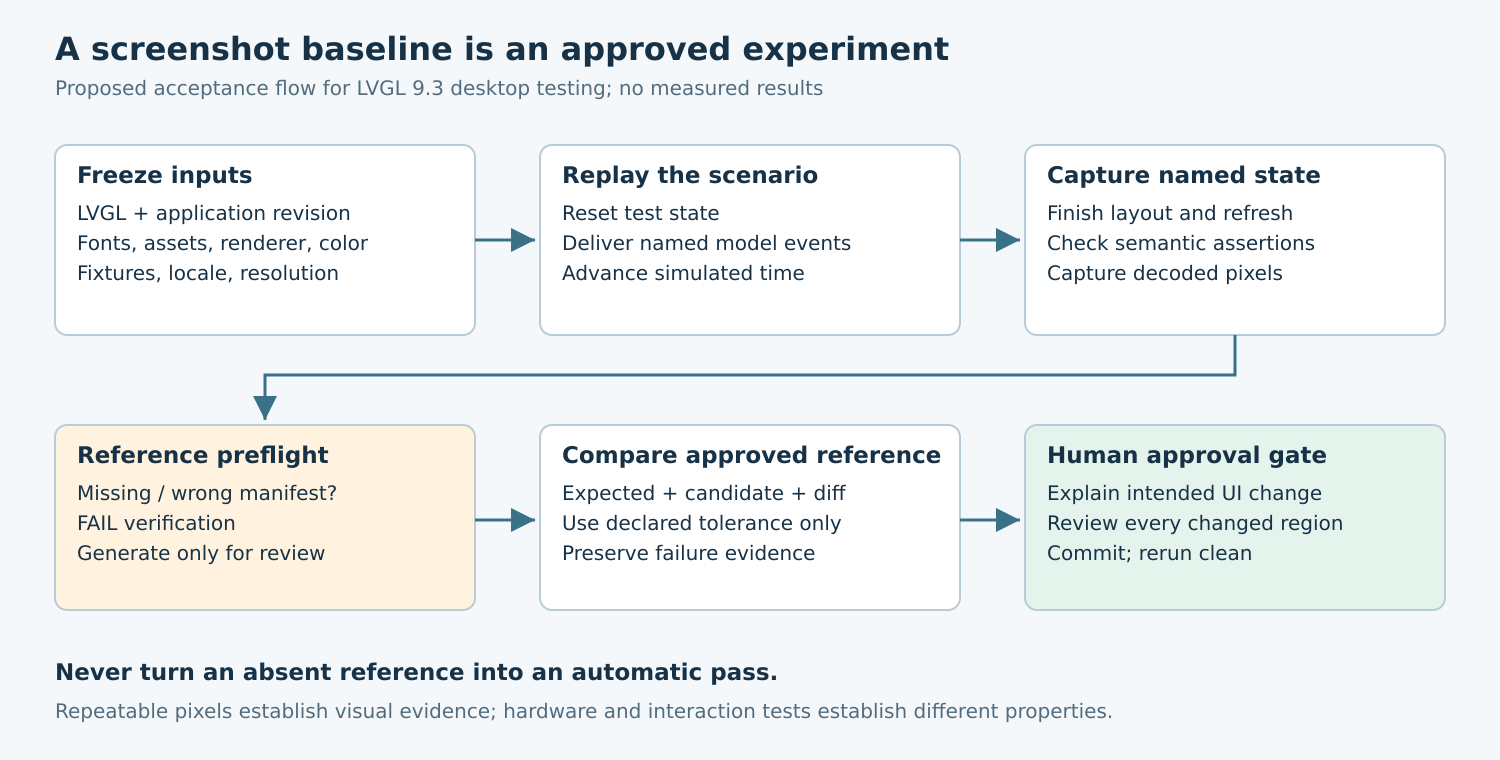
Give each capture a stable case identifier describing the screen, state, locale, resolution, and rendering configuration. A filename such as settings-alarm-active-en-480×272 is more useful than screenshot-final. Store a manifest beside the image containing the application revision, LVGL revision, configuration digest, font and image asset digests, renderer selection, color format, and scenario revision.
The manifest is a comparison contract. If one input changes, the test must either run against the corresponding reference family or report an environment mismatch. It should not silently borrow a baseline from a nearby screen size. Keep reference images under reviewable version control and record which product behavior each one accepts.
Choose the capture surface explicitly. An emulated LVGL framebuffer excludes desktop window borders, host scaling, and unrelated applications. A photograph includes panel, optics, and camera behavior and therefore answers a different question. Do not interchange these artifacts while reporting a single visual-regression result.
2. Control clocks and external data before building the screen
Replace live sensor feeds, wall-clock dates, network responses, and nondeterministic identifiers with fixture values. Seed any application randomness and reset persistent test state before each case. If a screen subscribes to asynchronous data, make the harness deliver named events at known simulated times instead of waiting for a real service.
The LVGL 9.3 UI-testing reference distinguishes incremental time advancement with lv_test_wait() from lv_test_fast_forward(), which processes the timer handler only after the jump. These are not interchangeable when intermediate callbacks affect the model. Select the scheduling behavior the scenario needs and record it.
For a static-state test, disable nonessential blinking or use a named capture phase. For an animation test, preserve the animation and capture selected elapsed times. A blanket instruction to stop all timers would remove the very behavior being tested. Allow layout and rendering to finish through the harness’s documented refresh path before capturing; an arbitrary host sleep is not a completion condition.
3. Lock fonts, rendering, and image conversion
Bundle the exact fonts used by the case. Record generated font files as build inputs, including fallback fonts that may appear only in translations or unusual symbols. A missing degree sign can change both the visible glyph and its neighbors. Include representative strings that exercise those fallbacks rather than relying only on ASCII labels.
Keep software and accelerated renderers in separate reference families unless equivalence has been established for the tested configuration. Likewise, a host reference in one color format should not become an unexplained oracle for a target pipeline with another format. Record image-decoder and font-renderer dependencies when those libraries participate in rendering.
The upstream v9.3.0 test README explicitly notes that pngquant versions can change generated images. This is a concrete reason to pin the image-generation environment, not just the application executable. Preserve lossless reference files and compare decoded pixels rather than treating differences in PNG compression as visual differences.
4. Fail safely when references are absent
The documented screenshot helper can create a reference when the requested file is missing. That convenience is appropriate for an intentional authoring workflow, but it is dangerous as an unattended acceptance policy. A renamed or untracked reference must not allow CI to approve the candidate rendering simply because there is nothing to compare.
Add a preflight check that every declared reference exists, has the expected dimensions, and matches the manifest. During verification, treat any newly generated reference as a failure requiring review. Keep baseline generation in a separate explicit operation whose output is a proposed change, not an automatic update committed by the failing job.
Retain the expected image, candidate image, difference visualization, and environment manifest on failure. LVGL’s documented comparison reports a divergent pixel and creates an error image. A project-specific difference map can make the extent easier to inspect, but should not alter the pass/fail rule without an approved policy change.
5. Define comparison rules before seeing the failure
Exact decoded-pixel comparison is an effective starting point for a fixed software-rendering environment. If a component genuinely needs tolerance, specify the allowed region, channel difference, and changed-area limit before accepting results. A global percentage threshold can hide a small but important alarm icon, minus sign, or disabled-state marker.
Prefer fixture replacement over masking for changing text. If a clock cannot be controlled, constrain its mask tightly and test the clock’s behavior separately. Keep safety-relevant labels and controls outside permissive masks. A mask or tolerance modification deserves the same review as a reference-image modification because it changes what failures the suite can detect.
Use semantic assertions alongside images: the expected alarm state is active, the confirmation action remains disabled, and the selected setting has the intended value. Pixels alone cannot prove that a visually identical control will dispatch the right action. Conversely, model assertions cannot prove that the control is legible.
6. Diagnose drift before approving a new baseline
Consider a hypothetical temperature-controller screen whose alarm banner fades in. The proposed test loads a fixed temperature, delivers an alarm event, advances the agreed simulated interval, and captures the banner. If repeated runs of the same build differ, block reference approval and inspect timing or asynchronous inputs first. These are example acceptance steps, not measured results.
If every label changes shape but rectangles remain aligned, compare font and renderer manifests. If only animation edges differ, inspect capture phase and scheduling. If one translation moves a button, inspect that case’s text and geometry. These patterns guide investigation; none proves the cause without checking the recorded inputs.
Approve a baseline change only with its intended UI change, old/new/difference images, and a short explanation of changed regions. A reviewer should reject unexplained changes outside that scope. After approval, rerun verification from a clean checkout with the new references present and ordinary update behavior disabled.
Release evidence and limits
A useful handoff contains the scenario manifest, immutable references, reproducible input sequence, comparison policy, and failure artifacts. Require stable repeated captures before relying on the suite, then add target checks for orientation, panel color, transfer corruption, and physical touch behavior. No simulator, board, or LVGL test executable was run for this article; the procedure is a proposed qualification plan.