Testing LVGL Gesture and Scroll Conflicts: Decide Which Widget Owns the Touch
Resolve touch conflicts by specifying which object may perform each application action, then replay complete press, movement, and release sequences while tracing events and scroll offsets. A finger moving over a button inside a scrollable list is one input stream. Treating every callback as an independent command can turn an attempted scroll into an unintended activation.
Applicability: this guide uses LVGL 9.3 documentation for single-pointer touch, ordinary scrolling, and basic gesture events. It does not cover multitouch recognizers, coordinate calibration, encoder navigation, or display wake policy. Pin your LVGL revision, input configuration, and widget hierarchy before applying the proposed tests.
1. Write an ownership policy for the actual screen
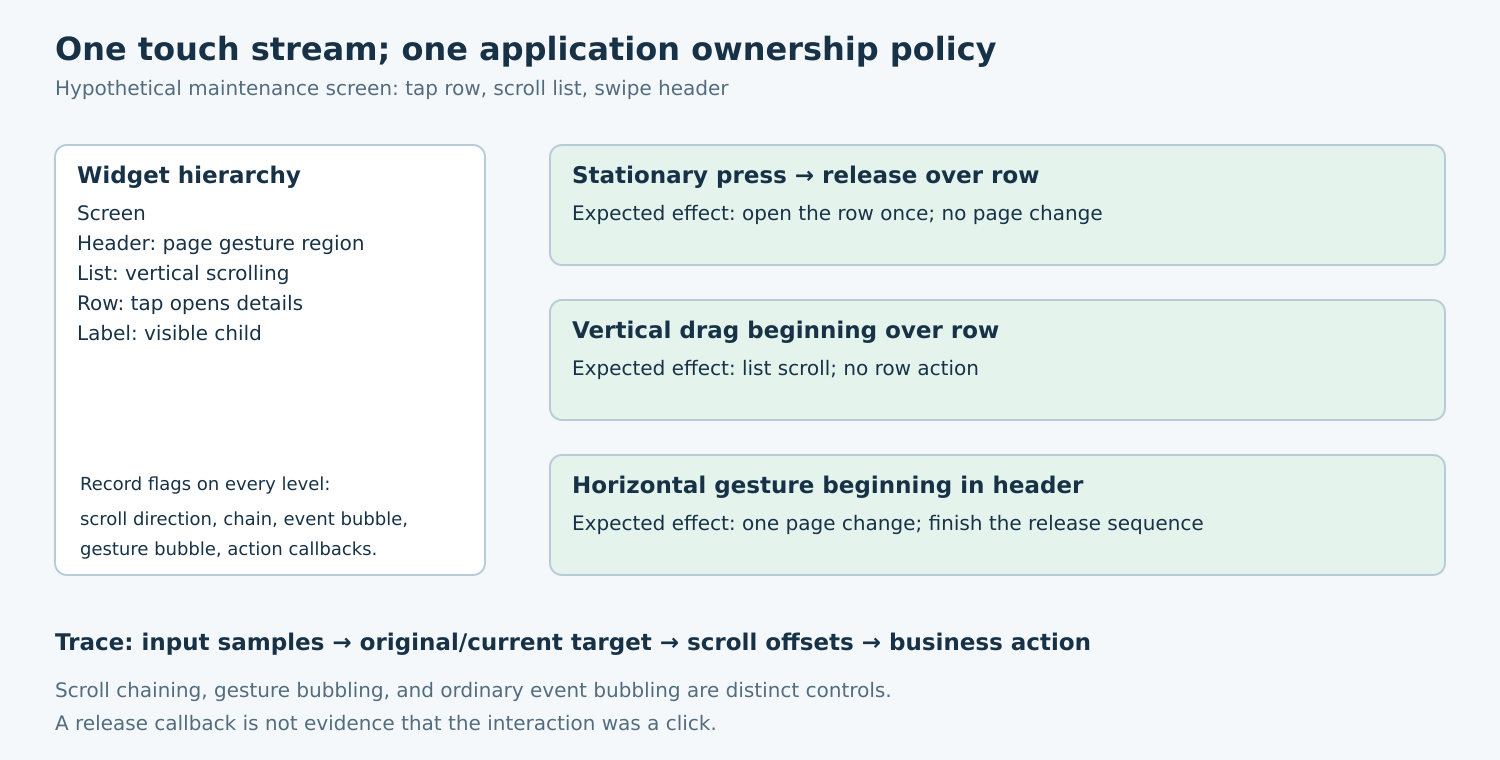
Start with a small interaction contract rather than event-handler changes. For a hypothetical maintenance screen, a tap on a row opens its details, a vertical drag scrolls the list, and a horizontal swipe on a dedicated header changes pages. A drag beginning inside the list must not also navigate away. These are example product choices, not LVGL defaults.
List the relevant objects from the touched child to the screen. Record clickable state, scrollable state, permitted scroll directions, chaining flags, gesture-bubbling flags, and application callbacks. Include decorative labels and overlays: the visible row is not necessarily the original event target. Give each application action one owner and an explicit eligibility condition.
Some designs intentionally allow a parent to take over at a child’s scroll boundary. Others retain the interaction inside the child. Make that choice separately for each direction. A reasonable policy for a horizontal carousel inside a vertical list may differ from one for two nested vertical lists.
2. Separate three different propagation mechanisms
LVGL’s scrolling documentation describes scroll chaining as propagation to an ancestor when a widget cannot scroll further. The horizontal and vertical chain flags control that propagation. Removing a child’s scrollable flag does not, by itself, prevent it from passing scrolling to a parent. Configure and test direction and chaining independently.
Gesture bubbling is another mechanism. The 9.3 input-device reference explains that basic gesture events commonly travel toward parents, can be bounded with LV_OBJ_FLAG_GESTURE_BUBBLE, and are not triggered while a widget is being scrolled. Do not design page navigation around the assumption that every drag through a scrolling list will also produce a gesture callback.
Ordinary event bubbling determines which callbacks see an event. It does not automatically establish exclusive ownership of an application action. When both a row and its container receive a click, both must not independently open the same dialog. Trace the original target and current callback target to distinguish one propagated event from two separate recognitions.
3. Activate on the event that expresses the intended action
The LVGL 9.3 event reference distinguishes LV_EVENT_CLICKED, delivered on release when the widget was not scrolled, from LV_EVENT_RELEASED, which can also follow scrolling. Binding a row’s business action to release can therefore violate a tap-only policy. Review the event semantics instead of adding a large movement tolerance to hide accidental actions.
Also define how long presses interact with ordinary clicks. A context menu and a row-open action must not both fire merely because the finger eventually comes up. Maintain explicit application action state when necessary, and clear it at the end of the complete interaction. Do not infer the intended action only from the final pointer coordinate.
After a handled basic gesture changes screens, the documented lv_indev_wait_release() helper can prevent further input-device-related events until release. Use it for the specific transition policy that needs it. Verify that the subsequent fresh press works normally; swallowing the next interaction would exchange one defect for another.
4. Record enough evidence to explain arbitration
For each input sample, log the scenario identifier, simulated timestamp, pointer position, and pressed/released state. For each relevant callback, log event code, original target, current target, scroll offsets, current screen, and any application command emitted. Stable object identifiers make the trace comparable after a rebuild; raw pointer addresses alone do not.
Keep counters for actual business effects: rows opened, pages changed, settings committed. An event trace containing several callbacks is not necessarily wrong, but two business commands from an interaction that allows one are a clear failure. Inspect final offsets only after the scenario’s scrolling or settling phase has finished.
Begin with a minimal hierarchy containing the conflicting widgets and their real flags. Add theme, layout, and live data afterward. If the issue disappears when a parent container is removed, investigate its propagation and handler policy before blaming the touch controller.
5. Replay sequences around the boundaries
The UI-testing module provides pointer emulation and deliberate time advancement. Replay the whole sequence, allowing input processing between state changes. Directly sending a click event tests the callback but bypasses pointer arbitration, so it cannot prove that a drag will be classified correctly.
- Stationary tap: press and release over the same row. Expect exactly one row action and no page change.
- Vertical drag: begin over a clickable child, move through several samples, then release. Expect the permitted scrolling and no row action.
- Child boundary: repeat at the top and bottom, with chaining enabled and disabled according to the policy. Record which ancestor moves.
- Diagonal movement: test trajectories on both sides of the configured direction boundary. The chosen owner must be consistent with the written policy.
- Header gesture: begin inside the designated gesture region, navigate once, hold briefly, and release. Then perform a fresh tap on the new screen.
- Cancellation: move outside the original target, replace the screen, or cancel the interaction through the supported path. No stale action may fire later.
Derive movement and timing samples from the actual input configuration, including cases just below and above the relevant thresholds. There is no universal pixel distance or hold duration that suits every panel, sampling rate, and product. Retain the exact traces with the test so a threshold change becomes a deliberate test update.
6. Read failures as ownership evidence
If the list scrolls and a row opens, inspect release-based activation and duplicate callback ownership. If the parent moves only when the child reaches its edge, inspect chaining. If page navigation never occurs during a list drag, compare the expectation with the documented gesture-versus-scroll behavior. These are diagnostic branches, not automatic diagnoses.
If desktop replay is stable but the panel behaves differently, capture the samples actually delivered by the driver and replay those. Missing releases, coalesced movement, and different sample timing can expose another layer without changing the application’s intended policy. Test momentum, elastic movement, and interrupted scrolling explicitly when the screen enables them.
The acceptance artifact should include the hierarchy and flag inventory, input traces, action counters, and expected ownership for every boundary case. No LVGL application or touch hardware was exercised for this article. The proposed tests establish a reviewable arbitration contract; they do not claim measured usability or certify a specific touchscreen.