Zephyr OS Sysbuild: Keep Bootloader Configuration Out of the Application Namespace
A setting accepted by a multi-image build may still reach the wrong image. With Zephyr sysbuild, identify whether a configuration belongs to sysbuild itself, the main application or another domain before changing its value. Verify the destination's effective configuration instead of treating one successful build as proof that every image received the option.
This guide uses Zephyr 4.4.0 documentation and tagged implementation. It focuses on configuration routing. It does not qualify a bootloader security policy, signing setup or device flashing operation, and no multi-image build has been executed for this article.
Draw the domains before editing configuration
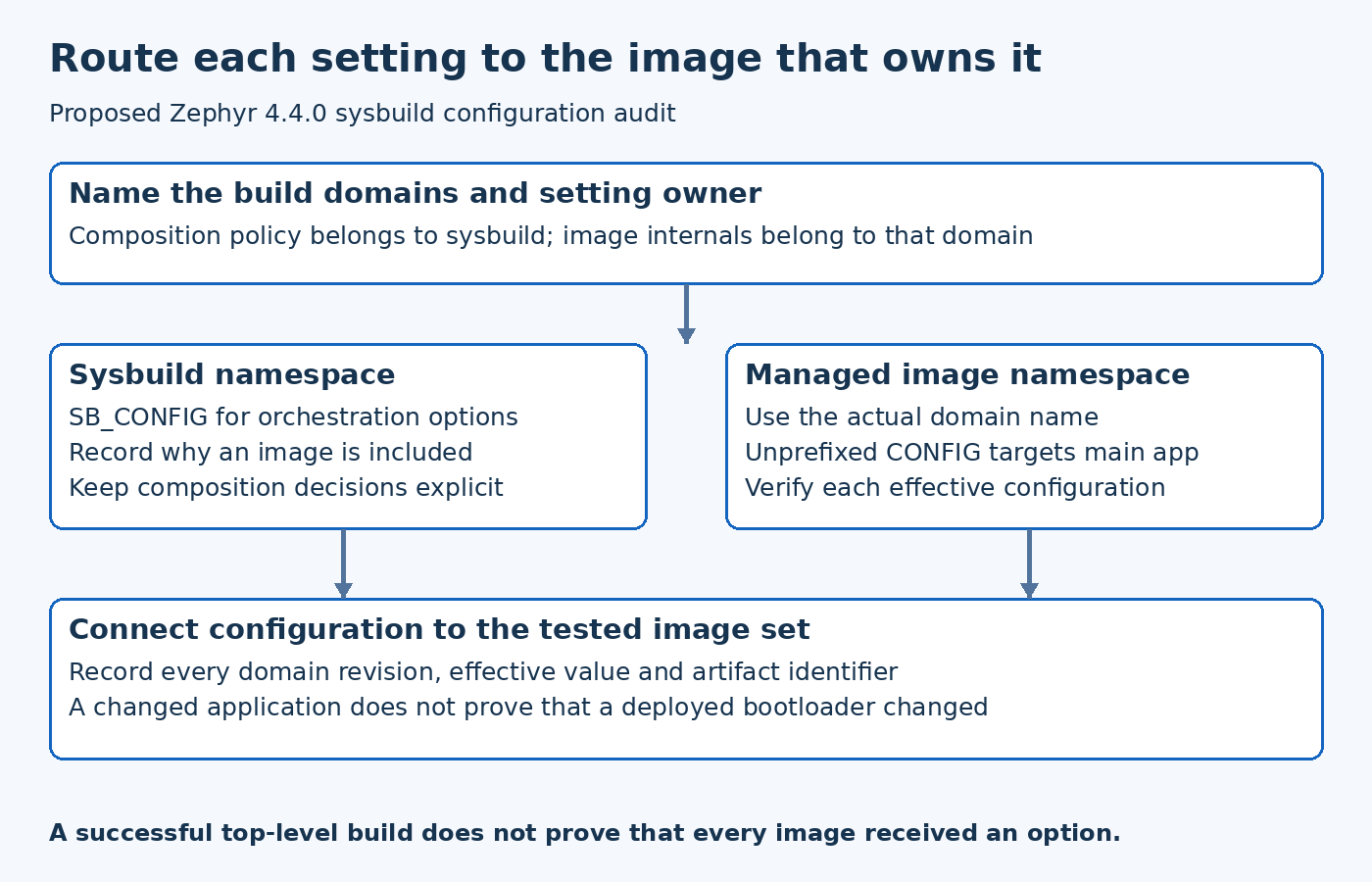
List the images managed by the build and their domain names. Record the main application separately from additional images such as a bootloader. A domain name is an input to configuration routing, so a project-specific name must be verified rather than copied blindly from an unrelated example.
The version-pinned Zephyr sysbuild guide describes sysbuild as a higher-level system managing other build systems. Its configuration namespace is therefore separate from the configurations of the images it manages.
A useful review sketch names each domain and the configuration files or command-line inputs intended for it. This is particularly valuable when the product adds a second application processor or a recovery image, because assumptions that were harmless in a single-image build become ambiguous.
Separate enabling an image from configuring its internals
A sysbuild option can control whether another image is included. That does not mean that every internal option for that image belongs to sysbuild's own Kconfig namespace.
For example, selecting a bootloader as part of the overall build and selecting a diagnostic feature inside that bootloader are different decisions. The first concerns build composition; the second concerns the bootloader domain's configuration. Keep that distinction visible in review comments and release evidence.
Do not move an unknown symbol into several files until one placement stops producing an error. Determine which project defines the symbol and which build system evaluates it. A warning-free configuration is only useful when it controls the intended component.
Use the correct namespace for command-line settings
The 4.4.0 guide documents SB_CONFIG for sysbuild Kconfig options and domain-prefixed configuration inputs for managed applications. Unprefixed CONFIG settings target the main Zephyr application in the documented command-line flow, not every domain simultaneously.
That means a hypothetical debug optimization setting can affect the application while leaving the bootloader unchanged. If the investigation requires both images to use the setting, each destination must be configured and verified deliberately.
Keep examples in product documentation tied to the actual domain names and release. A copied command containing a conventional bootloader name may not describe a customized project correctly. Prefer a small checked command or configuration fragment over a large collection of unexplained overrides.
Verify each domain's effective result
Inspect the generated configuration belonging to the intended domain. Record the relevant symbol value and the domain's source revision. For a feature controlled by dependencies, also inspect why a requested value was accepted or rejected.
The Zephyr 4.4.0 sysbuild extensions implementation is a release-matched reference for orchestration behavior. Use it when a product's custom CMake integration changes how image configuration is supplied, rather than assuming the default example covers every extension.
If the expected value is absent from the target domain, investigate routing first. If it is present but behavior is unchanged, move on to whether the code uses that option and whether the tested artifact came from that domain. These are separate evidence steps.
Trace configuration ownership across files
Identify which settings are product policy, which are board-specific and which are temporary diagnostics. Avoid leaving a one-off command-line experiment as an undocumented dependency of the release build.
When multiple fragments or orchestration hooks contribute to one image, record the effective input set. A later configuration action can alter an earlier request. The useful question is not which file contains the desired text, but which resolved value the domain ultimately builds with.
A hypothetical product may intentionally configure a verbose recovery image and a quieter main application. A shared setting copied into the wrong namespace can erase that distinction. Review the intended difference as a design decision rather than forcing every domain to share one configuration for convenience.
Connect domain configuration to the tested artifact
Retain the output identifiers for each image. During debugging, confirm that the image under inspection is the one whose configuration was changed. A correct application build does not establish that a previously programmed bootloader was updated as well.
This article does not prescribe a flashing sequence because that depends on the board and product recovery requirements. The general evidence requirement is that the tested combination of images is identifiable and consistent with the build record.
If one domain is intentionally held at an older release, state that explicitly. Mixed-version systems can be valid, but their compatibility must be evaluated rather than hidden behind a single top-level firmware label.
Test configuration routing as an integration property
A small configuration test can assert that a selected option appears in the intended domain and does not unintentionally appear elsewhere. Choose a harmless diagnostic setting for such a test, and avoid changing security-sensitive product policy merely to demonstrate routing.
Repeat the check when adding a domain, renaming an application or changing sysbuild integration. These changes can affect input ownership even when the application source code is untouched.
The practical outcome is a configuration map that another engineer can follow: the setting's owner, its namespace, the effective value and the artifact built from it. Sysbuild makes multi-image builds manageable, but that structure only helps when each configuration change has an explicit destination and verified result.