EEZ Studio PrintToPDF: Inspect the Tabulator Print Row Range Before Trusting a Report
A PDF generated from an EEZ Studio Tabulator is a presentation export with its own row selection. It should not automatically be treated as a complete copy of the table's backing data. A filter, an effective print row-range option or print-specific column settings can change what appears in the report.
The PrintToPDF reference currently documents Tabulator as the supported widget. The action implementation and Tabulator adapter provide the behavior examined here, pinned to EEZ Studio v0.29.0 commit 3000161d09d40a5c1dc2477ddc30b38037b3a612.
No PDF was generated for this article. The following checks distinguish the print request, the row set selected for printing and the completed file.
Identify the effective row range
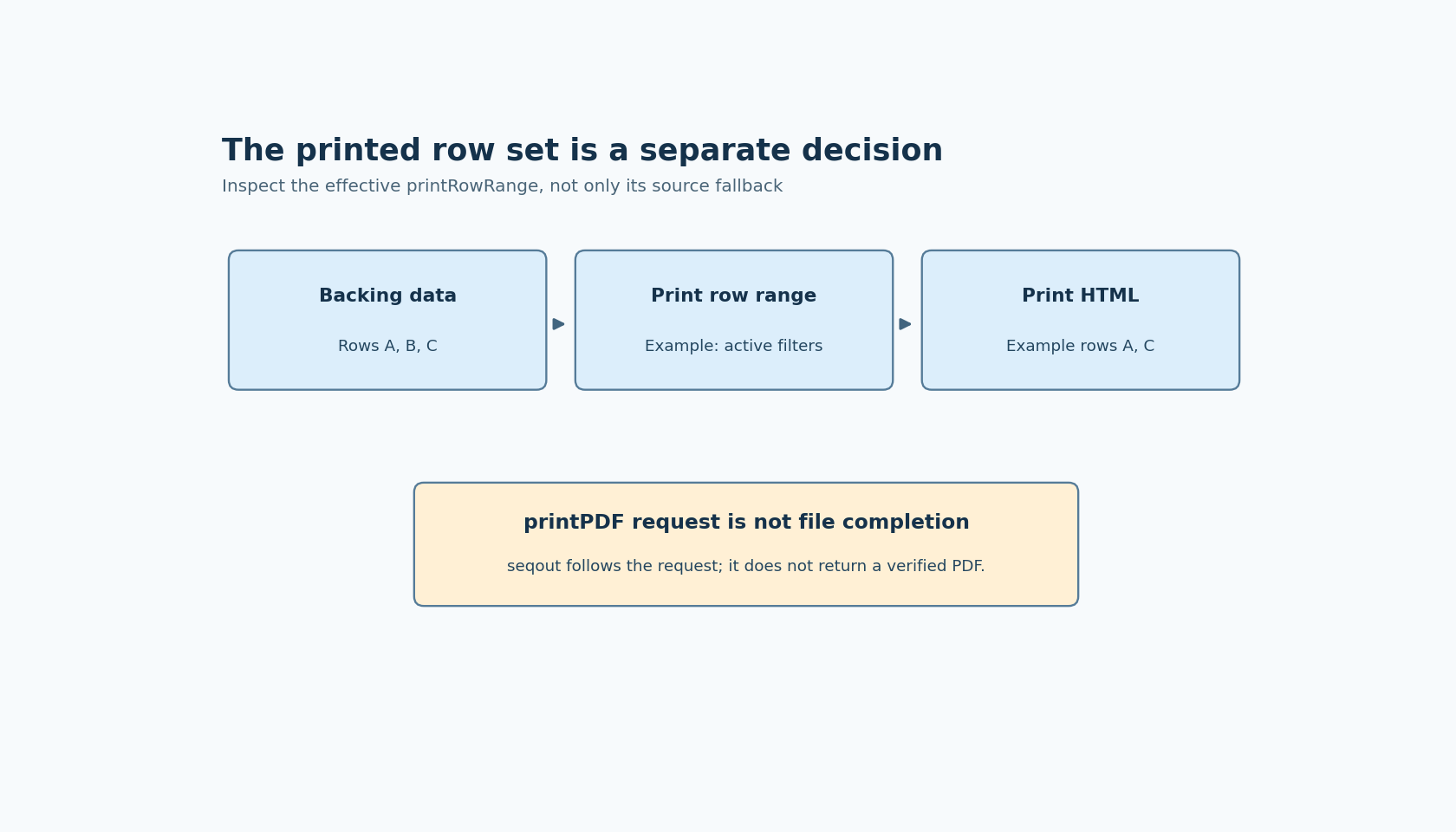
The widget constructs print HTML by calling Tabulator's export module generateTable. It supplies printConfig, printStyled and the expression printRowRange ?? "active", along with the print operation type.
That last expression is a fallback, not proof that every new table prints active rows by default. The Tabulator instance may already contain a library-supplied or project-supplied printRowRange value. Inspect the effective instance option before inferring which branch the nullish fallback takes.
The current Tabulator printing documentation distinguishes visible, active, selected and all row ranges. Active refers to rows passing the current filters; all includes rows regardless of filters. That documentation is labeled 6.x, while this EEZ package manifest pins Tabulator 6.3.0, so confirm the installed library's exact defaults rather than importing the latest default into the pinned source analysis.
Set a report contract before changing options
A report titled “current view” may intentionally use the filtered row set. A report described as “complete acquisition” needs a different completeness check. Neither is inherently correct without knowing what the report promises its reader.
Use a fixture with three identifiable rows and a filter that hides one. Record the backing dataset, the effective printRowRange and the rows present in the generated PDF. Then compare the appropriate all-row configuration with the filtered configuration. Check row identities, not only a total, because a count can remain unchanged while the selected rows differ.
Keep spreadsheet selection separate from this test if the project uses multiple sheets. Sheet choice determines the dataset under consideration; print row range determines which rows from the relevant table view are exported. Changing both at once makes a missing-row symptom harder to attribute.
Column print options can also affect completeness. A column visible on screen is not sufficient evidence of its printed inclusion, nor does a hidden screen column necessarily remain hidden in a report. Review the effective print configuration when report fields matter.
A valid handle still needs initialized printing support
The action resolves the widget handle and then the widget's execution state. It reports distinct failures for an invalid reference, an uninitialized widget or a widget without printWidget support. The documented support boundary should be checked before trying to print an arbitrary container or chart.
In the Tabulator adapter, printWidget sends a printPDF IPC request containing the generated HTML and options. The action calls that function and then propagates seqout. It does not receive a completed PDF file from that invocation.
Consequently, seqout is evidence that this action reached its continuation after requesting printing. It is not a hash, filename or successful-write acknowledgement for a finished report. The surrounding application must obtain whatever completion evidence its actual printing workflow provides before announcing that a report was saved.
Validate the artifact that readers will receive
Inspect a completed fixture PDF for expected row identities, required columns, headings and page breaks. A correct HTML row set can still produce an unusable document if layout clips columns or leaves the context on another page.
Record the editor version, Tabulator version, effective print options and active filtering state with the fixture. If the output changes after an upgrade, those observations separate an adapter change from a default change or an ordinary view-state difference.
The actionable boundary is the explicit row-set contract. A PDF can be generated successfully and still be incomplete for its intended purpose. Checking that contract is more useful than treating every file produced by PrintToPDF as a full-data export.