STM32WB FUS Binary Selection: Identify the Installed Service Before Choosing the Upgrade File
A file named “FUS firmware” is not enough information to select an STM32WB service update. The installed FUS version, the exact WB derivative and the package containing the candidate binary all matter. Read those identities before choosing a file, especially when factory inventory contains devices from different production periods.
This procedure follows AN5185 Rev 15 and ST's STM32WB FUS wiki snapshot. It explains binary selection without providing a programming command, changing option bytes or claiming that an update was executed. FUS, the CPU2 wireless stack and the M4 application are separate versioned components.
Read the service identity, not the application label
AN5185 section 1.2 identifies FUS through the shared device-information table, reached through the SRAM2a structure referenced by IPCCDBA. First record which CPU2 firmware is running. The official FUS wiki, section 3.1, distinguishes the layouts: the FUS version is at offset 0xC while FUS is running, but at offset 0x4 while the wireless stack is running. Reading one fixed offset without its mode can misidentify the service.
The note gives a concrete address example, but also distinguishes the device-information-table location used with STM32CubeProgrammer versions before and after 2.7.0. Therefore a hard-coded address copied from an old service script is not a universal identification method. Follow the documented shared-table route and the actual programmer version.
Switching to FUS is a service operation, not a passive memory read. Follow the selected maintenance transport's documented side effects rather than changing modes merely to reuse an old address.
Record the full device identity and flash density alongside the observed FUS version. Do not infer either from the application firmware filename. Devices running the same M4 release can have different FUS installations after manufacturing or repair.
Select the intermediate binary from the starting state
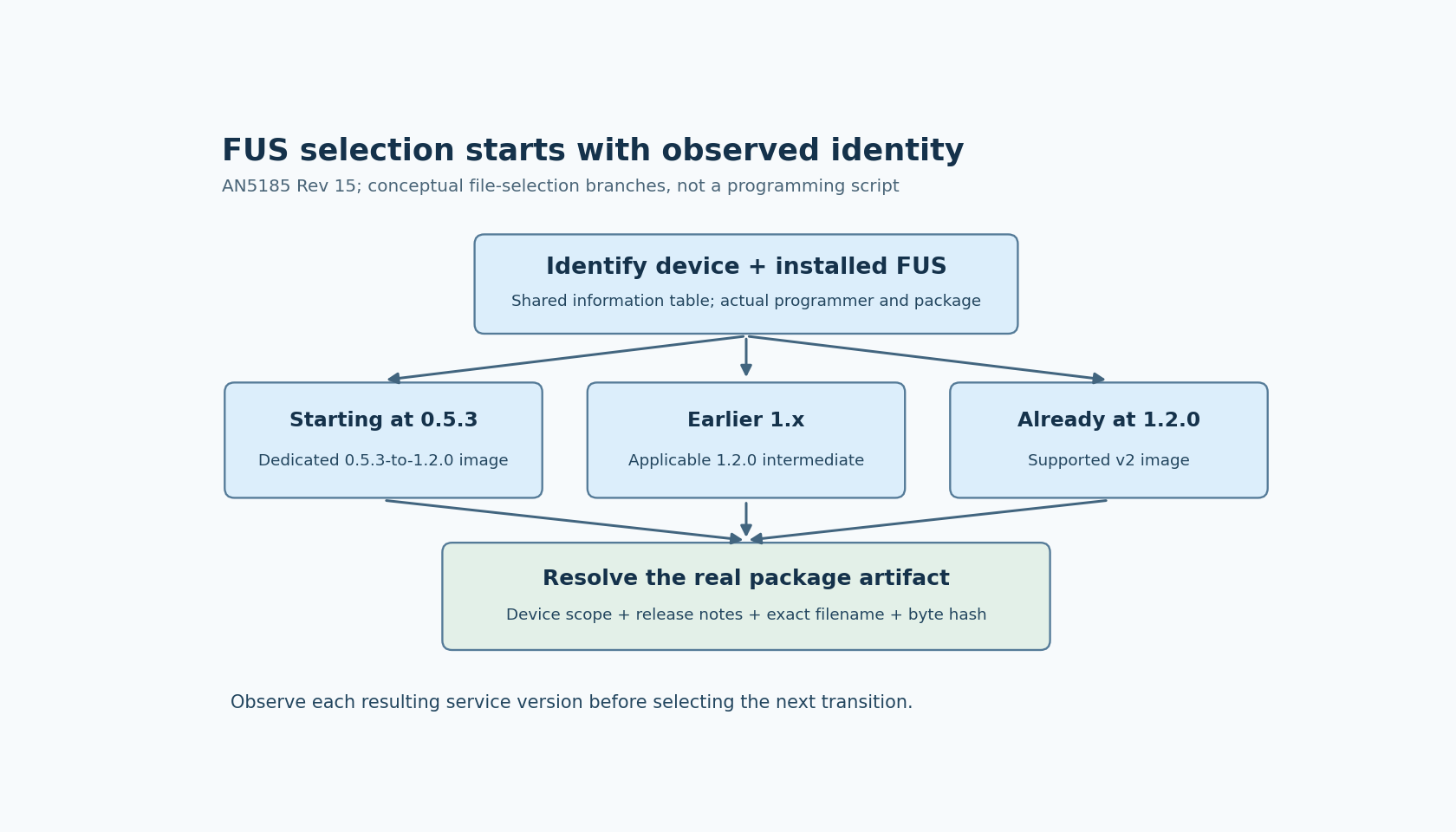
Rev 15 documents FUS v2.2.0 and a compatibility table. Its important current selection branches are:
- A device starting at FUS 0.5.3 uses the dedicated 0.5.3-to-1.2.0 binary before advancing to FUS v2.
- A device starting at an earlier 1.x release uses the applicable ordinary 1.2.0 intermediate binary before FUS v2.
- A device already at 1.2.0 can take a supported v2 transition according to the package and compatibility table.
The two ways of reaching 1.2.0 are not interchangeable merely because they end at the same version. The dedicated starting-state binary is part of the compatibility requirement.
For a hypothetical mixed lot, units A and B both need the same final wireless stack. Unit A reports FUS 0.5.3, while B reports 1.1.0. They cannot be assigned the same first intermediate file solely because both are “old FUS.” Select the first file from each observed starting state, then verify the resulting FUS identity before choosing the next operation.
Treat old density restrictions as real constraints
The history table describes v1.0.1 as dedicated to WB5xG devices with 1 MB flash. It explicitly warns against installing it on WB5xE/5xC derivatives. That warning is a reason to reject an old generic service recipe, not a recommendation to route current updates through v1.0.1.
Availability also differs from compatibility. Some versions were factory programmed but are not available as user-installable downloads. A version appearing in an inventory does not prove that the same version can be recreated later from a public package.
Use the current supported route for the identified starting state. Do not reconstruct a sequence by sorting historical version numbers or by assuming every row in the version-history table is an obtainable upgrade artifact.
Resolve filenames against the actual package
The official FUS wiki and AN5185 describe the same version-dependent branches, but their text contains variations in binary filename capitalization and version spelling. A documentation label should therefore identify the intended artifact class, while the actual package directory and its release notes establish the exact filename and installation conditions.
For each selected file, retain its package release, exact path, byte hash, supported starting state and device scope. If those do not agree, hold the operation rather than renaming a convenient binary to match a script's expectation. A matching filename cannot change the image's contents or compatibility.
The wiki also discusses a Safeboot update recommendation associated with the first transition from FUS 1.2 to v2. That is a separate component disposition to resolve from the chosen release instructions; it should not silently disappear inside a single “FUS complete” flag.
Close selection before opening the programmer job
The output of this review is a device-specific selection record: observed device and FUS identity, the applicable compatibility row, each actual package artifact, and the expected intermediate identity. It should be possible to explain why two devices in the same shipment receive different first steps.
After an authorized update, re-establish the service identity before advancing. Restore and qualify the product application through its separate maintenance procedure. Binary selection establishes what operation is applicable; it does not establish that flash programming, application restoration or radio startup succeeded.