SquareLine Studio Relative Animations: Control Repeated Starts and Delayed Initial Values
A SquareLine Studio animation that moves a card correctly the first time can drift on later runs. Another can jump immediately even though a delay is configured. Both symptoms can arise from confusing absolute endpoints, relative endpoints and the time at which the start value is applied.
Before adjusting durations by eye, define what a repeated trigger is supposed to do. Should the card return to a fixed resting position, move an additional distance from wherever it is now, or ignore input until its current motion finishes?
Separate the position rule from the timing rule
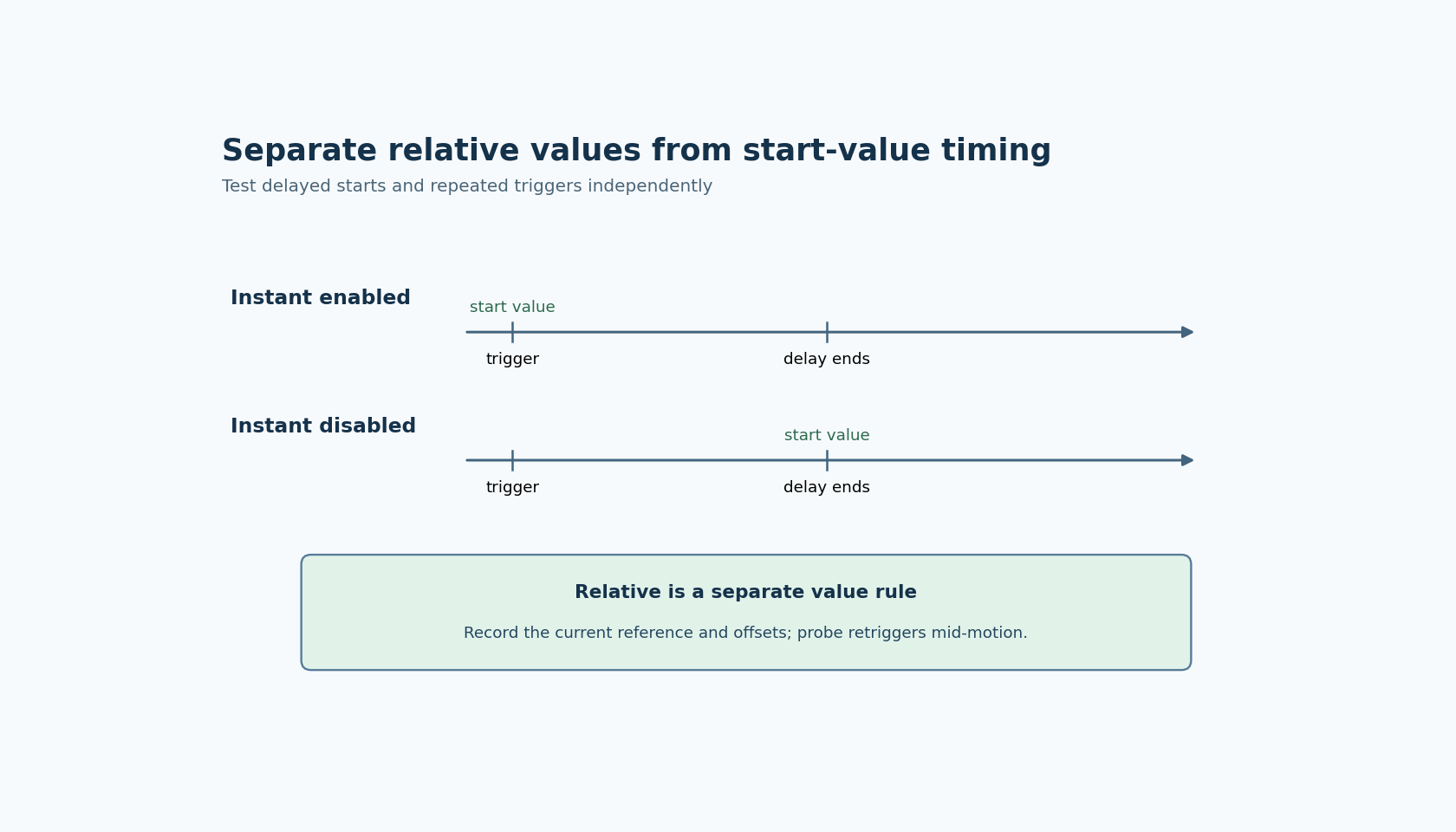
The official Animation panel documentation describes Relative as interpreting start and end values relative to the current value. It describes Instant as controlling whether the start value is applied before the configured delay: when Instant is unchecked, the start value is applied after that delay.
These settings answer different questions. Relative selects a reference for the values. Instant affects when the start value takes effect. Playback and loop controls introduce additional phases rather than changing the fundamental meaning of the first two settings.
The documentation does not, by itself, establish every detail of reference capture during overlapping animations. Use the generated code and a timed experiment to determine the behavior of the exact Studio and LVGL combination when a second trigger arrives mid-motion.
This article is scoped to SquareLine documentation labeled 1.6.2. The timelines and values below define proposed experiments, not measured scheduling results.
Build an animation without layout interference
Use one diagnostic object whose position is not being continuously recomputed by a parent layout. Choose a visible resting coordinate and mark it with a separate stationary guide. Keep animation duration long enough to observe the transition and avoid other code writing the same property.
Start with an absolute animation between two known coordinates. Record the object's position before triggering, immediately after triggering, after the delay and after motion completion. Then enable Relative while keeping the numeric endpoints deliberately simple.
For example, an offset range from zero to twenty represents a different requirement from absolute positions zero to twenty. Write the intended reference and expected final position in the test record. Repeat from a second starting coordinate so that an accidentally absolute implementation cannot pass merely because the first starting coordinate was zero.
Check the actual object property as well as its appearance. A parent transform, clipping or alignment can make a movement look different from the value being animated. The guide provides visual context; a property trace identifies the value under test.
Test Instant with a visible start discontinuity
If the configured start value equals the object's current value, enabling or disabling Instant may produce no visible difference. Choose a test where the start value differs from the current value and use a noticeable delay.
Observe four moments: just before the trigger, immediately afterward, just before the delay ends, and after motion begins. With Instant unchecked, the documented expectation is that the start value waits until the delay has elapsed. Compare that expectation with the generated output and observed object value.
Do not infer exact millisecond precision from the configured number. The UI service schedule and target execution environment affect when updates are observed. The first question is ordering: did the start value apply before or after the intended waiting phase?
The Events and Actions documentation also gives Play Animation its own action-level delay. Record that separately from the delay inside the animation property. Two configured waiting periods are not interchangeable labels for one setting, and changing both together obscures which phase caused the apparent pause.
Repeat from completion and from mid-motion
Trigger the animation again only after it has completed. For a relative movement, decide whether applying another offset is intentional. If the requirement is always to reach one resting coordinate, repeated relative displacement may be the wrong model even when the generator follows the setting correctly.
Next, trigger while the first motion is partway through. Record whether the generated integration replaces, restarts or otherwise interacts with the earlier animation for that property. Do not describe one observed behavior as a universal guarantee across all animation targets and versions.
Choose the application's repeated-input policy explicitly. Possible policies include ignoring triggers while busy, restarting from a defined baseline, or accepting a new target from the current position. The appropriate choice depends on the control's meaning, not on whichever behavior happens to look smooth in the editor.
If a handwritten handler enforces that policy, ensure it remains the only owner of the decision. A second generated action that also starts the same animation can defeat the policy while leaving both individual handlers apparently correct.
Add playback and loops last
Once a single motion and repeated trigger are understood, enable playback and then looping separately. Record the forward endpoint, return endpoint, playback delay and loop delay. Check that the object returns to the intended baseline before assuming a loop is visually stationary over many cycles.
Use a bounded number of cycles during diagnosis. A slow cumulative drift can be difficult to see in one pass but obvious when comparing the final position with the stationary guide after several runs.
The finished acceptance record should state the reference rule, the start-value timing, the repeated-input policy and the expected endpoints. Those decisions make animation behavior reviewable. Adjusting timing until one demonstration looks right cannot establish what the next trigger will do.