LVGL Menu History: Define Back Navigation for Reused and Dynamically Hidden Pages
Define Back from the user’s navigation history, not from a menu page’s current object parent. In LVGL, pages move between display containers and internal storage as navigation changes. Reusing a page or hiding its entry does not automatically establish which previous destination remains valid.
Applicability: this procedure pins LVGL v9.3.0 with a main-area menu and no sidebar for the initial fixture. Pages stay allocated throughout the tests. It addresses route history, page availability and reused content, not object destruction or encoder focus ordering. The example is hypothetical and has not been executed.
1. Write visits as logical routes
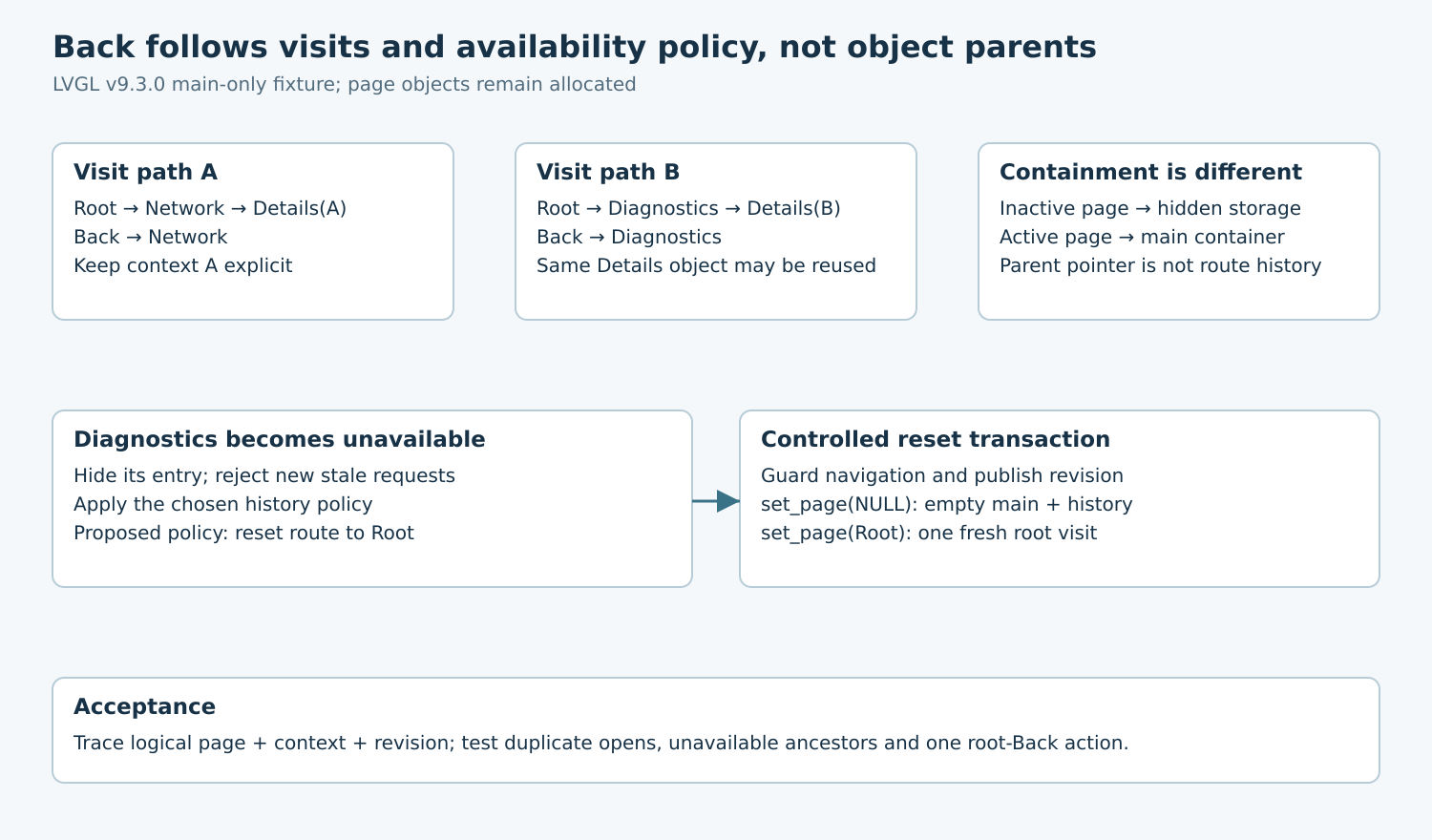
Consider a settings menu with Root, Network, Diagnostics and a reusable Details page. Details can be entered from Network or Diagnostics. The desired Back destination is the route that opened it, not a hard-coded parent label and not whichever object currently contains the Details widget.
Represent a visit with a logical page identifier, context identifier and navigation revision. For example, Details of interface A differs from Details of interface B even if both use one page object. Decide whether repeated requests for the current route are ignored, refresh data in place, or intentionally create another history entry.
Define root behavior separately. A Back action at Root might leave settings, ask about unsaved changes or do nothing. Choose one outcome and give it one owner. A visible root Back button should not be interpreted as evidence that LVGL knows which application screen is outside the menu.
2. Distinguish page containment from history
The 9.3 menu guide provides page creation, page loading and load-page event helpers. The tagged implementation moves the previous main page into hidden storage and the newly displayed page into the main container. A non-null set-page call adds a history node containing the page pointer.
Consequently, querying the page’s object parent does not recover the operator’s previous route. Also, setting the same page again is not an implicit deduplication operation. Repeated loads can create repeated visits even when the visible content appears unchanged.
Put a route guard before page loading when the product wants idempotent navigation. Updating a temperature label or refreshing a status value should update that page’s contents, not reload the page merely to force it to appear again. Test duplicate open requests from both user input and asynchronous application events.
3. Treat reused page context as application state
The built-in history’s page pointer does not snapshot arbitrary application data. If Details is repopulated for a different interface, an older history entry referring to that object does not restore the old interface automatically. Keep the context needed for each logical visit outside the widget’s current labels.
Choose one of two bounded designs. A simple menu can forbid stacked visits to the same reusable page and always return through a known parent route. A richer navigation owner can maintain its own logical visit records and reconstruct page contents when a route is revisited. Avoid combining two independent history owners that each pop on the same Back action.
For the simple fixture, take Root → Network → Details(A), then Back to Network. Separately take Root → Diagnostics → Details(B), then Back to Diagnostics. Verify both the displayed page and its context. Correct page geometry with the wrong interface data is still a navigation failure.
4. Make unavailable pages a history transaction
Suppose Diagnostics becomes unavailable while the operator is on Details(B). Hiding the Root entry prevents a new entry path, but does not by itself rewrite the existing menu history. Hiding the page object itself can also leave an unwanted hidden destination. Availability must be checked as a route policy, not inferred from whether a label is currently visible.
A conservative proposed policy is to reset the menu to Root whenever an active route or its return path becomes unavailable. The menu API exposes history clearing and page loading. The documented set-page call with NULL clears the main page and history; loading the validated Root afterward establishes a fresh root visit.
Perform that sequence under the navigation owner’s update guard. Publish the new availability revision, block stale open requests, clear the old route and load Root once. The temporary empty-main state is intentional; callbacks must not interpret it as an independent user request to navigate elsewhere.
Clearing history alone is different: the pinned function clears history records and depth, but does not itself replace the displayed page. Do not leave the UI in that intermediate condition and expect its old header controls to define the new route policy. Complete the chosen reset transaction and verify visible content and Back behavior together.
5. Route root Back precisely
The menu guide describes bubbled header Back clicks and lv_menu_back_button_is_root. In the menu callback, identify the original button target rather than assuming the menu itself is the button. The tagged header uses LV_MENU_ROOT_BACK_BUTTON_ENABLED when enabling root Back.
The pinned built-in Back handler distinguishes a root click from a normal history pop. Your application should handle the root action once, while leaving ordinary page Back to the intended history owner. Log the clicked header identity, root classification, previous logical route and resulting route.
A sidebar introduces another policy boundary: the load-page helper can clear main history when selecting a sidebar item. Qualify that mode separately instead of extending a main-only trace by assumption. Changing the menu’s presentation mode can change which Back button represents the root action.
6. Replay histories rather than individual button clicks
| Proposed sequence | Expected result |
|---|---|
| Root → Network → Details(A) → Back | Network, correct context |
| Root → Diagnostics → Details(B) → Back | Diagnostics, correct context |
| Open current route twice | One visit if idempotence is the chosen policy |
| Hide entry after visiting its page | Explicit history policy applied; no assumed pruning |
| Availability revoked on Details(B) | One controlled reset to Root |
| Back at Root | Exactly one application-defined root action |
Include a queued old open request arriving after the reset, a context change while Details is visible and repeated root clicks. Record logical visits alongside LVGL’s current main-page getter. Do not inspect private history fields as a production navigation API; use the application’s own expected-route trace and visible outcomes.
The release artifact is a transition map with an explicit unavailable-route policy. Pass the menu when Back returns to a meaningful, permitted route with the right context after reuse and dynamic changes. An object tree that remains valid does not, by itself, prove that navigation history remains correct.