Zephyr OS RTC Alarms: Check Supported Fields Before Promising a Calendar Schedule
An RTC that stores a full date does not necessarily compare every date field when generating an alarm. Before implementing “wake on this exact date,” establish which alarm fields the selected Zephyr driver supports and which recurrence the requested mask actually describes. A successful clock read is not evidence that the alarm can represent the same timestamp.
The examples below use Zephyr 4.4.0 API and driver source. They describe a proposed scheduling review, not measured alarm accuracy or a verified system wake configuration. Electrical interrupt routing and wake-from-sleep behavior remain separate checks.
Query the particular alarm's capability
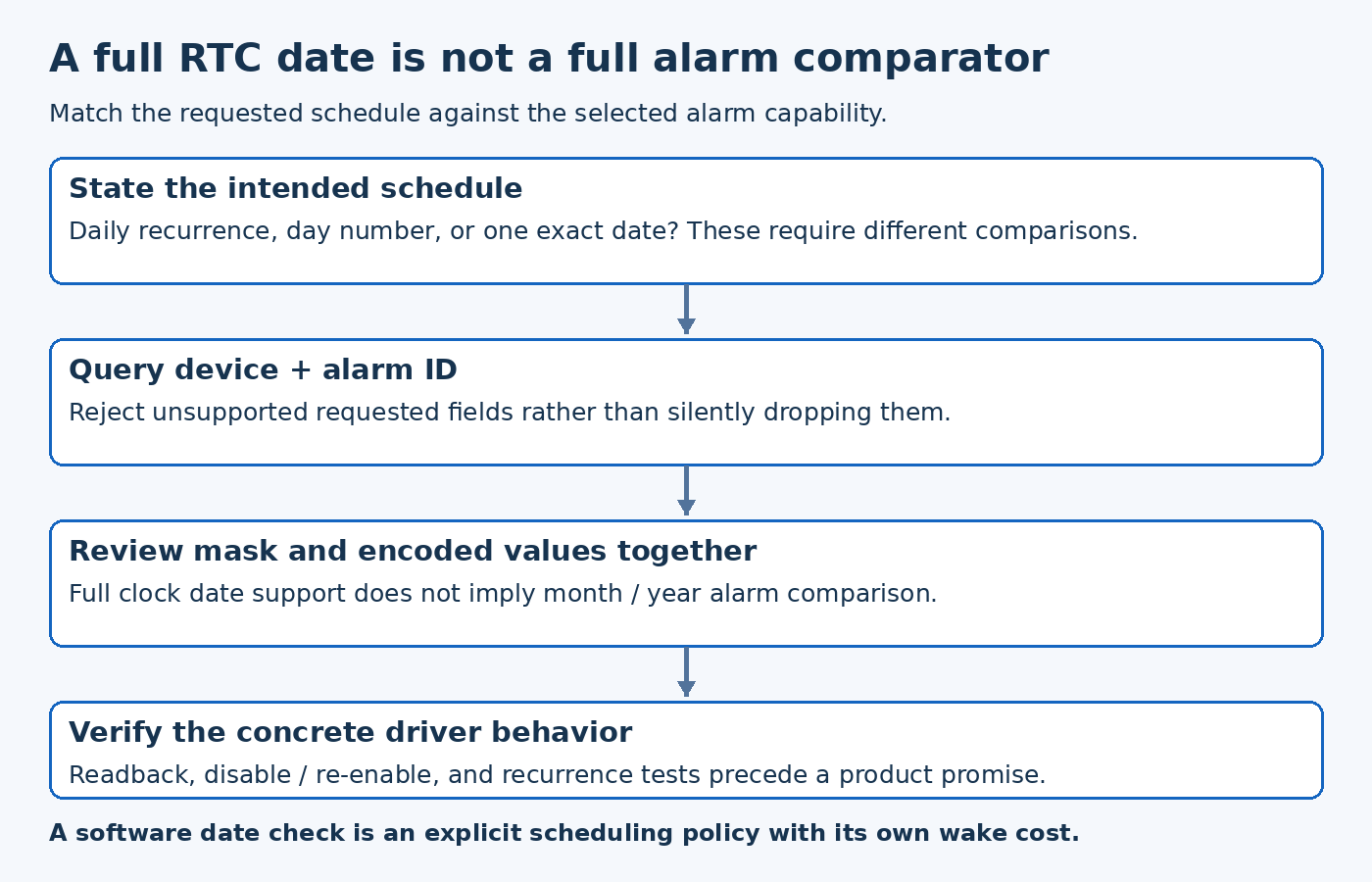
The tagged RTC API provides rtc_alarm_get_supported_fields() with both a device and alarm ID. A requested mask selects the fields to compare. The documented alarm condition is that all enabled fields match; a zero mask disables the alarm. The wrapper can return -ENOSYS when an operation is absent.
Build a capability check before constructing a schedule. Compare the requested fields against the returned supported mask, and handle a failed capability query explicitly. Do not silently remove unsupported fields to obtain a successful call: that changes the schedule the user requested.
Keep alarm ID in this check. Treating a device as one undifferentiated calendar-alarm capability makes it harder to support controllers whose alarm channels differ. Where only one alarm exists, reject an out-of-range selection rather than mapping it onto an arbitrary available channel.
A full clock and a partial comparator can coexist
The tagged PCF85063A driver illustrates the distinction. Its supported alarm mask includes second, minute, hour, month day and weekday, while its clock-time mask also includes month and year. The capability function accepts alarm ID 0 and rejects other IDs.
For a hypothetical appointment at 09:30 on one particular future date, an hour-and-minute comparison alone does not encode that date. Even adding month day cannot express a specific month and year if those comparator fields are unavailable. The application must reject that representation or deliberately implement a higher-level scheduling strategy.
A higher-level strategy could use a supported recurring alarm and check the complete current date in software before performing the action. That is a design option, not an equivalent hardware feature: it changes wake frequency, energy use, and what happens if the application is unavailable. Document those consequences before choosing it for a battery-powered product.
Do not confuse values with enabled fields
Initializing a complete time structure does not mean every initialized field participates in matching. Review the mask alongside the values. Conversely, an enabled field needs a valid value even if surrounding fields are irrelevant to that alarm.
The API's calendar representation uses zero-based months and years relative to 1900. Convert external calendar values at a deliberate boundary, and make the conversion visible in a test. A correctly selected field mask cannot rescue an incorrectly encoded month or year.
For a recurring schedule, write down the intended recurrence in ordinary language and list the enabled comparisons beside it. This simple step exposes the difference between “every day at this time,” “a particular day number,” and “one exact future date” before the implementation relies on the wrong comparator.
Verify readback and disable behavior on the selected driver
After setting an alarm, inspect the result and, where supported, read back its mask and enabled values. Test disabling and re-enabling separately. The generic API contract is the starting point; the concrete driver and hardware still need verification, especially around optional operations and interrupt state.
Use development tests around a minute transition, a day transition, and a calendar boundary relevant to the intended schedule. Check whether the application action occurs once or repeats, and whether stale pending state affects the next activation. These are proposed tests, not claims about a particular controller's behavior.
The schedule is ready to expose to users only when its requested semantics fit the supported comparisons or a clearly specified software policy. Capability-aware scheduling avoids a subtle failure: accepting a calendar appointment while programming hardware that can represent only part of it.