EEZ Studio PythonRun: Keep Each Process Handle Attached to Its Own Controls
Two Python scripts can be running successfully while a Dashboard button sends a message to the wrong one. The mistake can be as simple as storing every PythonRun handle in one global “current process” variable and allowing the latest run to replace it.
The PythonRun guide describes handles for selecting among multiple scripts. The pinned Python action implementation maintains a handle-to-PythonShell registry and uses it for PythonSendMessage and PythonEnd. This article examines EEZ Studio v0.29.0 editor commit 3000161d09d40a5c1dc2477ddc30b38037b3a612.
The question is process identity: which running script owns this handle, which controls may use it, and when those controls must stop using it. It is not a promise of a process supervisor or a security sandbox.
Store a run record, not just the last integer
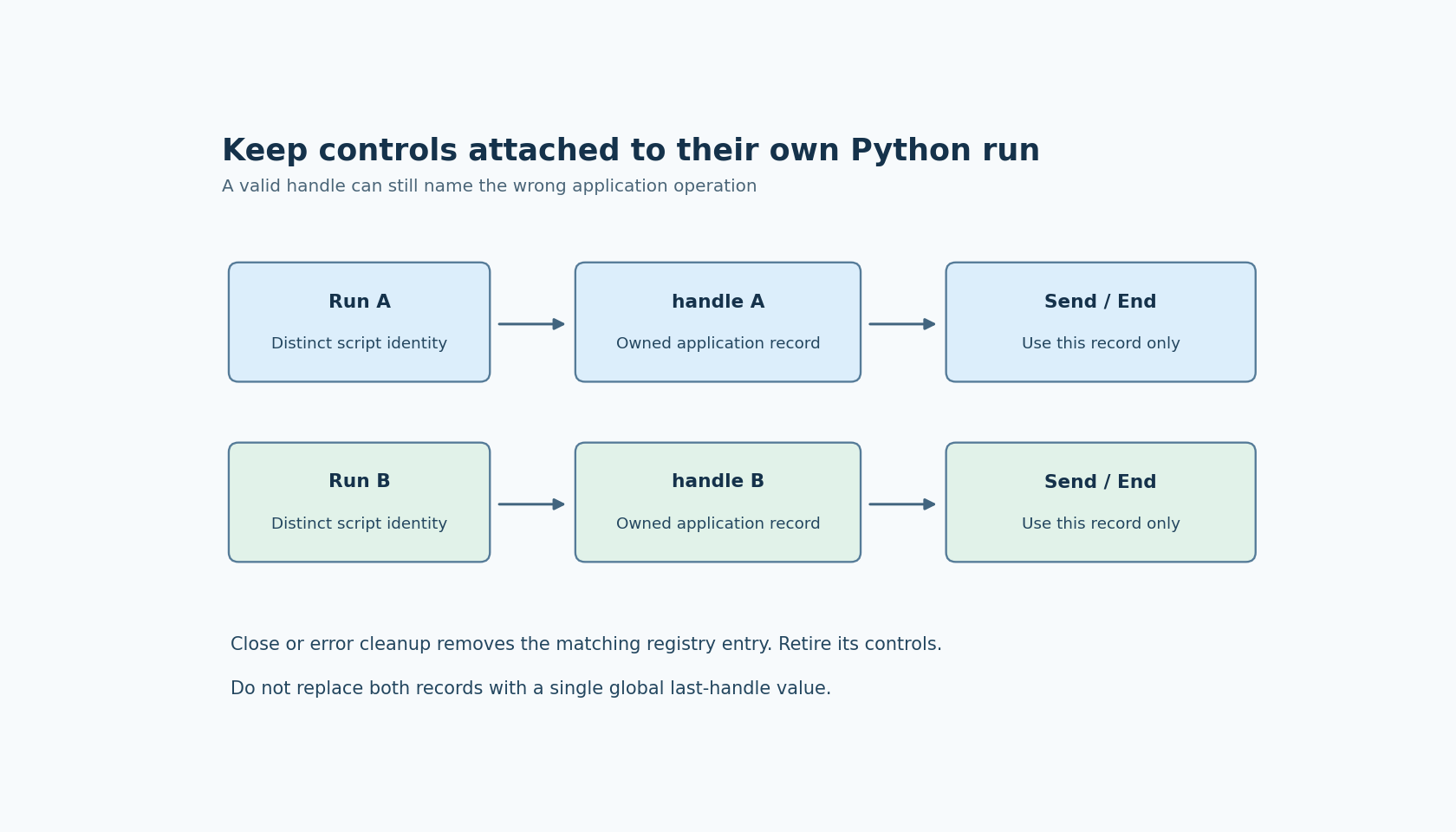
Associate each emitted handle with the application operation that launched it. A diagnostic run record can include the handle, a harmless run label, its current application state and the controls that are allowed to address it.
If two operations may run concurrently, keep two records. A single selected-run control is also possible, but selection must be deliberate and visible. Do not let a background PythonRun output silently change the process targeted by an already visible send or end button.
The handle comes from the runtime registry. Do not manufacture a handle by predicting a counter or copy a value saved from an earlier Dashboard session. The pinned implementation allocates and registers handles internally; their role is a live runtime reference, not a stable application identifier.
Sending a message requires the intended live handle
PythonSendMessage evaluates the handle, looks up its PythonShell and rejects an unavailable shell as an invalid handle. It then evaluates the message and sends it through that selected shell.
This lookup is a useful failure boundary, but it cannot detect that a valid handle belongs to the wrong application operation. If run A's button holds run B's still-valid handle, the registry can resolve it successfully. The application's ownership record is what prevents that mistake.
Make the fixture scripts report their own distinct labels when they receive a message. Merely observing that some text appeared in a shared console does not establish that the intended process received the request. Keep output routing distinguishable while testing concurrent runs.
The component uses the PythonShell message interface. Do not assume it implements an arbitrary structured JSON protocol simply because the script prints JSON-looking text. Establish message framing and parsing separately for the application that needs them.
End targets one registered script
The PythonEnd documentation explains that its handle selects the script to stop. In the inspected implementation, PythonEnd finds that shell and calls its end method, continuing the Flow from the method's callback.
That source observation does not establish a force-kill deadline, process-tree termination or the behavior of every script that ignores its expected input lifecycle. Do not label a control “all processes stopped” merely because one end request was issued.
Keep an end request associated with the record that produced it. If the UI allows another run to start while the first is closing, the new handle must not overwrite the record being retired. A user-selected active run and a closing run can coexist, and their controls should express that distinction.
Retire the reference when its lifecycle ends
The PythonRun implementation removes the shell's registry entry during its cleanup path. For an inline script, cleanup also removes its handle-specific temporary script file. Normal close and error handling reach cleanup through the inspected event handlers.
A handle can therefore remain present in an application variable after it no longer refers to a registered shell. Clear or mark the corresponding application record as inactive when the supported completion or error path establishes that state. Do not keep a send button enabled solely because its numeric field is nonzero.
Test stale-handle behavior explicitly with a harmless short script. A rejected stale handle should be treated as a lifecycle outcome, not repaired by guessing another integer. If the application wants to start a replacement run, that is a new operation that needs a newly emitted handle.
Exercise two identities before adding real workloads
Use two short local fixture scripts with labels A and B. Start both, capture their handles separately and send one diagnostic message to each. Verify the matching label in each output route. End one and confirm that the other record remains independently addressable.
Then attempt the intended stale-record route after the first run has closed, observing the component's supported error handling. Repeat an application selection change while the second run is active to expose accidental use of a global last-handle variable.
No scripts were launched for this article. The useful acceptance result is a trace connecting each launch, handle, message, end request and retirement to the same application run. That identity chain is what the registry enables, and what the Dashboard must preserve.