EEZ Studio SerialRead: Give One Consumer Ownership of a Connection Read Callback
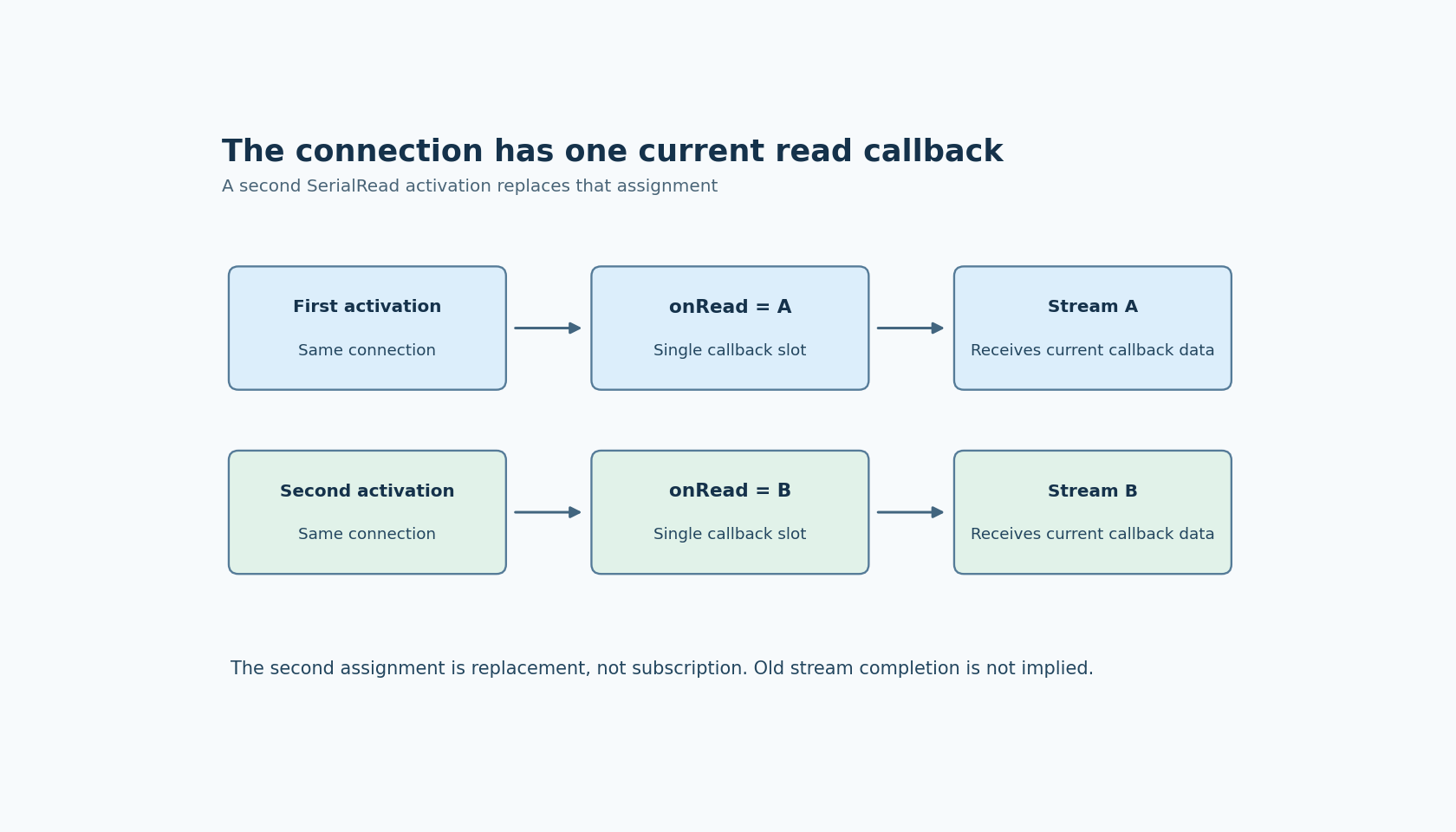
Two SerialRead components attached to one EEZ Dashboard serial connection should not be assumed to receive independent copies of the same data. In the inspected implementation, the connection has one onRead callback slot. A later SerialRead activation assigns that slot again.
The SerialRead guide describes the action's stream output. The ownership detail comes from serial.tsx at editor commit 3000161d09d40a5c1dc2477ddc30b38037b3a612, corresponding to the inspected EEZ Studio v0.29.0 source.
This is a Dashboard callback-routing issue. It is separate from UART DMA, baud-rate selection, packet framing or a firmware driver's receive buffer.
One assignment establishes the read owner
SerialRead creates a Readable stream and propagates it through the data output. It then finds the selected serial connection and, when connected, assigns a function to serialConnection.onRead. That function pushes received data into the new stream.
The SerialConnection implementation has one onRead member, not a collection of subscribers. Its onData method appends received text to its internal data and invokes the current callback with the result of read when that callback exists.
Consequently, another SerialRead activation on the same connection can replace the callback installed by the first. This can happen through a second component or through a repeated activation of the same component. Creating another output stream does not create another callback slot in the connection.
A connected port does not prove both consumers are live
Suppose a display branch uses one SerialRead and a logging branch starts another on the same object. The connection can remain open and healthy while new data is directed to the callback installed by the later activation.
A status indicator that only checks the port connection cannot diagnose that ownership change. Observe the actual data reaching each branch, with distinct labels. A familiar value still visible in the first display can be an old value rather than evidence that the first reader continues receiving new data.
The callback replacement itself does not notify the previous Readable in the assignment shown here. Do not assume that the earlier consumer will receive a helpful completion event merely because a newer reader has taken over. Its lifecycle needs to be examined in the installed application.
On disconnect, the inspected connection invokes the current onRead callback with undefined and clears that slot. Again, that is the current owner, not a broadcast to every stream that was ever created for the connection.
Read once, distribute deliberately
A clearer design gives one part of the Dashboard ownership of SerialRead for that connection. Downstream processing can then distribute the received information through an explicitly supported design.
Choose the distribution boundary according to the application. If several consumers need parsed records, parse once and distribute the accepted records rather than creating independent serial readers that each expect to own the same incoming bytes. If consumers need the raw stream, verify the stream fan-out and backpressure behavior of the mechanism actually used.
Do not treat a visual fork of a stream-valued connection as proof of lossless broadcast, independent buffering or replay for late subscribers. Those are separate stream-consumption contracts. The one-owner recommendation removes the callback collision; it does not automatically solve every downstream buffering problem.
Expose replacement with a short loopback fixture
Use a disposable serial loopback setup that emits a sequence of distinct markers. Start one SerialRead and confirm that its labeled output receives successive markers. Then activate a second reader on the same connection and observe both labeled paths.
The important comparison is delivery before and after the second assignment, not merely whether the port stays connected. Repeat a single component's activation as a separate case if the product can re-enter that setup path during navigation or reconnect handling.
Finally, disconnect the fixture and observe which stream receives the supported termination behavior. Keep the experiment small and avoid real device commands; its purpose is callback ownership, not protocol acceptance.
No serial connection or loopback test was executed here. The pinned source supplies a concrete reason to avoid multiple read owners: each activation writes the same single callback member. A reliable Dashboard makes that owner explicit and tests distribution after it, rather than expecting the connection to duplicate data automatically.