SquareLine Studio Image Inner Align: Separate the Widget Frame from the Image Inside It
Changing a SquareLine Studio Image widget's width and height does not, by itself, define how the artwork should fill that area. The widget frame and the image source inside it are separate geometry decisions. Inner Align is the control to inspect when the frame changes but the expected fit behavior does not.
The SquareLine Image documentation, labeled version 1.6.2, describes Inner Align for LVGL 9.x projects. The 1.4.1 changelog records the earlier addition of LVGL 9.1 inner alignment and image stretch. The LVGL 9.5 Image reference explains the underlying frame-and-source relationship.
Keep those version scopes separate. A current LVGL reference does not prove that every alignment enum appears in every SquareLine editor version or selected LVGL target.
Start with an intentionally mismatched rectangle
Use a nonsquare source image with a visible border and a recognizable center mark. Place it in a larger square widget frame. This makes alignment and distortion easier to distinguish than a square icon inside an equally sized frame.
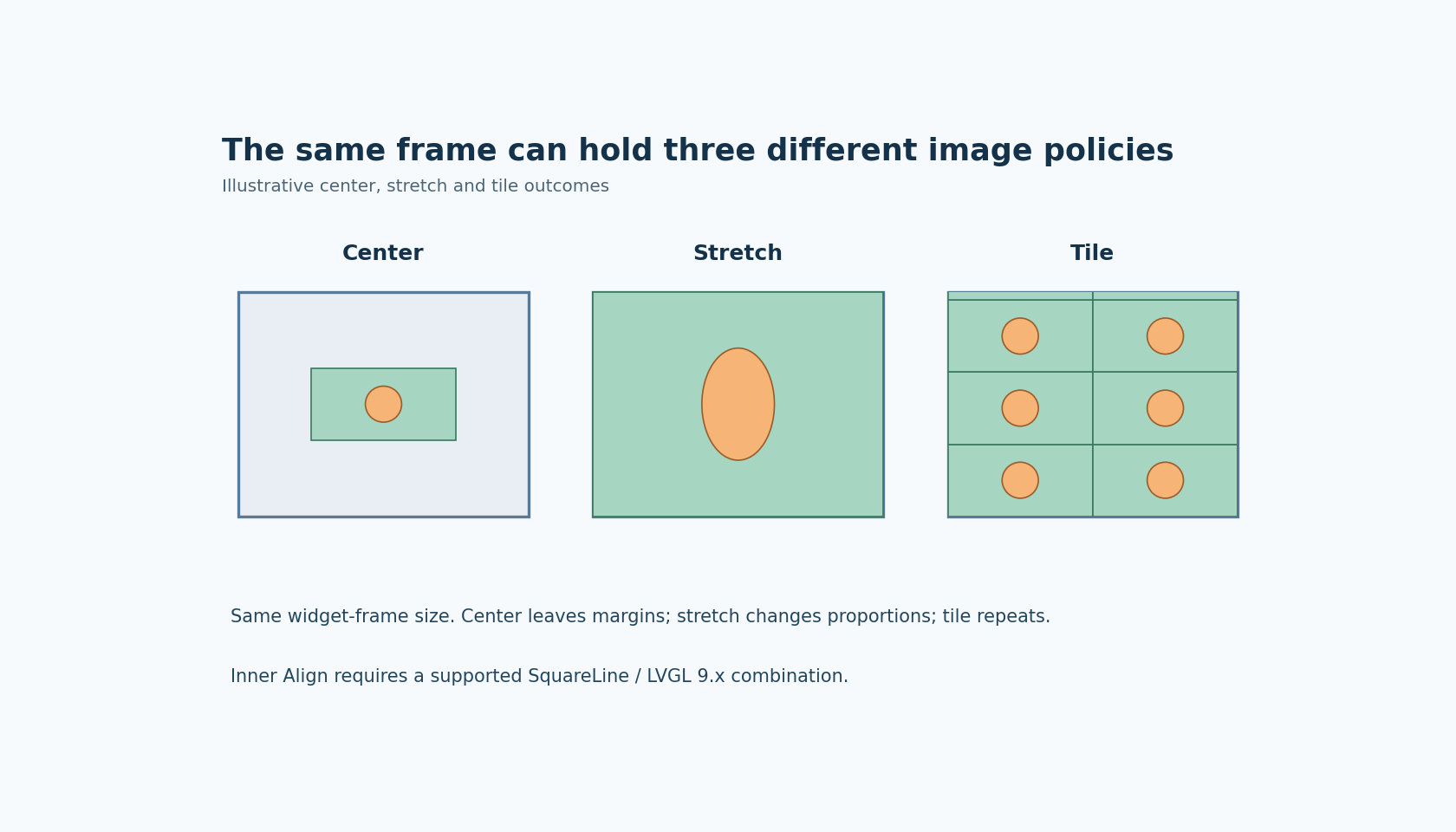
With a centered source, the artwork can retain its own proportions and leave unused space inside the frame. With stretch, the source is scaled independently in the two dimensions to fill the area. With tile, repeated source instances fill the frame rather than producing one enlarged copy.
These outcomes answer different product requirements. A logo may need preserved proportions, while a decorative texture may be intended to repeat. “Make it fill the box” is not a sufficiently precise requirement to choose between them.
Inspect the frame as well as the artwork
LVGL describes an Image widget's default content-sized dimensions and the inner alignment used when those dimensions are changed. Therefore record both the widget's actual frame size and the selected image behavior when diagnosing the exported result.
A screenshot without a visible frame can hide the distinction. Add a diagnostic outline or surrounding reference rectangle in a disposable project copy. It should be clear whether the frame is wrong, the image is positioned incorrectly inside a correct frame, or the image is deliberately distorted by stretch.
Keep scale and pivot settings controlled during this first comparison. SquareLine exposes them separately for image scaling and rotation. Changing scale, pivot, rotation and Inner Align simultaneously makes it difficult to identify which setting caused the visible difference.
Check what the exporter actually requests
After selecting a supported Inner Align mode, inspect the generated image configuration in the exported UI. For the LVGL version used by the project, identify the emitted alignment operation and its value, rather than assuming that a width-setting call expresses the desired image policy.
Compare a center, stretch and tile candidate with the source asset held constant. This experiment concerns layout behavior, not image dithering, SVG parser support or optimized image formats. Changing the source conversion at the same time introduces a separate variable.
The LVGL 9.5 reference also describes contain and cover modes. Do not silently assume that those modes are exposed by the SquareLine version under test. Use the controls and generated APIs actually available in the selected editor/runtime pair.
Evaluate the intended visual contract
For centered artwork, check the visible margins and the chosen alignment inside the frame. For stretch, inspect a circle or grid in the diagnostic source so unequal X/Y scaling is obvious. For tile, inspect repeated edges and partial tiles near the frame boundary.
Repeat at a second frame size that occurs in the product. A mode that appears acceptable at one size can create excessive distortion, awkward margins or an unsuitable repetition pattern elsewhere. This is a visual acceptance decision, not a benchmark or an automatic memory optimization.
No SquareLine export or target rendering test was executed for this article. The useful result is a recorded pairing of frame dimensions and Inner Align policy that produces the intended artwork behavior on the target. Treating those as two explicit decisions prevents a frame-resizing edit from being mistaken for an image-fit specification.