OPC UA Reverse Connect for SCADA: Separate the Client Listener from the Server Endpoint
Reverse Connect can support an approved industrial network design in
which a PLC-side OPC UA server initiates the TCP connection toward a
SCADA client. It does not exchange the applications’ OPC UA roles. The
server still provides data, and the client still selects and
authenticates the server it intends to use.
Two endpoint roles must therefore remain distinct: the client-side
listener that the server can reach, and the server endpoint identity
used for OPC UA communication over that connection. Confusing them can
leave a reachable TCP listener without a usable SCADA session.
The references are the TwinCAT TF6100 server manual v1.6.0, OPC UA
Part 6 displayed as v1.05.07, and UaExpert 2.0.1.648 as a documented
diagnostic-client example. No listener, firewall rule or connection was
created.
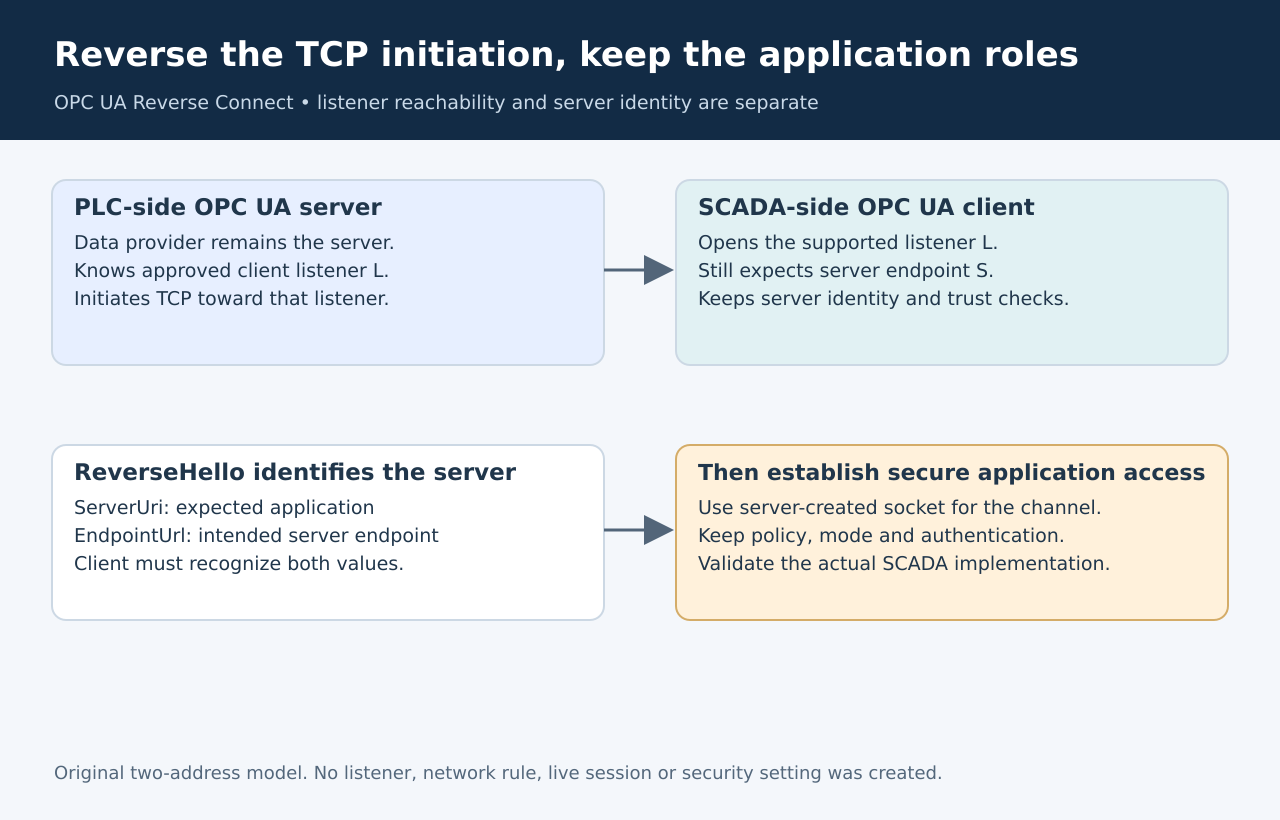
Original two-address model. The arrows distinguish TCP initiation
from application roles; they do not describe a measured packet
exchange.
Verify both ends
support the arrangement
Beckhoff’s Reverse
Connect guide configures client addresses in the server, which
initiates the TCP connection. The client must support Reverse Connect
and be reachable at its client endpoint URL. The guide is also included
in the TF6100
manual, pages 138–140.
Start with the actual SCADA product and version. General OPC UA
client support does not establish Reverse Connect support, nor does a
successful ordinary connection. The network design must provide an
approved route from the server to the intended listener. Reverse Connect
is not permission to circumvent a network policy.
For a diagnostic comparison, Unified Automation’s UaExpert
2.0.1 connection documentation explicitly supports receiving reverse
connections. This establishes one available client implementation, not
compatibility of every SCADA package or proof that a particular
installation works.
Keep a two-address record
For a hypothetical installation, call the SCADA listener address L
and the PLC server endpoint S. The server is configured to initiate TCP
toward L. The client’s connection definition still identifies S as the
server endpoint to use once that connection exists.
Do not replace S with L simply because L is the externally reachable
address. They name different participants. Equally, copying a server
endpoint string into the listener field does not make the server
reachable through the client’s local socket.
Record the listener’s approved network interface and port separately
from the expected server application identity and endpoint URL. Where
several PLC servers use one SCADA host, keep their expected identities
distinct instead of treating every arrival at that listener as
equivalent.
Use
ReverseHello to identify the intended server
The Part
6 ReverseHello definition carries the server’s ApplicationUri and
EndpointUrl. The client must recognize the server and endpoint; the
endpoint value is returned in the subsequent Hello message. The
server-created socket is then available for the client’s SecureChannel
establishment.
This is why a successful TCP connection is only the first
observation. A server can reach the right listener yet announce an
unexpected application or endpoint. Preserve those identifiers when
diagnosing a rejected reverse connection, while keeping credentials and
private keys out of the record.
Do not infer that the endpoint hostname must have the same routing
role as the client listener. Conversely, do not assume arbitrary
rewriting of that endpoint will be accepted. Reconcile the actual server
configuration, announced identity and client expectation.
Preserve the
security and acceptance checks
TwinCAT’s guide keeps the selected security policy, message-security
mode and authentication settings in force for Reverse Connect.
Certificate trust remains required. Reversing TCP initiation does not
make an unexpected server trustworthy or remove authorization
checks.
A focused qualification separates three failures: no approved
connection reaches the listener; a connection arrives but the announced
server identity is not the expected one; or identity and transport are
correct but secure application access fails. Each needs different
evidence and a different correction.
Complete acceptance only when the intended server is authenticated
and the SCADA application receives its required data through that
configuration. A diagnostic client can help localize the failure, but
its success is not a substitute for testing the deployed SCADA client
and its own trust store.