Rust Embedded Graphics Custom Fonts: Keep Glyph Indices Matched to the Bitmap
A custom font can display valid, recognizable characters while spelling the wrong message. The bitmap may be correct, and the input may be valid UTF-8, but the character-to-glyph mapping can select a different cell than the asset generator intended. Treat the bitmap and its mapping as one versioned artifact.
This guide targets MonoFont in embedded-graphics 0.8.2. It concerns the association between Unicode characters, glyph indices and bitmap cells, not text baseline placement. The examples are proposed validation fixtures; no Rust program or physical display was tested.
Start with the cell order
The MonoFont structure carries the font image, character size, spacing, decoration metrics and a glyph mapping. A font name or a nominal character size does not establish how glyphs are ordered inside that image.
Suppose an illustrative font atlas holds four equal-sized glyph cells in one row: question mark, zero, one and degree sign. Its mapping order is ?01°. Index zero must address the question mark, index one the zero, and so on. Replacing the bitmap with an exporter that sorts those characters differently requires replacing the mapping too.
Use numbered cell thumbnails during asset review. A reviewer should be able to compare the generated cell at index three with the manifest’s character at index three without guessing from the appearance of a complete word. This catches a permutation that ordinary bounds checking cannot detect.
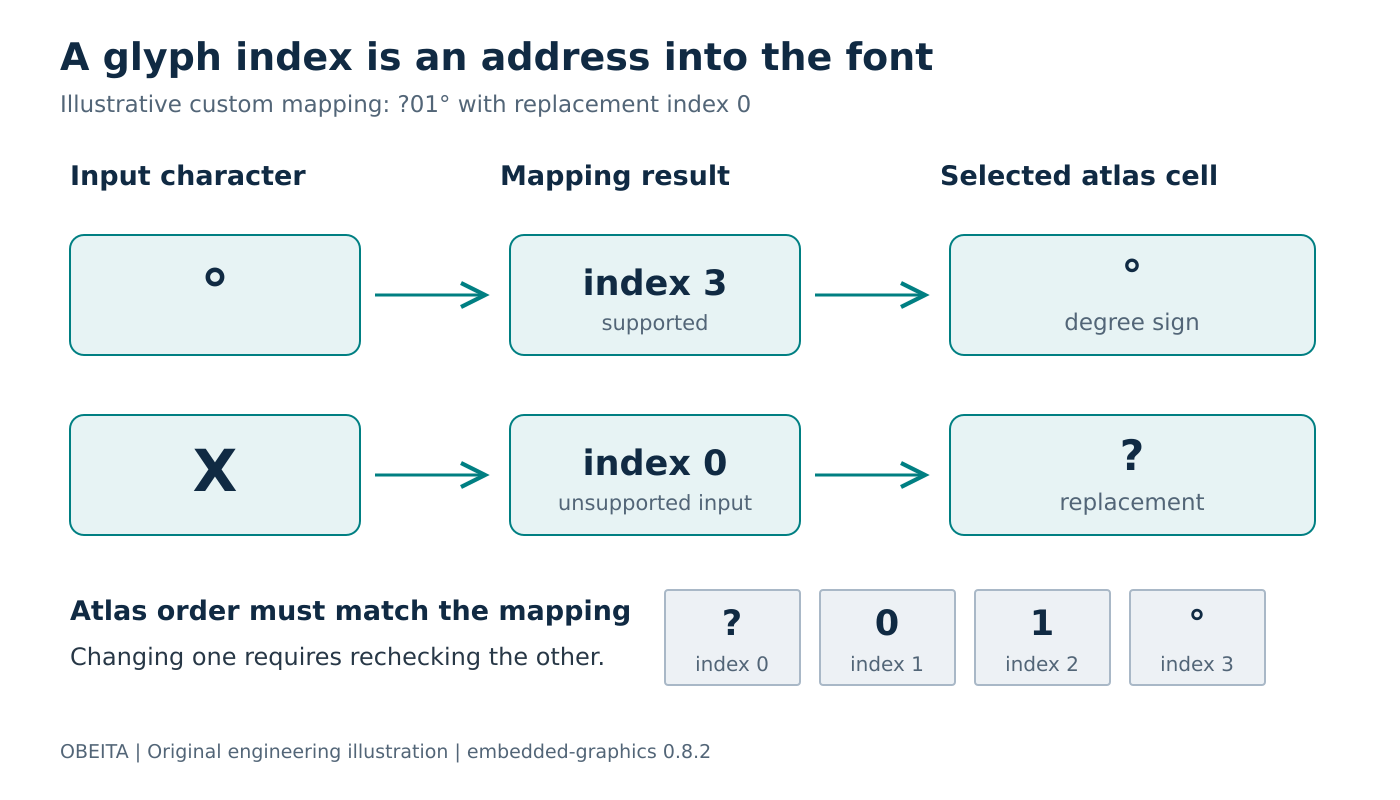
Original mapping diagram. Cell order is an illustrative custom-font design.
Make fallback an intentional mapping result
The GlyphMapping contract returns a glyph index for every character. For an unsupported character, the implementation returns the index of a suitable replacement glyph. The return type does not carry an independent missing-character error.
For the four-cell fixture, the proposed mapping is:
use embedded_graphics::mono_font::mapping::{
    GlyphMapping, StrGlyphMapping,
};

let mapping = StrGlyphMapping::new("?01°", 0);
assert_eq!(mapping.index('°'), 3);
assert_eq!(mapping.index('X'), 0);
assert!(!mapping.contains('X'));
These assertions express two different checks. The first verifies the intended cell. The second verifies the fallback decision. The final check preserves the distinction between a supported question mark and a replacement used because the input contained an unsupported character.
Do not infer coverage by asking whether index returned a value. It always returns an index. For StrGlyphMapping, use its coverage inspection when building a validation report. For a custom mapping function, maintain equivalent explicit coverage metadata instead of trying to reverse-engineer support from a fallback index.
Validate every reachable cell
The font implementation derives the number of glyphs per row from image width divided by character width. It then maps the glyph index into row and column coordinates.
For a hypothetical atlas 24 pixels wide and 16 pixels high with six-by-eight-pixel cells, there are four cells per row and two complete rows. Index five belongs to column one, row one, beginning at pixel (6, 8). This is a calculated address, not a measured renderer output.
Validate that every supported character and the replacement index address complete cells inside the intended atlas. Require nonzero cell dimensions and deliberately chosen whole-cell row and column counts in the asset pipeline. An in-range integer alone does not prove that the selected rectangle contains the promised glyph.
Also verify the replacement cell visually. A fallback accidentally pointing at a blank cell can turn a missing unit symbol into an apparently omitted unit. A fallback pointing at a digit can be worse because the result looks plausible. Use an unmistakable approved replacement and log unsupported input where the product’s diagnostics allow it.
Do not confuse Unicode storage with text shaping
The monospaced text renderer source iterates through Rust characters and advances through fixed-width cells. A custom mapping adds associations for individual characters; it does not, by itself, establish a shaping engine for multi-character sequences.
A precomposed accented character and a base letter followed by a combining mark can therefore exercise different mapping inputs. Define the accepted representation for product-controlled strings, and test the actual input form. If external names or messages require more elaborate script handling, evaluate an appropriate rendering path rather than claiming that a larger atlas solves every language requirement.
Release the bitmap and mapping together
Add a specimen containing every supported glyph in manifest order, a normal product label, and deliberately unsupported input. Compare cell identity as well as the complete rendered message. A reordered atlas should fail even if every requested glyph still exists somewhere in the file.
Save the bitmap checksum, mapping definition, cell dimensions, replacement index and generator version in one manifest. Review a bitmap-only change as a contract change until the mapping comparison passes. This turns a difficult field symptom, such as a degree sign becoming a digit, into an asset consistency failure that can be caught before firmware is shipped.