Rust Embedded Graphics Fixed Point: Review Angular Steps Before Tuning a Gauge
Enabling fixed_point can change more than the arithmetic cost of a gauge. In embedded-graphics 0.8.2, the fixed-point sine implementation selects a lookup-table entry after rounding the angle to an integer number of degrees. A product that animates small angular increments should qualify that behavior before accepting the feature as a transparent optimization.
The discussion below is a pinned source review and a proposed comparison procedure. It contains no measured cycle counts, compiled Rust results or display captures. It does not claim that every primitive changes or that fixed-point rendering is faster on every microcontroller.
Identify the feature boundary
The crate feature documentation describes fixed_point as using fixed-point arithmetic for trigonometric calculations. That description should not be expanded into a claim that an entire application contains no floating-point operations.
For example, the Angle implementation still exposes from_degrees and from_radians constructors accepting f32. The degree constructor performs a degrees-to-radians expression before conversion to the internal representation. Public input types and the selected internal trigonometric path are separate facts.
If removing floating-point code is a firm product requirement, inspect the compiled application and its complete call paths. A feature name alone does not establish that requirement. Likewise, a processor with a floating-point unit still needs a workload-specific comparison rather than an assumption that one implementation must win.
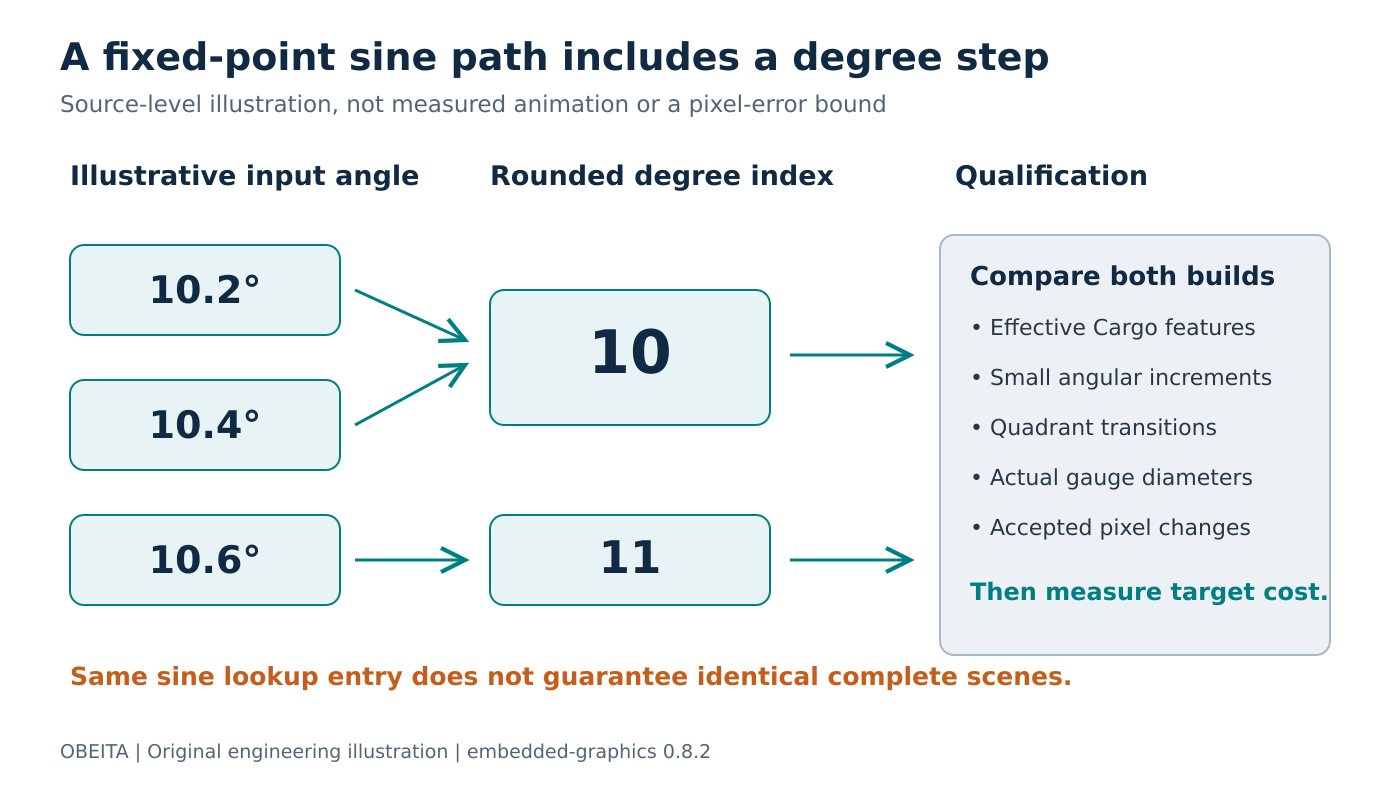
Original explanation of the source-level lookup step. It is not a measured gauge animation or a universal raster-error bound.
Read the quantization mechanism
The pinned sine path contains a table for the first quadrant. It converts the internal angle to degrees, rounds, wraps the result into a full revolution, and uses quadrant symmetry to choose the signed table value. Cosine is calculated through a quarter-turn shift followed by that sine path.
Consequently, nearby inputs can use the same sine table entry. As an illustrative away-from-boundary example, 10.2 and 10.4 degrees both round to index 10, while 10.6 rounds to 11. This identifies a quantization stage; it does not prove that two complete rendered scenes will always be identical.
The plane-sector source and the primitive implementations should be followed when tracing how angular boundaries affect a particular shape. Other decisions, including sweep handling, integer raster geometry and stroke settings, remain part of the final result.
Avoid turning a source-level rounding step into an unsupported pixel-error guarantee. A larger dial can make a small direction change more noticeable, but the actual affected pixels depend on the entire drawing operation. Qualify the product’s visible behavior directly.
Construct two genuinely different builds
Create one build without the feature and one with it enabled. Pin the same crate release, compiler, target, optimization profile and application scene for both. Preserve separate output directories or otherwise ensure that the recorded binaries and screenshots belong to the intended configuration.
The Cargo feature reference explains that dependency features are unified in the relevant dependency graph. Removing a flag from one manifest entry is insufficient evidence that another dependency has not enabled it. Inspect the resolved feature graph for the build being compared.
Record the effective feature set in the test results. An apparent perfect match between two builds is uninformative if both actually selected the same trigonometric implementation. This configuration check is especially useful in a workspace where a demonstration application and production firmware share dependencies.
Choose inputs around the product’s movements
Start with the smallest angular increment that the user interface is intended to communicate. Exercise that increment across a short interval, rather than checking only cardinal directions. Include values on both sides of the degree-rounding boundaries and repeat the sequence near quadrant transitions.
Test the product’s supported diameters, stroke widths and sweep directions. The Arc definition exposes diameter, start angle and sweep angle as separate inputs. Hold two constant while varying the third so a difference can be attributed to a specific change.
For each step, retain the expected application value, the angle sent to the renderer and the resulting pixel pattern. Define whether repeated visible positions are acceptable at the selected update rate. A display may intentionally quantize a coarse indicator, while a smoothly moving fine gauge may have a different requirement.
Measure only after visual acceptance
Once both candidates satisfy the chosen visual contract, measure render time and linked code size on the actual target. Keep panel-transfer timing separate so a slow bus does not hide a rendering difference. Use the same sequence of gauge values and report the measurement boundary.
Retain the feature choice with those results and repeat the comparison after a relevant crate upgrade. The useful decision is not that fixed point is inherently better or worse. It is that the selected arithmetic path, angular resolution and measured resource cost all meet this gauge’s requirements.