EEZ Studio Evaluate: Choose When a Changing Value Is Sampled
When should a changing setpoint be captured: when the user presses a button, or when an EEZ Studio Evaluate action later executes? Those moments can differ. A queued Evaluate expression that reads a live variable should not be described as an event-time snapshot unless the application explicitly captured and passed that value.
The Evaluate documentation describes computing an expression and sending its result. The Flow execution documentation describes ready components executed from a shared queue. The pinned editor source defines Evaluate's result output separately from its optional sequence continuation.
The editor reference is EEZ Studio v0.29.0 at commit 3000161d09d40a5c1dc2477ddc30b38037b3a612. These sources establish component and queue semantics, not an atomic snapshot across native producers. This article concerns standard EEZ Flow and proposes a timing-boundary test rather than reporting an executed experiment.
Define the intended sampling moment first
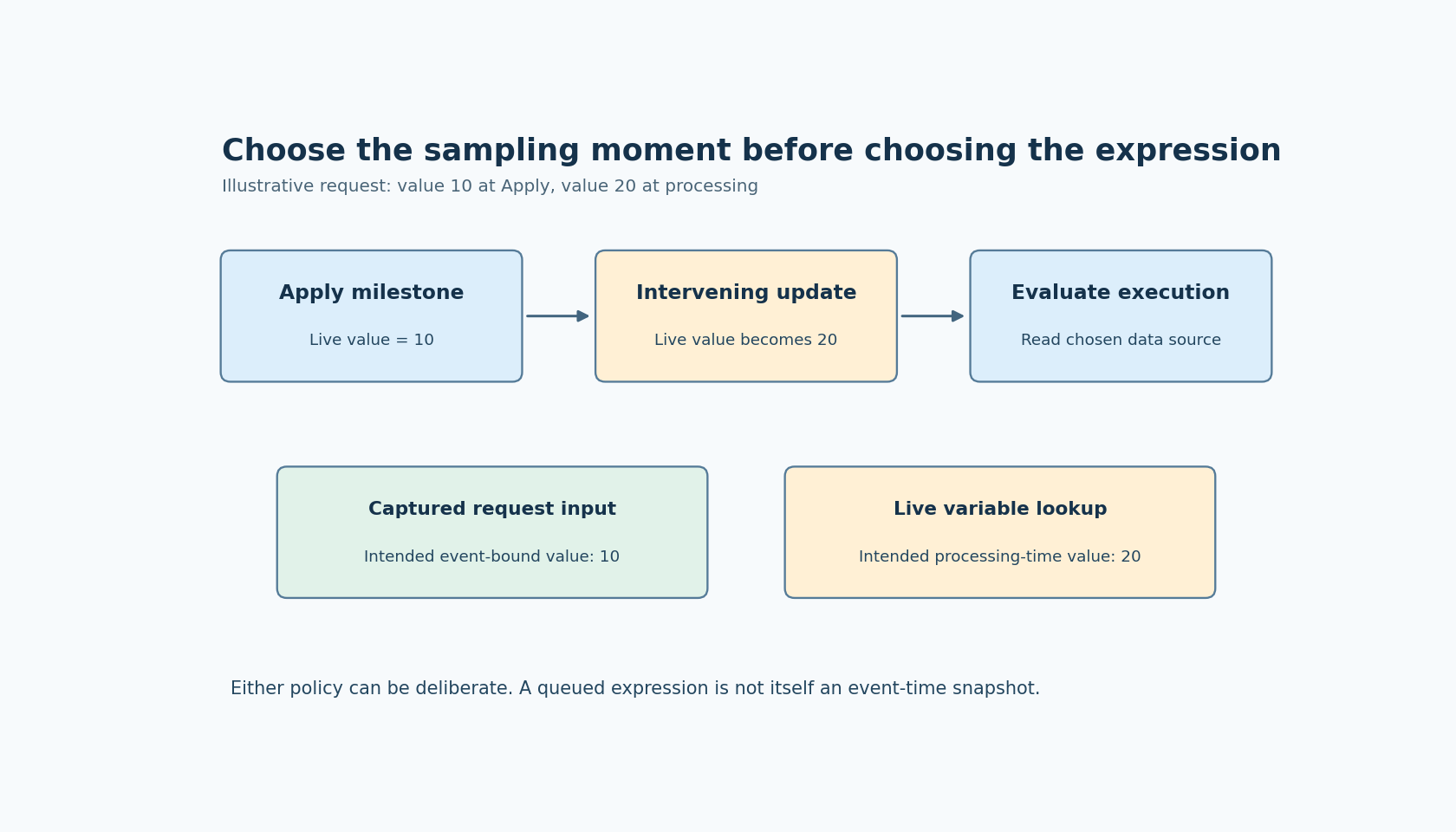
Suppose the UI displays a setpoint of 10 when the user presses Apply. Before a queued expression reads the setpoint variable, another permitted update changes it to 20. Should the request use 10 or 20?
Both policies can be reasonable in different products. “Apply the value visible when pressed” requires an event-bound value. “Apply the latest accepted value when the request is processed” requires a later read. The defect is leaving the policy unstated and assuming an Evaluate component supplies whichever meaning the reviewer had in mind.
Write the requirement in terms of a milestone the application can observe. Avoid “the current value” without saying current at what point. This wording matters more than adding another component to the graph.
Compare live lookup with captured input
Build two diagnostic paths. In the first, Evaluate reads the live setpoint variable when the action runs. In the second, the producer captures the intended value as request data at the chosen milestone, and Evaluate operates on that captured input.
Attach a request identifier to the diagnostic record so values from two button presses cannot be confused. Log the value at the capture point and the result at Evaluate. If a timestamp is included, state what it timestamps and the clock it uses; a number labeled “time” is not automatically a reliable ordering reference across every producer.
Arrange a controlled update between the chosen capture point and the later processing point. Use the selected runtime's supported diagnostic or scheduling facilities, and observe the actual order. Do not claim a particular interleaving merely because two wires appear in that order on the canvas.
Snapshot the data you need, not just the expression text
An expression saved in the project describes how to compute a result. It is not itself a saved copy of the variables it will read. If the operation needs a captured setpoint, pass that value rather than passing an instruction that later looks up the live setpoint again.
For a calculation using several fields, define whether they must come from the same accepted request. Capturing one field while reading another live can create an unintended hybrid. An application-owned request record can make the intended group visible, but its publication and copy behavior must be verified in the actual integration.
This is not a promise that constructing a record automatically makes native access atomic. If multiple threads or interrupt-driven producers can change its contents, the native synchronization contract still applies. The Flow queue description does not remove that responsibility.
Keep sampling separate from change monitoring
Evaluate answers a question at an execution point. A Watch action observes changes to an expression over its lifetime. Replacing one with the other changes the contract rather than simply making the same calculation more reliable.
For a one-shot Apply request, the important artifact is the accepted request value and identity. Continuous monitoring may help update the display, but it does not establish which observation belongs to that particular request. Conversely, repeatedly triggering Evaluate is not automatically a guarantee that every transient change was captured.
The diagnostic should therefore focus on the one-shot sampling boundary. It does not need a long-running observer test or a generic tutorial on every Flow input rule.
Decide what the result output proves
Evaluate's result carries the computed data. Its optional sequence continuation is a separate connector. If downstream work needs the computed result, ensure that the design consumes that result rather than assuming a sequence pulse contains it.
Keep failures and unavailable data visible in the application contract. A successful calculation using the wrong sampling moment can be numerically valid and still violate the user's intent. Arithmetic correctness alone is an incomplete acceptance test.
The useful result of this procedure is a statement such as “request R uses the value captured by its producer at Apply,” or “request R intentionally reads the latest accepted value at processing.” Once that statement is explicit, the two-path diagnostic can verify it. Without it, a live read can quietly masquerade as a snapshot.