Android BLE Permissions: Nearby Devices, Location and Scan Failure Diagnosis
A BLE peripheral that works with one Android phone and disappears on another does not immediately justify a firmware change. First determine whether the app is allowed to scan, whether a scan actually started, and whether its results match the intended advertisement. These are separate failure boundaries. This guide builds a permission and diagnosis path for a native Android central app.
Scope: the worked configuration uses minSdk 29 and targetSdk 35, separating Android 10–11 from the Android 12-and-later permission model. It covers foreground discovery and GATT connection. Older targets, companion-device association and background execution require separate designs. Documentation was checked on 11 October 2026; the procedure below is a proposed validation plan, not a handset test report.
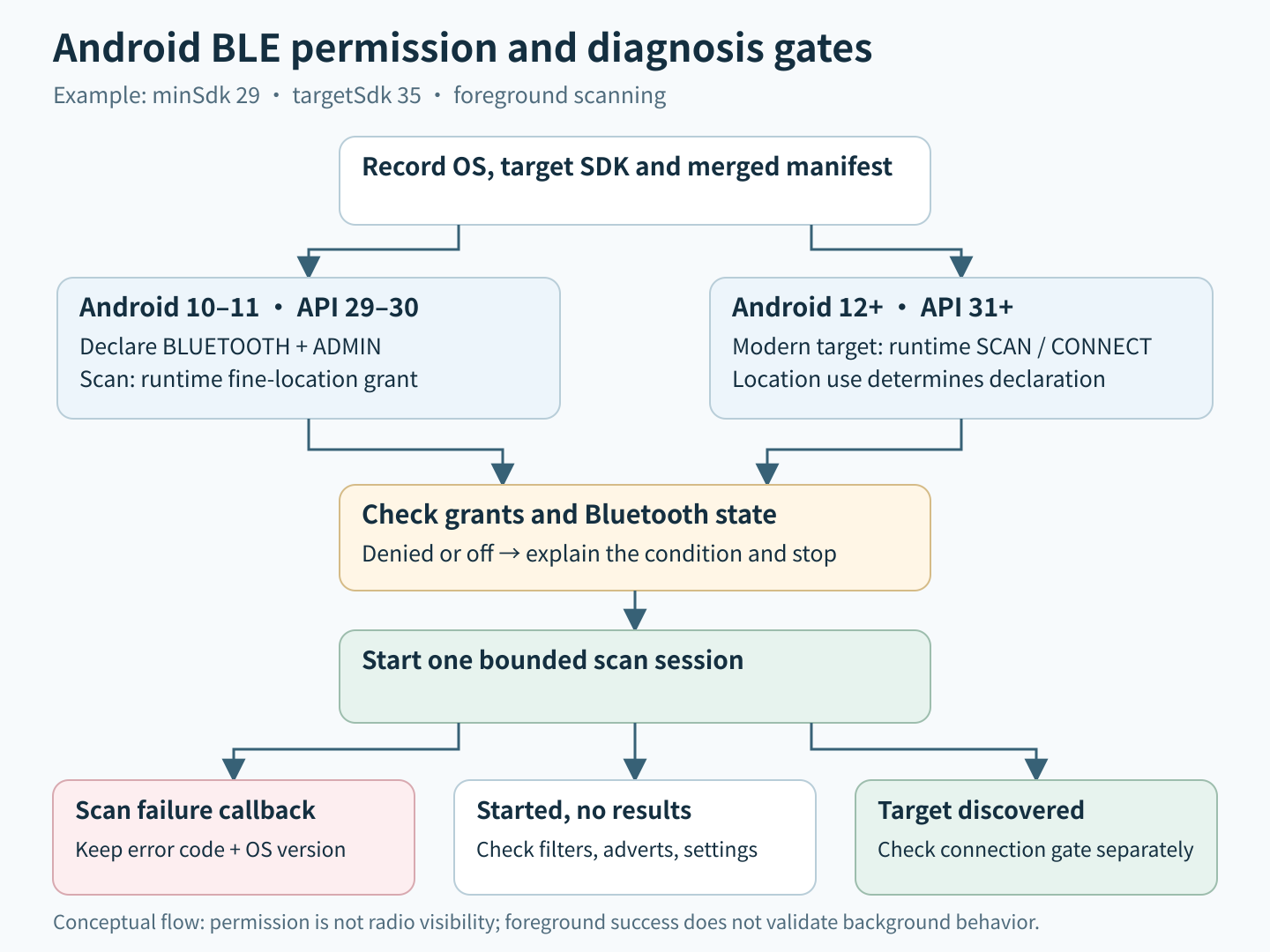
Record both operating system and target SDK
Keep the installed app version, target SDK, device OS/API level and merged manifest in every reproduction record. Updating targetSdk can change a permission path even when the phone and peripheral are unchanged. A source manifest is insufficient if a library or build variant changes the packaged result.
| Deployment row | Permission path to verify | Additional distinction |
|---|---|---|
| Android 10–11, API 29–30 | Legacy BLUETOOTH and BLUETOOTH_ADMIN declarations; runtime ACCESS_FINE_LOCATION for scanning | Background discovery has additional location requirements |
| Android 12+, API 31+, modern target | Runtime BLUETOOTH_SCAN for discovery; BLUETOOTH_CONNECT for connection APIs | Location use determines the scan declaration |
For a modern app retaining these legacy devices, limit the old Bluetooth declarations to maxSdkVersion 30. If Bluetooth scan results never derive location and location is otherwise unnecessary, the legacy fine-location declaration can also end at 30. The platform documents these branches in its Bluetooth permissions guide.
Request capabilities the feature actually uses
Scanning and connecting are distinct operations. BLUETOOTH_CONNECT protects GATT connection APIs; it is not merely a permission for previously bonded products. Check the BluetoothDevice API contract for the exact method used. Permission does not establish a bond or authenticate a peripheral. A setup screen that discovers a device and then connects will normally need both SCAN and CONNECT on the modern branch.
Do not add BLUETOOTH_ADVERTISE just because the product uses BLE. It is relevant when the phone itself advertises or is made discoverable. Describe the user action that needs each permission before adding it. Inspect third-party SDK calls too: a scan callback may read device properties that require a different permission from the scan operation itself.
Treat neverForLocation as a product assertion
The neverForLocation flag is appropriate only when the app genuinely does not derive physical location from Bluetooth scans. Android warns that this assertion filters some BLE beacons. Therefore, adding it solely to remove a permission prompt can change device visibility. The scanner reference also documents this restriction.
Review actual payload use: room identification, proximity-based location inference and SDK analytics deserve scrutiny even if the app never reads GPS. For an eligible non-location product, test its real advertisement format under the chosen declaration. If a required beacon disappears, investigate the declaration and product requirements together; do not silently misrepresent location use to obtain results.
Make denial a stable application state
Check grants immediately before protected work and consume the asynchronous permission result before starting it. The runtime-permission workflow provides rationale and request mechanisms. Do not infer grants from the wording of the Nearby devices dialog or assume a permission group remains unchanged.
Represent missing permission explicitly, with a disabled discovery action and a short explanation. Repeated denial must not produce a prompt loop. A false shouldShowRequestPermissionRationale result is not by itself proof of permanent denial; it can occur before the first request. Keep request history as UI context, while treating the current permission check as authoritative. Recheck when the user returns from settings rather than retaining a stale success flag.
Separate scanner failures from an empty list
Use one bounded scan session with a session identifier, start time and stop reason. Android’s discovery guidance recommends stopping when the desired device is found and setting a time limit. The scanner can be unavailable when Bluetooth is off. Show that condition separately from permission denial.
Record onScanFailed codes instead of translating every failure into “device not found.” The ScanCallback reference distinguishes an already-started scan, registration failure, unsupported features and internal errors; the too-frequent and hardware-resource constants were added in API 33. Preserve numeric codes with the OS version, and avoid a rapid restart loop that obscures the original failure.
If scanning starts without a reported failure but returns nothing, inspect filters, peripheral advertising state and the chosen scan settings. On legacy test rows, record the system Location switch as a separate controlled variable. Do not turn that diagnostic step into a universal claim that every modern BLE use requires location. The scanner API also documents screen-off behavior for unfiltered scans, so keep the first reproduction foreground and screen-on.
Run a controlled acceptance sequence
- Use the same peripheral firmware and advertising configuration for each phone. Record service UUIDs and a redacted payload summary.
- Install the intended release variant cleanly. Verify the packaged manifest, then test grant, denial and cancellation paths.
- Start discovery only after the required grants exist. Confirm one scan session, a visible stop condition and captured callback errors.
- Compare production filters with a temporary broad scan on the same authorized test device. If only the broad scan sees the peripheral, inspect advertised fields before changing RF parameters.
- After discovery, separately verify the connection permission and connection callback. A visible advertisement does not prove GATT availability.
- Repeat after permission revocation and a return from settings. Confirm the screen recovers without restarting the app or repeatedly prompting.
Accept the implementation when each failure leads to a specific next step: permission choice, Bluetooth state, scan configuration or peripheral investigation. Retain timestamps and state transitions, but avoid storing full device addresses or user-associated payloads unnecessarily. The useful output is a reproducible boundary failure, not an undifferentiated Bluetooth error.