Buildroot Image Size Budgets: Trace Growth Before Flash Partitions Overflow
Choose the quantity that can actually overflow
A firmware file growing by two megabytes does not automatically mean its installed filesystem grew by two megabytes. Package file sizes, filesystem metadata, compression, padding and update packaging all measure different things. Before removing software, identify the exact object constrained by the flash layout: a compressed filesystem image, a fixed-size block image, a boot partition or an update staging area.
This guide uses Buildroot 2025.02 and proposes a size-budget workflow for an LTS update. It is not a device measurement or an eMMC endurance analysis. Preserve both old and candidate build outputs, use the same filesystem format and compression settings for the first comparison, and record any intentional format change separately. Otherwise a size difference may describe packaging rather than software growth.
Measure four layers independently
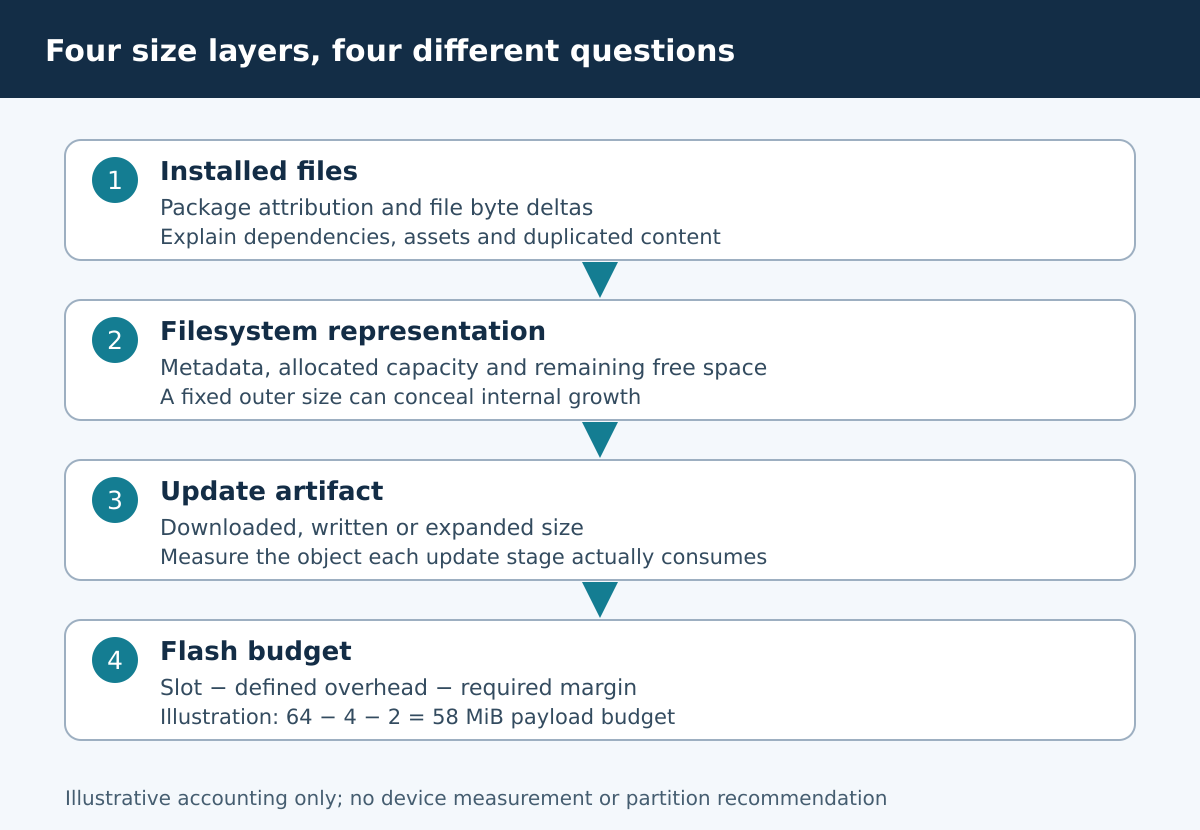
At the file layer, measure installed file lengths and identify large additions. At the filesystem layer, account for metadata, allocation and free space. At the distributable-image layer, measure the exact bytes written or expanded by the update process. At the partition layer, reserve space for headers, alignment and the product’s required safety margin.
Keep units explicit. MiB means 1,048,576 bytes; MB means 1,000,000 bytes. A sparse image’s host disk usage can be smaller than its logical length, so ordinary disk-usage output may not represent the space the target update requires. The 2025.02 image and size documentation discusses sparse files and warns against treating sparse host handling as a safe flashing method.
Generate attribution from a complete clean build
After a complete build, make graph-size produces a graph plus package-size-stats.csv and file-size-stats.csv under the graphs output directory. The version-pinned documentation cautions that these attribution data are meaningful after a complete clean rebuild. Prefer new output directories for the baseline and candidate, retaining existing outputs rather than deleting them as the first step.
The 2025.02 size-statistics implementation is useful when interpreting totals. It attributes installed files to packages; it is not a simulation of every byte of a compressed or writable filesystem. Save the CSVs with the configuration and image digests. If the graph groups small contributors into an “Others” slice, inspect the CSV instead of assuming the small packages are irrelevant.
Trace the largest changes back to causes
Sort the file-level differences by absolute byte growth, then group them by package. Look for a newly enabled dependency, an extra firmware collection, language resources, debug information or two copies of a similar asset. A package version increase can change its feature defaults even when the top-level configuration looks familiar.
Compare the final installed files, not only the source archive sizes. Explain each large increase with the option or source change that introduced it. If a shared dependency serves several applications, removing one application may not remove that dependency. Conversely, a small top-level feature can pull a large dependency tree. Keep the dependency explanation beside the byte difference so a reviewer can assess the functional cost of removing it.
Translate the flash map into a byte budget
Consider a purely illustrative 64 MiB slot with 4 MiB reserved for product-defined overhead and 2 MiB of mandatory margin. The payload budget is 58 MiB, or 60,817,408 bytes. Those numbers are a worked example, not a recommended partition map or measured device requirement. The real overhead must come from the image format, boot/update design and storage geometry.
slot_bytes = 64 * 1024 * 1024
overhead_bytes = 4 * 1024 * 1024
margin_bytes = 2 * 1024 * 1024
payload_budget = slot_bytes - overhead_bytes - margin_bytes
assert payload_budget == 60817408
For a compressed update that expands before installation, check both the downloaded size and the expanded destination requirement. A/B layouts, temporary extraction, journal space and raw-flash bad-block reserves may create separate limits. Do not add them all to one arbitrary percentage; map each requirement to the physical or logical area where it must fit.
Set both absolute and change-based CI gates
An absolute gate prevents an artifact exceeding its established byte budget. A change-based gate flags unexpected growth relative to the accepted baseline, even when the partition still has space. The two gates serve different purposes. Choose thresholds from the product’s update constraints and review process rather than presenting a universal “safe” growth percentage.
Have CI report the image format, logical image length, applicable budget, remaining margin and largest file/package deltas. Where the artifact is a fixed-capacity filesystem image, a constant outer file size can conceal decreasing internal free space; include an appropriate filesystem-level usage check. A green download-size check alone must not override a failed installed-capacity check.
Reduce size with a functional owner
For each removal candidate, identify who owns the affected behavior and what acceptance test will prove it still works. Debug symbols can often be archived outside the shipped image, while required firmware, certificates, localization assets or recovery tools may be part of supported operation. The right decision is not simply to delete the largest directory.
Rebuild the candidate configuration in a fresh output and repeat attribution after every meaningful change. Confirm that removed files are absent from the actual final image. A manual deletion from an existing target directory is not a reproducible size reduction. Also compare startup and recovery requirements: removing a rarely used tool may save space while breaking the only field-recovery path.
Acceptance and evidence limits
Accept the update when the exact written or expanded artifact fits every relevant limit, the remaining margin is explicit, major growth is attributed, and approved removals have functional acceptance coverage. Archive the flash-map revision, image-format settings, CSV comparisons and CI decision together. The 2025.02 top-level make rules provide the exact graph-size output names used in this workflow.
This process explains static size and capacity risk. It does not establish flash endurance, runtime memory usage or a universal compression ratio. Those need different measurements. A useful release review can answer not only “does it fit?” but also “what grew, why was it accepted, and which constraint will warn us first next time?”